Invisible reCAPTCHA: How It Works and When It Shows
Invisible reCAPTCHA is a v2 widget with no checkbox. How execute() and the badge work, how to tell it from v3, and what a real headless run showed.
Invisible reCAPTCHA is a reCAPTCHA v2 widget with no "I'm not a robot" checkbox. It runs when the visitor submits a form or when your code calls grecaptcha.execute(). Most visitors get a token with no click, and the image challenge only appears when Google is unsure. It is not reCAPTCHA v3, even though both show the same badge. Our overview of reCAPTCHA v2, v3 and Enterprise covers the whole family. This post covers the invisible widget: how it is wired, what it looked like in a real browser run, and how to tell it apart from v3.
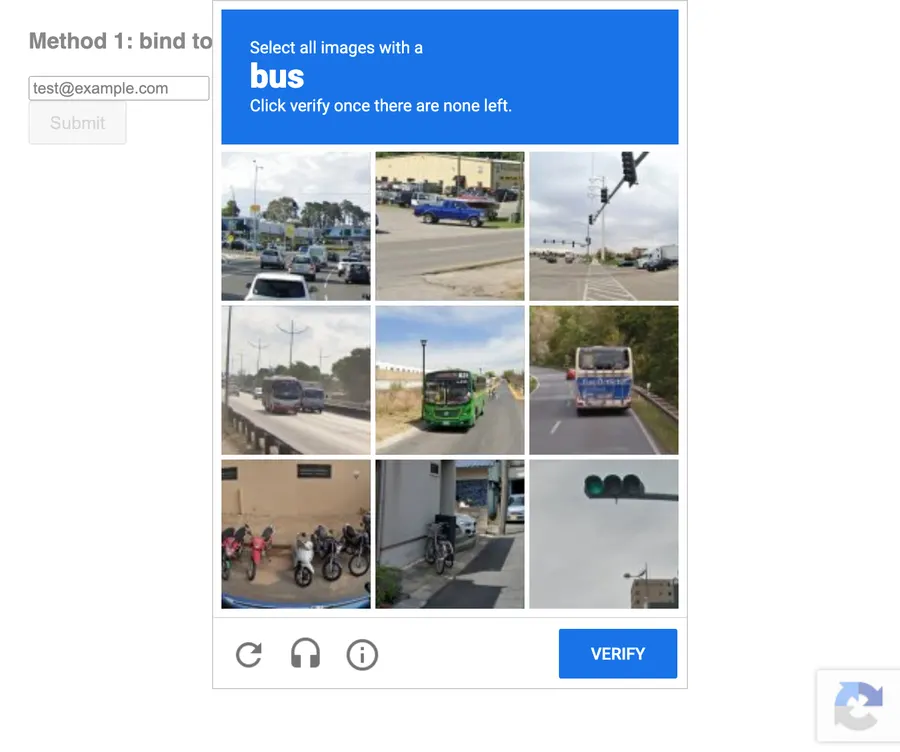
Our run, 21 November 2026 (UTC): Google's public invisible demo key on a local test page, headless Chromium 151. One click on Submit opened the image grid.
What is invisible reCAPTCHA?
Invisible reCAPTCHA is one of the ways to render a reCAPTCHA v2 key. You pick "Invisible reCAPTCHA badge" when you create a v2 key, and Google's invisible reCAPTCHA developer guide documents the setup. The widget gets data-size="invisible", so no checkbox is drawn. A small badge sits in the corner of the page instead.
The verdict is still v2's: the visitor gets a token or a challenge. That is the main difference from v3, which never challenges and returns a score that your server has to act on. Our reCAPTCHA v2 vs v3 comparison goes through that split in detail. Server-side, invisible v2 works like the checkbox. You post the token to siteverify with your secret key and get success true or false.
How invisible reCAPTCHA works
Google gives three ways to start it: bind it to a button automatically, bind it to a button from JavaScript, or call grecaptcha.execute() yourself. In every case the token is passed to your callback, and only after that should the form be submitted.
Bind it to the submit button
This is the shortest setup. The button carries the site key and the name of the callback. Clicking it runs reCAPTCHA first and calls your function with the token:
<script src="https://www.google.com/recaptcha/api.js" async defer></script>
<script>
  function onSubmit(token) {
    document.getElementById('signup').submit();
  }
</script>

<form id="signup" action="/signup" method="POST">
  <input name="email">
  <button class="g-recaptcha" data-sitekey="YOUR_SITE_KEY" data-callback="onSubmit">Submit</button>
</form>
Render a div and call execute()
Use this when you need to validate the form first, or when one page has several forms. Render the widget with size: 'invisible', keep the widget ID, and execute it from your own submit handler:
<script>
  let widgetId;
  function onloadCallback() {
    widgetId = grecaptcha.render('recaptcha', {
      sitekey: 'YOUR_SITE_KEY',
      size: 'invisible',
      badge: 'bottomright',          // or 'bottomleft', 'inline'
      callback: (token) => form.submit(),
      'expired-callback': () => grecaptcha.reset(widgetId),
      'error-callback': () => showRetryMessage(),
    });
  }
  form.addEventListener('submit', (e) => {
    e.preventDefault();
    if (formIsValid()) grecaptcha.execute(widgetId);
  });
</script>
<script src="https://www.google.com/recaptcha/api.js?onload=onloadCallback&render=explicit" async defer></script>
<div id="recaptcha"></div>
Define the onload callback before api.js loads, or it never fires. grecaptcha.execute(), reset() and getResponse() all take an optional widget ID. With two widgets on a page, always pass it. Some older guides say execute() only works with a single widget. Google's current API reference shows the widget ID argument that handles more than one.
Is invisible reCAPTCHA really invisible? What our run showed
Not always. For a trusted visitor it is invisible. For a visitor Google is unsure about, the same image grid as the checkbox opens over the page. To see both outcomes, we ran a small Playwright experiment on 21 November 2026 (UTC) in headless Chromium 151.0.7922.34. We served a local page and rendered two keys: Google's published v2 test key, and the public invisible demo key from Google's recaptcha-demo.appspot.com. Raw results:
- Before execute:
grecaptcha.getResponse()returned an empty string in every run. Theg-recaptcha-responsetextarea existed but was empty. - Test key, 6 runs: five
execute()calls returned a 1,700 to 1,721 character token in 254 to 375 ms. In the button-bound run, the callback fired 158 ms after the click. The challenge frame never became visible. - Demo key, 2 runs (one
execute(), one button click): the challenge iframe (/recaptcha/api2/bframe) grew to 400×580 pixels and showed a "select all images with a bus" grid, as in the screenshot above. Neither run produced a token within 8 to 10 seconds, because nobody solved the grid. - Expiry, 1 run, test key:
expired-callbackfired 60.0 seconds after the token callback, andgetResponse()was empty again.
The sample is small and limited to one browser. It shows what can happen, not how often real visitors see a challenge. Google doesn't publish that rate, and it depends on the visitor, the network and the key's security setting. Still, two practical points follow. A headless browser should expect the challenge. And the page should run execute() at submit time, not on page load, because the client-side token can expire before a slow visitor finishes typing. Google's siteverify documentation says a token is valid for two minutes on the server and can be verified only once. If you have ever been stuck on the image grid as a visitor, our piece on why the select-images grid keeps coming back explains the triggers.
Invisible reCAPTCHA vs reCAPTCHA v3: how to tell them apart
Look for the challenge iframe. Both draw the same badge, and both anchor iframes carry size=invisible in their URL. Only invisible v2 also loads /recaptcha/api2/bframe, the frame that holds the image challenge. In our run the v3 page never created it.
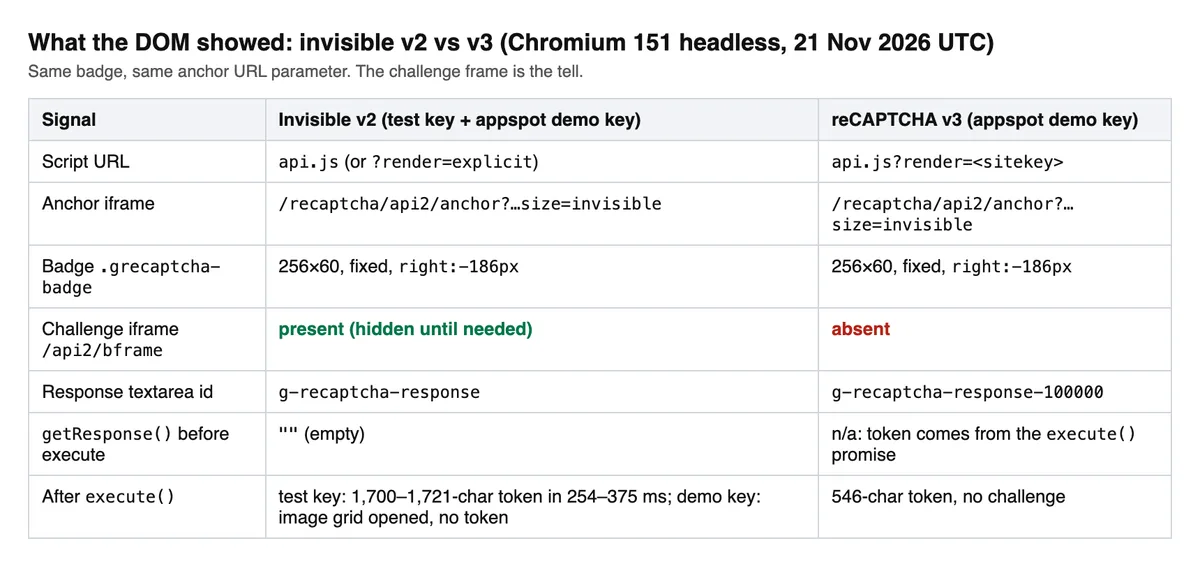
DOM signals recorded in the same run. The v3 key is Google's public appspot demo key.
Other signals helped, but none was enough alone:
- Script URL: v3 loads
api.js?render=<sitekey>. Invisible v2 loads plainapi.js, or?render=explicitwith an onload callback. - How the token arrives: v3 returns it from a promise,
grecaptcha.execute(sitekey, {action: 'submit'}). Invisible v2 passes it to a callback. - Textarea ID: the first v2 widget used
g-recaptcha-response. The v3 page usedg-recaptcha-response-100000.
The script URL alone can mislead. Google's reCAPTCHA FAQ says the invisible JavaScript API also works with v3 keys, so a v3 site can render with size: 'invisible' and look like v2 at first glance. The bframe check and the key's own settings decide. Our guide to finding the reCAPTCHA site key on a page shows where to read it.
The reCAPTCHA badge: position and hiding it
The badge is a 256×60 pixel box, fixed to the bottom right by default. Set data-badge (or the badge render parameter) to bottomleft, or to inline to place it with your own CSS. In our run the default badge sat at right: -186px, so only its 70-pixel logo edge showed until hover.
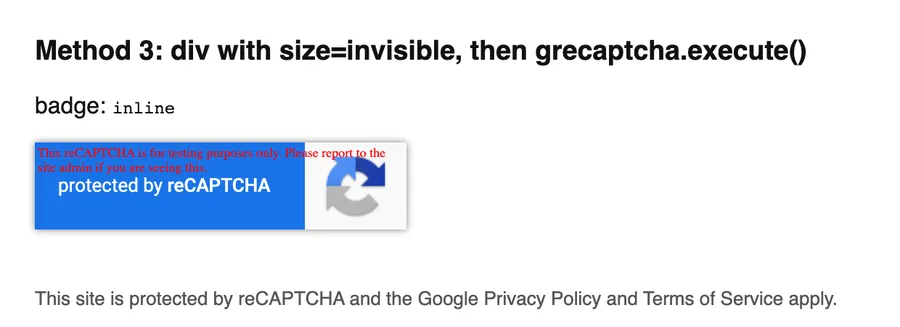
The inline badge with Google's test key, which adds the red testing notice, and a written disclosure below the form.
You can hide it. Google's FAQ allows hiding the badge if the reCAPTCHA branding stays visible in the user flow, with the text "This site is protected by reCAPTCHA." Google's recommended CSS is .grecaptcha-badge { visibility: hidden; }. Many sites use a longer line that links Google's Privacy Policy and Terms of Service, and that is a safe superset of the required text. Put it next to the submit button, not in the footer.
One observation from our run: we also tried a stylesheet rule of display: none. The badge's inline style still read display: block plus visibility: hidden, and execute() still returned a token with the test key. Don't read that as permission. It was one run with a test key, and Google's documented method is visibility: hidden.
Common invisible reCAPTCHA problems and fixes
Most invisible reCAPTCHA bugs come from timing: the form submits before the callback, or the token is fetched too early. Check these first:
getResponse()is empty. Nothing calledexecute(), or it was called on a different widget ID. With the div method, the token only exists afterexecute()and the callback.- The form submits without a token. The submit button posts the form directly. Use
preventDefault(), or let theg-recaptchabutton and its callback submit the form. - The token is stale on the server.
siteverifyreturnstimeout-or-duplicatewhen a token is over two minutes old or already used. Runexecute()at submit time, and callgrecaptcha.reset(widgetId)after each attempt. Our reCAPTCHA verification failed guide lists everysiteverifyerror code. - Nothing happens on click. Check the console. A Content Security Policy must allow
https://www.google.com/recaptcha/andhttps://www.gstatic.com/recaptcha/inscript-src, andhttps://www.google.com/recaptcha/andhttps://recaptcha.google.com/recaptcha/inframe-src, according to Google's FAQ.error-callbackfires on network failures, so show a retry message there. - The badge shows "ERROR for site owner". The host isn't on the key's domain list. Localhost isn't allowed by default either. Our fix for Invalid domain for site key walks through it.
For automated tests of your own form, use Google's test key: it always passes, as our run showed. Our walkthrough on testing reCAPTCHA and Turnstile with test keys covers the server-side cases and how to keep test keys out of production.
Invisible reCAPTCHA in browser automation
A headless browser clicking an invisible-protected button should expect the image grid, as our run showed. The token route avoids it. Read the site key, confirm the widget is invisible, get a token from a solving API, and pass it to the page's callback.
- Read
data-sitekeyfrom the.g-recaptchaelement, or thekparameter of the anchor iframe URL. - Confirm it is invisible v2:
data-size="invisible"orsize=invisibleon the anchor, plus abframeiframe. No bframe and arender=<sitekey>script means v3. - Find the callback:
data-callbackon the button or div, or thecallbackpassed togrecaptcha.render. - Request a token, write it into the
g-recaptcha-responsetextarea, and call the callback with it.
With CaptchaNo, step 4 is one request to our reCAPTCHA v2 solver: type: "recaptcha_v2" with invisible: true, the page URL and the site key. Our own solving infrastructure returns the token. Our full Puppeteer reCAPTCHA script has the detection and injection code. If the page turns out to be v3, send it to the reCAPTCHA v3 endpoint with the page's action name instead. We don't support score-based reCAPTCHA Enterprise keys, so check the anchor URL for /enterprise/ before you start. Only automate sites you own or are allowed to automate.
Frequently Asked Questions
Is invisible reCAPTCHA v2 or v3?
Invisible reCAPTCHA is part of reCAPTCHA v2. You choose it when creating a v2 key, and it gives a pass or a challenge, never a score. reCAPTCHA v3 is a separate key type that never shows a challenge and returns a score between 0.0 and 1.0 for your server to judge. Both display the same corner badge, which is why they are often confused.
Can I hide the reCAPTCHA badge?
Yes, Google allows it as long as the reCAPTCHA branding stays visible in the user flow. Show the line "This site is protected by reCAPTCHA" near the form, ideally with links to Google's Privacy Policy and Terms of Service. Hide the badge with the CSS rule visibility: hidden on the grecaptcha-badge class, which is the method Google's FAQ recommends.
Why does grecaptcha.getResponse() return an empty string?
With invisible reCAPTCHA there is no token until grecaptcha.execute() runs and the callback fires. Calling getResponse() earlier, or on the wrong widget ID, returns an empty string. In our run it was empty in every case before execute. Call execute() from your submit handler and read the token inside the callback instead.
Does invisible reCAPTCHA ever show a challenge?
Yes. Invisible only means there is no checkbox. When Google's risk analysis is unsure about a visitor, it opens the same image grid the checkbox uses. In our headless Chromium run, Google's public demo key showed a select-all-buses grid on the first click, while the test key returned a token with no challenge.
How long is an invisible reCAPTCHA token valid?
Google's documentation says a response token is valid for two minutes on the server and can be verified only once. In our run with the test key, the widget's expired-callback fired 60 seconds after the token arrived. Generate the token at submit time and verify it at once, rather than fetching it when the page loads.
Get invisible reCAPTCHA tokens from one API
If your workflow needs invisible reCAPTCHA tokens on sites you're allowed to automate, start with the CaptchaNo reCAPTCHA v2 solver. Checkbox, invisible and callback variants use the same request shape. You're charged only for successful solves, and credit never expires. Rates are on our pricing page, request fields are in the captcha solver API reference, and questions go to the engineers who run the service at support@captchano.com.