reCAPTCHA Site Key: How to Find It and Is It Public?
Find your reCAPTCHA site key in Google Cloud, or on any page in 5 places we tested. Site vs secret key, v2 vs v3 tells, Turnstile sitekeys and test keys.
A reCAPTCHA site key is the public half of a reCAPTCHA key pair. It sits in a page's HTML and tells Google's widget which key to load. The secret key is the private half that your server uses to check tokens. If you own the site, you find both in the Google Cloud console. If you don't own it, the site key is still in the page, and we found it in up to five different places in one test run against Google's own demo pages. If you just want the answer for a URL, the free captcha detector reads the page and prints the key, the type and the v3 action.
This guide covers both jobs. Site owners get the current console path, which changed when Google moved classic keys into Google Cloud. Developers testing or automating a page get a script that pulls the key from every place it can hide, and a table that tells v2, invisible, v3 and Turnstile apart. Everything below about page internals comes from a Playwright run we did on 19 November 2026 (UTC), and the raw output is shown.
Site key vs secret key: which one is public?
The site key is public by design. The secret key must never leave your server. Google's key terminology page says the site key loads reCAPTCHA on your site. The secret key authorises your backend when it talks to Google.
| Site key | Secret key | |
|---|---|---|
| Also called | Public key; "Key ID" in Google Cloud | Private key; "legacy secret key" in Google Cloud |
| Where it lives | Page HTML or JavaScript, visible to anyone | Server environment variable only |
| Used for | Rendering the widget and minting tokens | Calling siteverify or creating an assessment |
| If it leaks | Nothing to fix: it was never secret | Rotate it and check your verification logs |
That last row is where some security pages get it wrong. Finding a site key in page source is not a leak. Every visitor's browser downloads it. A secret key in a public repository is a leak. Rotate it, and keep it out of frontend code. Google's key-creation docs specifically advise against putting a legacy secret key on your frontend.
How to find your reCAPTCHA site key in Google Cloud (site owners)
For sites you own, the site key is the Key ID shown on the key's page in the Google Cloud console. This is now the place to look even for old v2 and v3 keys, because Google has been moving every classic key into a Cloud project.
- Open the Google Cloud console, pick the project that holds the key, and go to the reCAPTCHA page.
- Open the key. The Key ID at the top is the site key you put in your HTML or CMS plugin.
- For the secret key, open the key's Integration tab and retrieve the legacy secret key. The console does not show it by default.
- Check Platform details to see the key type: "Website • score" is v3, "Website • checkbox" is v2 checkbox, and "Website • invisible" is invisible v2.
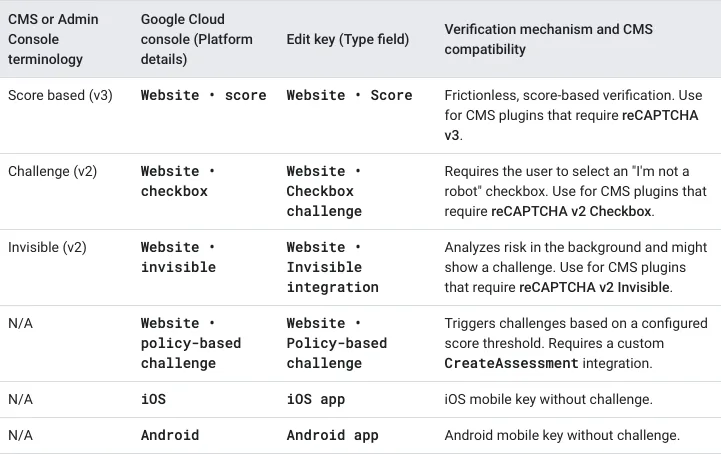
Google's mapping between old Admin console names and Cloud console key types (docs.cloud.google.com, screenshot taken 19 November 2026).
What changed with classic keys
Most of the guides that rank for this query still send you to the old Admin console form to "switch to classic mode." That no longer works. According to Google's migration overview, new classic keys have been blocked since Q3 2024. Automatic migration of classic keys began in Q4 2025, and Google planned to finish it in Q1 2026. Existing v2 and v3 site keys keep working after migration, and the siteverify endpoint behaves as before. The Admin console is still available, but configuration changes go through Google Cloud.
Three other details from Google's docs come up again and again in support threads:
- Domains. A key can list up to 250 domains, and a domain change can take up to 30 minutes to apply. A key used on a domain that isn't listed fails, which is the usual cause of the "Invalid domain for site key" error covered in our reCAPTCHA verification failed guide. Our hostname-by-hostname test of that domain error shows which subdomains pass and which fail.
- Localhost. Localhost is not allowed by default. Add it only to a separate development key.
- Invisible keys. You can't create new invisible v2 keys in the Cloud console. Existing ones keep working.
If you only need a key for automated tests, don't create one. Google publishes a v2 test site key, 6LeIxAcTAAAAAJcZVRqyHh71UMIEGNQ_MXjiZKhI, and a matching secret on its reCAPTCHA FAQ. With that pair, verification always passes and the widget shows a warning. There is no v3 test key, so Google says to make a separate key for test environments. Our walkthrough on testing forms with reCAPTCHA and Turnstile test keys covers the full setup.
How to find the site key on any page
Open DevTools and search the Elements panel (Ctrl+F or Cmd+F) for sitekey, render= and k=. Between them, those three searches find the key on almost every page. On Google's checkbox demo, the attribute sits right on the widget's container:
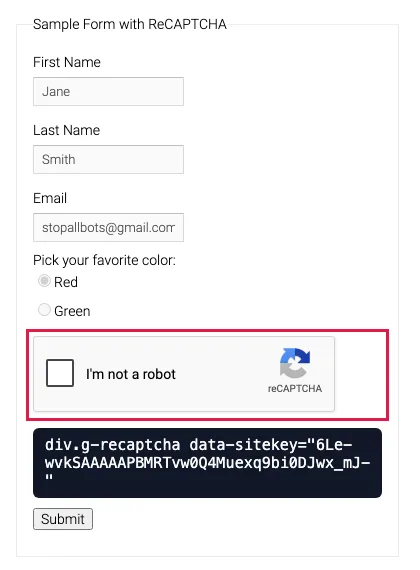
The v2 checkbox on google.com/recaptcha/api2/demo, with its div.g-recaptcha container outlined and the data-sitekey value printed.
Checking by hand is fine for one page. To be sure where the key turns up on each widget variant, we wrote a small Playwright script that checks five places and ran it against Google's v2 checkbox demo, Google's invisible and v3 demos, and two local pages using Cloudflare's Turnstile test sitekey:
data-sitekeyattribute on.g-recaptchaor.cf-turnstile(automatic rendering).render=on the script URL:recaptcha/api.js?render=KEYmeans v3.render=explicitmeans the key is passed in JavaScript instead.k=on the anchor iframe:/recaptcha/api2/anchor?k=KEY, or/recaptcha/enterprise/anchorfor Enterprise.___grecaptcha_cfg.clients, the config object the reCAPTCHA script keeps in the page, which holds the sitekey for each rendered widget.- The Turnstile challenge frame path:
challenges.cloudflare.com/cdn-cgi/challenge-platform/…/turnstile/…/KEY/….
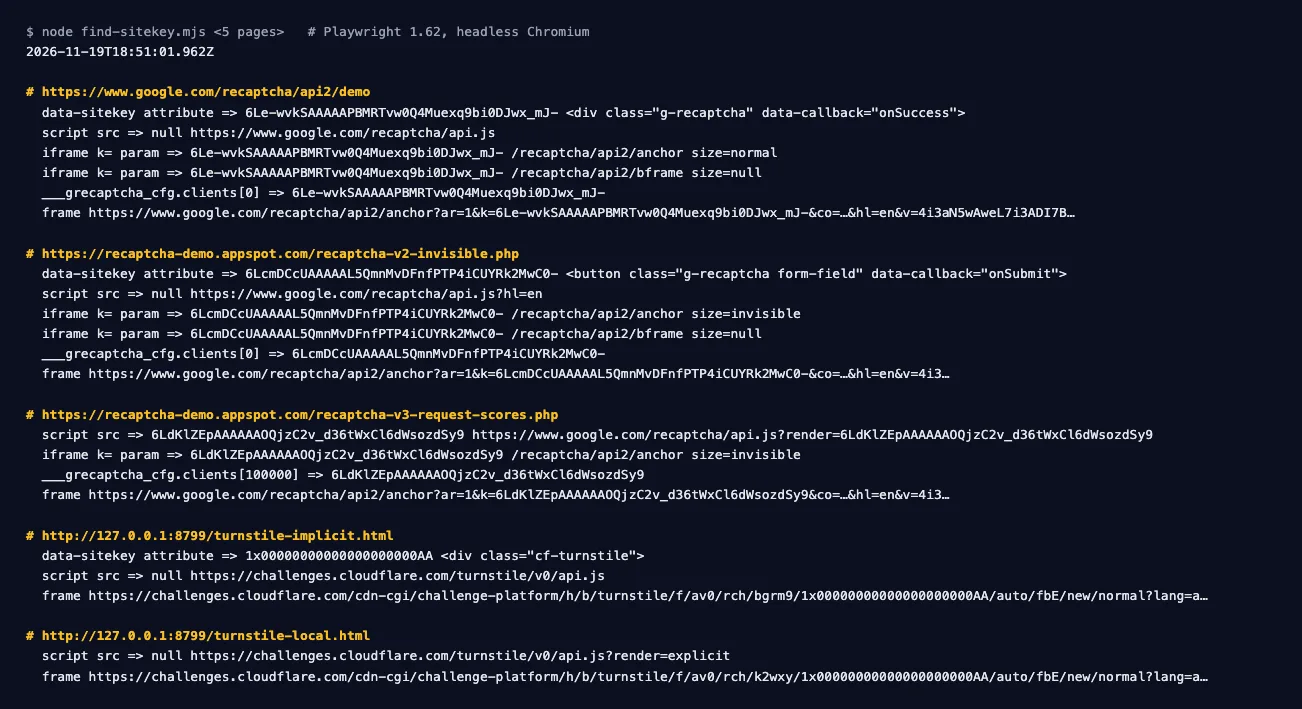
Raw output from our run on 19 November 2026 (Playwright 1.62, headless Chromium). The co= values are cut short. Each one is just the page origin in base64.
The core of the script is one function you can run with page.evaluate, or paste into the DevTools console:
function findSiteKeys() {
  const out = [];
  document.querySelectorAll('[data-sitekey]').forEach(el =>
    out.push(['data-sitekey', el.dataset.sitekey, el.className, el.dataset.size || '']));
  document.querySelectorAll('script[src*="recaptcha"], script[src*="turnstile"]').forEach(s => {
    const u = new URL(s.src);
    const r = u.searchParams.get('render');
    if (r && r !== 'explicit') out.push(['script render=', r, u.pathname]);
  });
  document.querySelectorAll('iframe[src*="/anchor"]').forEach(f => {
    const u = new URL(f.src);
    out.push(['iframe k=', u.searchParams.get('k'), u.pathname, 'size=' + u.searchParams.get('size')]);
  });
  return out;
}
Two results surprised us. Neither appears in any of the ranking pages or Google docs we read for this article.
Invisible v2 and v3 look the same in the iframe
On both the invisible v2 demo and the v3 demo, the anchor iframe loaded with size=invisible. So the iframe alone can't tell you which version you face, and sending a v3 key as v2 is a common reason tokens get rejected. Two other signals told them apart. The v3 page loaded api.js?render=KEY and stored its client under ID 100000 in ___grecaptcha_cfg. The invisible v2 page loaded plain api.js and put the key on a <button class="g-recaptcha"> with a data-callback. That client sat under ID 0, the same as the checkbox demo.
Explicit Turnstile rendering leaves no attribute
With api.js?render=explicit and turnstile.render('#box', { sitekey }), the page had no data-sitekey at all, so an attribute search finds nothing. The key still showed up in the challenge frame URL, which Playwright's page.frames() lists. The other option is reading the sitekey passed to turnstile.render in the page's own script. One warning from earlier runs: trapping window.turnstile with Object.defineProperty breaks the widget, so read the frame instead.
Which captcha is it? Reading the key's placement
Where the key appears tells you which API type to use. Base it on what the page loads and calls, not on how the widget looks.
Not every data-sitekey belongs to Google: on a div.smart-captcha container it is a Yandex SmartCaptcha client key, which needs its own request type, shown in how to find and solve a Yandex SmartCaptcha sitekey.
| What you see on the page | Type | What else to capture |
|---|---|---|
div.g-recaptcha[data-sitekey], plain api.js, anchor size=normal | reCAPTCHA v2 checkbox | data-callback name, if any |
data-size="invisible" or a button.g-recaptcha, plain api.js, anchor size=invisible | reCAPTCHA v2 invisible | The callback that submits the form |
api.js?render=KEY and grecaptcha.execute(KEY, {action}) | reCAPTCHA v3 | The exact action string |
recaptcha/enterprise.js or /recaptcha/enterprise/anchor | reCAPTCHA Enterprise | Whether it shows a checkbox or is score-only |
.cf-turnstile[data-sitekey] or turnstile.render | Cloudflare Turnstile | action and cData, if set |
Key shapes help too. Every reCAPTCHA key we saw in this run, including Google's test key, started with 6L and was 40 characters long. Production Turnstile sitekeys start with 0x. Cloudflare's test sitekeys start with 1x, 2x or 3x, and Cloudflare's Turnstile get-started guide explains that each widget gets its own sitekey and secret pair. For background on the versions themselves, see how v2 and v3 differ in practice and what Enterprise adds on top of them.
For v3, the key alone is not enough. You also need the action string the page passes to execute, and a token minted with the wrong action scores badly on the site's backend. Our Python v3 guide shows how to find it.
What to do with the site key once you have it
If you are building or testing an automation against a site you are allowed to automate, the site key, the page URL and the type are the three things a solver needs. We ran the v3 demo URL through our detector, and it returned the same key the Playwright script found, plus the action examples/v3scores and a ready-to-send request body:
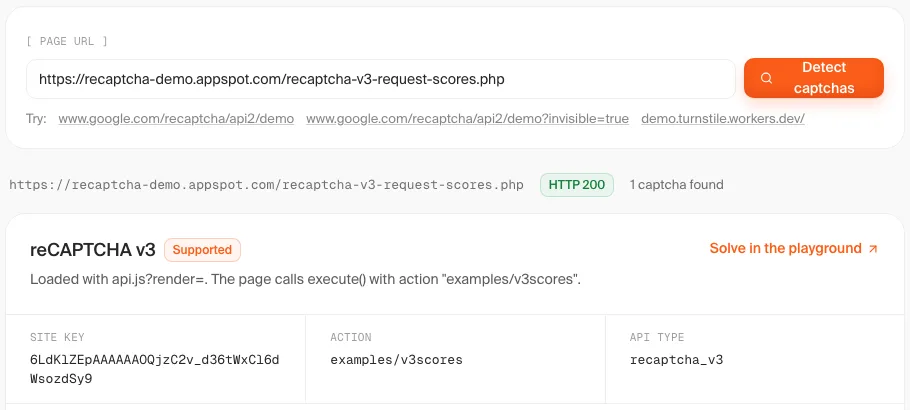
The detector result for recaptcha-demo.appspot.com's v3 page, captured on 19 November 2026. The key and action match the Playwright run.
With CaptchaNo, you send those fields to one endpoint: type (recaptcha_v2, recaptcha_v3, recaptcha_enterprise or turnstile), url, sitekey, plus action for v3. With ?wait=60 you get a token back in the same response, solved on our own solving infrastructure. Billing only counts successful solves, and failed solves are never charged. The full field list is in the API docs, and rates are on the pricing page.
Here are the limits, stated plainly. We solve reCAPTCHA v2, v3, checkbox-style Enterprise keys and Turnstile. We don't solve score-only reCAPTCHA Enterprise keys or hCaptcha. If the detector reports one of those, a solver won't help, and you should check whether the site offers an API or a test mode instead. We also didn't run any solves for this article. The test above only covers finding and classifying keys.
Frequently Asked Questions
Is it safe to show my reCAPTCHA site key publicly?
Yes. The site key is meant to be public, because every visitor's browser has to download it to render the widget. What stops other sites from abusing it is the list of domains registered on the key, so keep that list tight. The secret key is the one to protect. Keep it in a server-side environment variable, never in frontend code or a public repository.
Where is the reCAPTCHA secret key in Google Cloud?
Open the key in the reCAPTCHA section of the Google Cloud console and go to its Integration tab, where you can retrieve the legacy secret key. The console doesn't show it by default. The site key is the Key ID at the top of the same page. CMS plugins usually want both values, while custom backends can call the assessment API instead.
Can I use the same site key on several domains?
Yes. Google lets one key list up to 250 domains, and changes can take up to 30 minutes to take effect. Google recommends separate development and production keys, and allowing localhost only on the development one. Pages served from a domain that isn't on the list fail verification with an invalid-domain error.
Does reCAPTCHA v3 use a different site key than v2?
Yes. Each key has a fixed type: score (v3), checkbox (v2) or invisible (v2). A v3 key won't render a checkbox, and a v2 key won't return a score. You can check the type under Platform details in the Cloud console. From outside, the fastest tell is a render parameter carrying the key on the api.js script URL, which only v3 uses.
Why can't I find data-sitekey in the page source?
The page probably renders the widget explicitly, passing the key in JavaScript instead of an HTML attribute, or loads it only after a click. Search the loaded scripts for render, execute and sitekey. Then check the k parameter on the reCAPTCHA anchor iframe, or the Turnstile challenge frame URL, which contains the sitekey in its path once the widget has loaded.
Find the key, then solve with the right type
Find the key, confirm the type from where it appears, capture the action for v3, and only then request a token. To skip the DevTools step, paste the URL into the detector above. When you're ready to send real requests, create a CaptchaNo account and email support@captchano.com if a page doesn't match any row in the table. Replies come from the engineers who run the solving infrastructure.