How to Test reCAPTCHA and Turnstile With Test Keys
How to test reCAPTCHA and Turnstile with test keys, and the server test cases those keys hide. Real siteverify results from our October 2026 run.
To test reCAPTCHA or Cloudflare Turnstile on your own site, point your test build at the providers' published test keys, then test your server's rejection logic separately, because the test keys hide most of it. We ran both providers' test keys against their real siteverify endpoints on 28 October 2026, and Google's v2 test secret said success: true even when we sent no token at all. If you want the background on what these widgets check, start with how modern captcha tests decide you are human.
This guide is for developers and QA engineers testing forms they own. It covers the keys for reCAPTCHA v2, v3 and Enterprise and for Turnstile, what each one actually returns, the server-side test cases that matter, and a guard that stops test keys reaching production.
How to test reCAPTCHA and Turnstile: the short answer
Use the provider's test keys for browser tests, and stub the verification call for server tests. That split is the whole method.
- Browser (end-to-end) tests check that the widget loads, the token reaches your form and the form submits. Test keys make this deterministic: no image grid, no flaky score.
- Server tests check what your backend does with a missing, invalid, reused or expired token, and when siteverify is down. Test keys cannot drive most of these cases, as our results below show, so you control the siteverify response yourself.
- A production guard refuses to start, or refuses every token, if a test key is configured in production.
Do not try to solve your own captcha in CI, and do not lower your production threshold so tests pass. Both test something other than what real users get.
Test keys for each captcha type
Each provider handles testing differently: Google publishes one fixed v2 key pair, Cloudflare publishes a set of keys with fixed outcomes, and reCAPTCHA v3 and Enterprise need a separate key you create.
| Captcha | What to use in tests | Behaviour | Source |
|---|---|---|---|
| reCAPTCHA v2 (checkbox and invisible) | Google's published test site key and secret | No challenge; every verification passes; widget shows a red "for testing purposes only" notice | reCAPTCHA FAQ |
| reCAPTCHA v3 | A separate key you create for test environments | Real scoring, so scores may be unreliable without real traffic | reCAPTCHA FAQ |
| reCAPTCHA Enterprise / Google Cloud keys | A testing key created with gcloud recaptcha keys create and --testing-score (plus --testing-challenge for checkbox keys) | Fixed score on every assessment; checkbox keys either never challenge or always show an unsolvable challenge | Google Cloud reCAPTCHA FAQ |
| Cloudflare Turnstile | Dummy site keys and secret keys | Always pass, always fail, force an interactive challenge, or return "already spent" | Turnstile testing docs |
Google lists the v2 pair in its reCAPTCHA FAQ (site key 6LeIxAcTAAAAAJcZVRqyHh71UMIEGNQ_MXjiZKhI, secret 6LeIxAcTAAAAAGG-vFI1TnRWxMZNFuojJ4WifJWe). They are public on purpose, so you can commit them to test fixtures. For v3, the same FAQ tells you to create a separate key and warns that scores may not be accurate, which is why many teams lower the threshold only in their test build or mock the score. Our guide to reCAPTCHA v3 scores covers what those numbers mean.
Keys you manage in Google Cloud work differently. Google's Cloud reCAPTCHA FAQ (updated 26 October 2026) shows how to create testing keys with the gcloud CLI: a checkbox key with --testing-challenge=nocaptcha --testing-score=1.0 that never challenges, one with --testing-challenge=challenge --testing-score=0.0 that always shows an unsolvable challenge, and a score key with a fixed --testing-score. Testing keys cannot be converted or edited later, only deleted. If you would rather keep your real staging key, Google's IP allowlist feature gives allowlisted addresses a fixed score of 0.9, up to 1,000 addresses or subnets per key. Our explainer on how Enterprise differs from v2 and v3 helps if you are not sure which key type you have.
Cloudflare documents the Turnstile set on its Turnstile testing page (updated 20 October 2026). Site keys: 1x00000000000000000000AA always passes (visible), 2x00000000000000000000AB always fails, 1x00000000000000000000BB and 2x00000000000000000000BB are the invisible pass and fail keys, and 3x00000000000000000000FF forces an interactive challenge. Secrets: 1x0000000000000000000000000000000AA passes, 2x0000000000000000000000000000000AA fails, and 3x0000000000000000000000000000000AA returns "token already spent". The passing site key produces the dummy token XXXX.DUMMY.TOKEN.XXXX.
What the test keys actually returned in our run
We loaded each test site key in headless Chromium on a local page, captured the token, and sent it to the real siteverify endpoints with every secret and a few bad inputs. The run was a small Node script on 28 October 2026 at 05:45 UTC, repeated 46 seconds later with identical results.
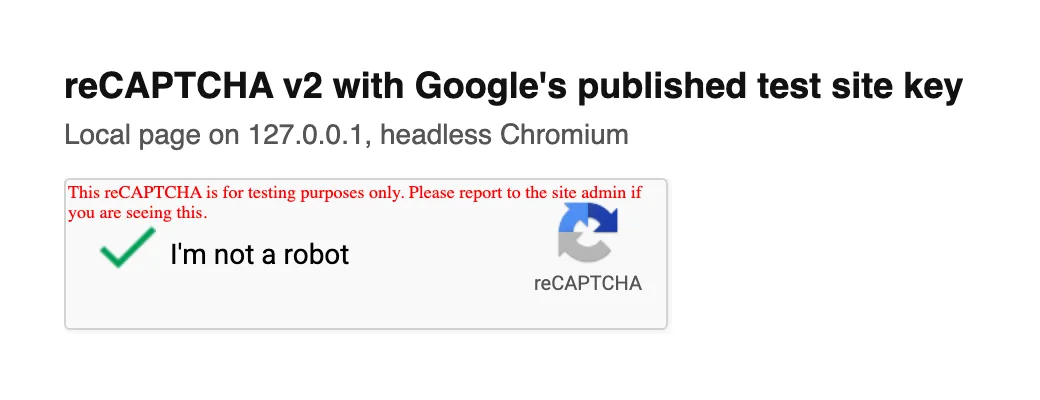
Google's v2 test key on 127.0.0.1: one click, a green tick with no image challenge, and a red testing notice inside the widget.
The checkbox produced a token about half a second after the click in both runs (495 ms and 436 ms). Then the server side:
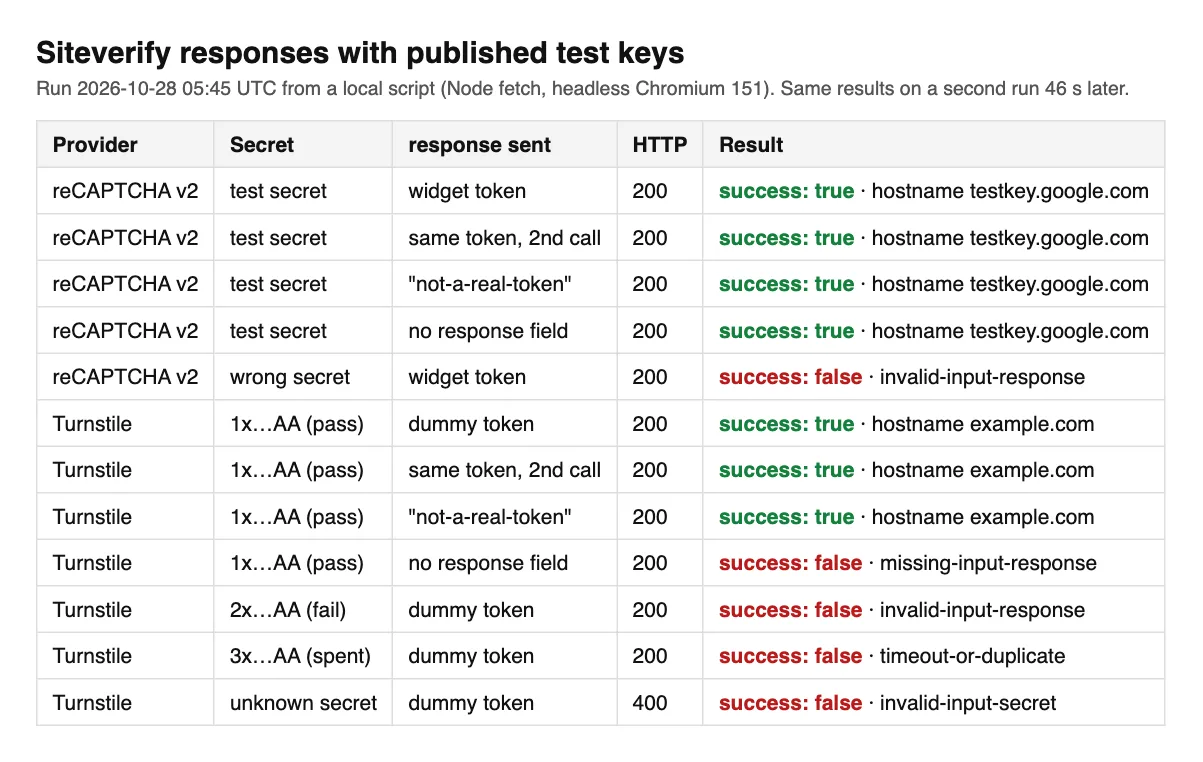
Raw siteverify results from our run. With production keys, the reused, fake and missing-token rows would all have failed.
Four results matter for anyone writing tests:
- Google's v2 test secret accepts anything. A real token, the same token a second time, the string
not-a-real-token, and a request with noresponsefield at all all came backsuccess: truewith hostnametestkey.google.com. Google's docs say production tokens are single-use and expire after two minutes; the test pair checks neither, so it cannot test your replay, expiry or missing-token handling. - Turnstile's passing secret is almost as permissive. It accepted the dummy token twice and also accepted
not-a-real-token. It did reject a request with no token (missing-input-response). Cloudflare's page says test secrets reject real tokens; our fake string was not a real token, so this does not contradict it, but do not rely on the passing secret to catch malformed input. - Turnstile covers the failure paths Google does not. The
2xsecret returnedinvalid-input-responseand the3xsecret returnedtimeout-or-duplicate, both with HTTP 200. An unknown secret returned HTTP 400 withinvalid-input-secret, so your code has to read the JSON body even on a 400. - The responses label themselves. Turnstile's test responses included
"metadata": {"result_with_testing_key": true}and hostnameexample.com(Cloudflare's sample showslocalhost). Google's carried hostnametestkey.google.com. Both make a cheap production guard, below.
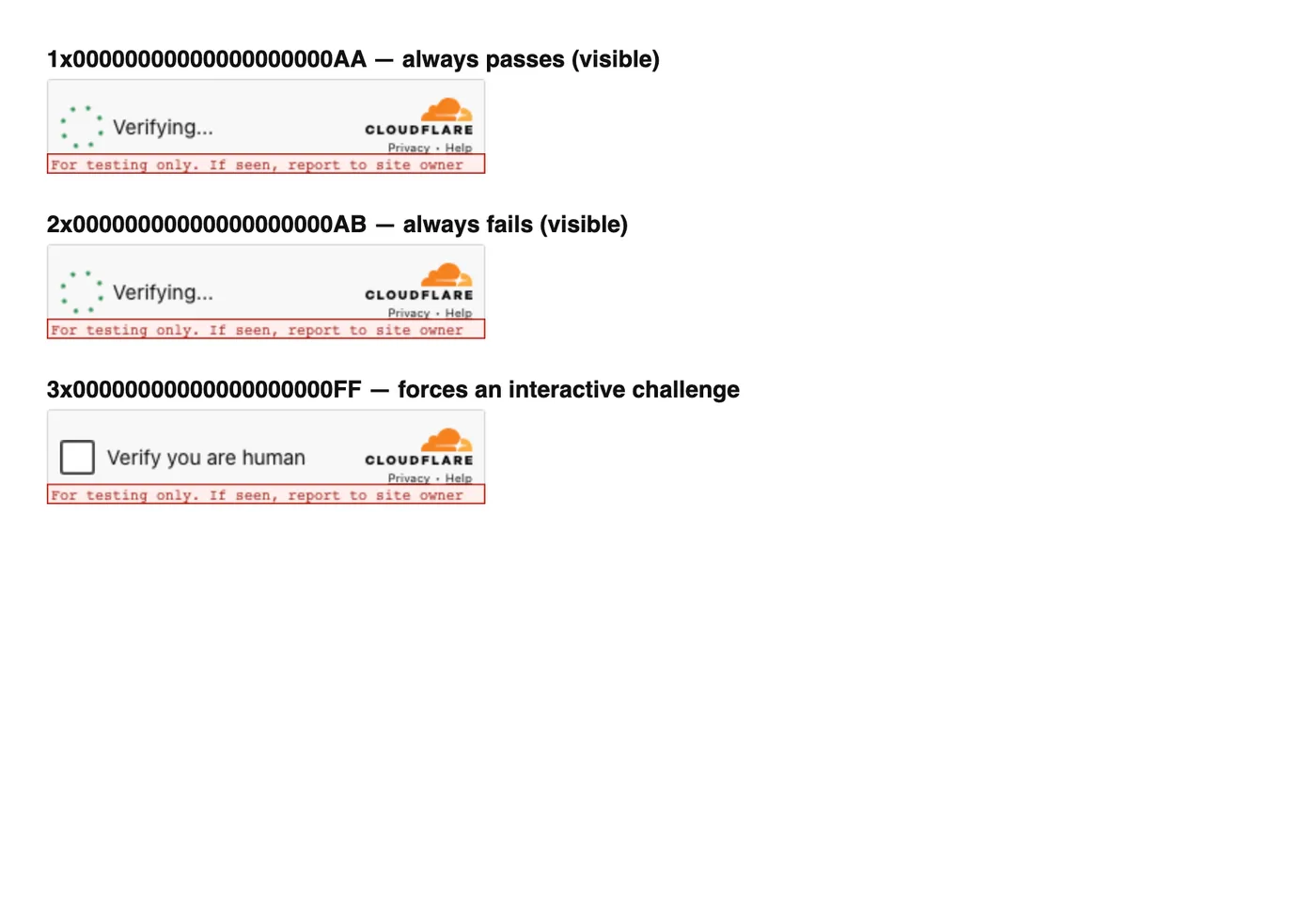
Turnstile test site keys in headless Chromium. The pass widget had already delivered its dummy token when this was captured, though it still drew "Verifying…".
That last screenshot is a useful warning for end-to-end tests. In headless Chromium the always-pass widget's callback fired with XXXX.DUMMY.TOKEN.XXXX while the widget still drew "Verifying…" six seconds later. The always-fail key called the error callback with code 600010, and the forced-challenge key never issued a token without a click. Assert on the callback or the hidden cf-turnstile-response input, not on what the widget looks like.
Server-side test cases for a captcha-protected form
Most captcha bugs live in the backend, so most of your test cases belong there. Run them against a stubbed siteverify, not the test keys, because the stub lets you return exactly the response each case needs.
| Test case | Stubbed siteverify response | Expected behaviour |
|---|---|---|
| Valid token | success: true, your hostname | Form is processed |
| No token in the request | Not called, or missing-input-response | Rejected before any side effect |
| Invalid or forged token | invalid-input-response | Rejected; user asked to retry |
| Reused or expired token | timeout-or-duplicate | Rejected; widget reset so a fresh token is issued |
| Wrong environment's secret | invalid-input-secret (HTTP 400 on Turnstile) | Rejected and logged as a configuration error |
| Hostname mismatch | success: true, another hostname | Rejected |
| reCAPTCHA v3 low score or wrong action | score: 0.1 or an unexpected action | Your fallback runs (extra step), not a silent drop |
| Siteverify unreachable or times out | Network error | Fail closed: reject, do not process |
The expected behaviour column is where tests usually pass for the wrong reason. Assert that no side effect happened (no row written, no email sent), not just that the response code was 403. A useful sanity check: delete the siteverify call from your handler and run the suite. If everything still passes, the suite is not testing the protection. When a real user's token is rejected in production for reasons none of these cases cover, our guide to why valid tokens get rejected walks through the session-level causes.
A guard that keeps test keys out of production
Test keys pass everything, so a test key in production switches your captcha off without any error. Guard against it at startup and on every response.
const TEST_SECRETS = new Set([
  "6LeIxAcTAAAAAGG-vFI1TnRWxMZNFuojJ4WifJWe", // reCAPTCHA v2 test secret
  "1x0000000000000000000000000000000AA",
  "2x0000000000000000000000000000000AA",
  "3x0000000000000000000000000000000AA",
]);

if (process.env.NODE_ENV === "production" && TEST_SECRETS.has(process.env.CAPTCHA_SECRET)) {
  throw new Error("Captcha test secret configured in production");
}

export function isTrustedResult(json, expectedHost) {
  if (!json.success) return false;
  if (json.metadata?.result_with_testing_key) return process.env.NODE_ENV !== "production";
  if (json.hostname === "testkey.google.com") return process.env.NODE_ENV !== "production";
  return json.hostname === expectedHost;
}
The hostname check also catches the more common real bug: a token minted on another site being accepted by yours. Keep the test keys in a test-only env file and add a CI step that fails the build if a production config contains any of them. Cloudflare's own end-to-end tutorial suggests a variant: choose test or production keys per request, based on a loopback IP or a secret test header.
End-to-end tests in Playwright, Selenium and Cypress
With test keys in place, the browser test only has to wait for a token and submit. No clicking through challenges, no sleeps.
- reCAPTCHA v2 test key: click
#recaptcha-anchorinside the iframe titled "reCAPTCHA", then wait until#g-recaptcha-responsehas a value. In our run that took under 500 ms. - Turnstile pass key: no click needed. Wait for your
data-callbackto fire or forinput[name="cf-turnstile-response"]to equal the dummy token. - Failure path in the browser: load the page with
2x00000000000000000000ABand assert that your error UI appears. This is the one failure case worth testing in a browser. - reCAPTCHA v3: there is no visible widget to wait for; assert that your page requested a token with the right action name, and test score handling on the server.
Keep it to one or two browser tests per form. The rest of the coverage belongs in fast server tests against the stub. Our Playwright reCAPTCHA walkthrough shows the iframe selectors and callback wiring in full, and how Turnstile issues its token explains the hidden input and callbacks.
When test keys are not enough
Test keys only work where you control the configuration. Three situations push teams beyond them.
- Testing against real keys you do not own. A partner's staging environment, a third-party checkout embedded in your flow, or a production smoke test of a login you are authorised to monitor. You cannot swap their keys.
- Proving the production path. Test keys skip the real challenge, so they never exercise the widget your users actually see. A small scheduled run against real keys catches integration breaks that test keys hide.
- Score tuning. A v3 test key with a fixed score tells you nothing about how real traffic scores.
For the first two, a solving API returns the token the real widget would have produced, and your test injects it the same way a user's browser would. That is what CaptchaNo does on authorised QA and end-to-end runs: it solves reCAPTCHA v2, reCAPTCHA v3 and Cloudflare Turnstile on our own solving infrastructure. It does not solve score-based reCAPTCHA Enterprise keys, so for those use Google's testing keys or the IP allowlist. Only run real solves against systems you own or have written permission to test.
Frequently Asked Questions
What are the reCAPTCHA test keys?
Google publishes one reCAPTCHA v2 key pair for testing: site key 6LeIxAcTAAAAAJcZVRqyHh71UMIEGNQ_MXjiZKhI and secret 6LeIxAcTAAAAAGG-vFI1TnRWxMZNFuojJ4WifJWe. The widget never shows a challenge and displays a red testing notice. In our October 2026 run, verification with that secret returned success for every request, including ones with no token.
Is there a reCAPTCHA v3 test key?
Not a public one. Google's FAQ says to create a separate v3 key for test environments and warns that scores may be inaccurate without real traffic. If your keys live in Google Cloud, you can create a testing key with a fixed score using the gcloud CLI, or allowlist your test runners' IP addresses so they always receive a score of 0.9.
How do I test Cloudflare Turnstile locally?
Use Cloudflare's dummy keys. The site key 1x00000000000000000000AA always passes and issues the token XXXX.DUMMY.TOKEN.XXXX, and the secret 1x0000000000000000000000000000000AA accepts it. Swap in the 2x secret to test rejection and the 3x secret to test a spent token. They worked on a 127.0.0.1 page in our run with no hostname setup.
Can I test token expiry and replay with test keys?
Not with Google's. Its v2 test secret accepted a reused token and a fake one in our run, so it never produces the timeout-or-duplicate error. Turnstile's 3x secret does return that error on demand. For both providers, the reliable approach is to stub the siteverify response in your server tests and return each error code directly.
Should I disable the captcha in staging instead?
Disabling it is simpler but hides bugs: the widget script, token wiring and verification call never run. Test keys keep that whole path in place while making the result predictable. If you do use a feature flag, make sure it cannot be switched on in production, and keep at least one test that runs with the captcha enabled.
Test the real path when you need to
Test keys plus a stubbed siteverify cover almost every case on forms you own. When you need a real token, against a partner's staging site or a scheduled production check, read the API docs to see how a test requests one, or try the widgets first on our live captcha demo page.