reCAPTCHA Verification Failed: Causes and Fixes
reCAPTCHA verification failed? Learn if it's your browser or the site, what Google's six error codes mean, and how to fix each, with real API replies.
reCAPTCHA verification failed means the check did not produce a token the website would accept. Either your browser never got a valid answer from Google, or the site's server sent the token to Google and got back "success": false. Start with one question: does it fail for everyone, or only for you? If only you, it is your browser or network. If every visitor sees it, the site's keys, domain list or server code are wrong. This guide covers both, maps Google's six error codes to their fixes, and shows what Google's endpoint actually returned when we sent it bad input. For background on the versions, see how reCAPTCHA v2, v3 and Enterprise differ.
What does "reCAPTCHA verification failed" mean?
It is a generic message, written by the website or its form plugin, not by Google. It appears whenever the site's check of your reCAPTCHA token does not pass, and it rarely says why.
There are two failure points: your browser, where the widget may never produce a token, and the site's server, which posts the token and its secret key to Google's siteverify endpoint and gets a JSON reply. Google's verification documentation lists what that reply contains: success, challenge_ts, hostname and an optional list of error-codes. It also states the rule behind most server-side failures: each token is valid for two minutes and can be verified only once.
"reCAPTCHA verification failed, please try again later", "Captcha verification failed" and similar wordings all mean the same thing: no accepted token arrived with the form.
Is it your browser or the website? A quick triage
If the same form works on another device or network, the problem is on your side. If it fails everywhere, and other people report it too, the site is broken and only its owner can fix it.
| What you see | Most likely side | First thing to try |
|---|---|---|
| Checkbox never appears, or spins forever | Your browser or network | Disable ad and script blockers for the site, update the browser |
| "Your computer or network may be sending automated queries" | Your network's IP reputation | Turn off the VPN or proxy, switch networks |
| Endless image grids, then failure | Your IP, extensions or browser profile | Try a clean profile or private window without the VPN |
| Red text inside the widget: "ERROR for site owner" | The website | Nothing on your side; tell the site owner |
| "Verification expired. Check the checkbox again." | Neither: you waited too long | Tick the box again and submit straight away |
| Box ticks green, but the form says verification failed | Usually the website's server | Retry once; if it repeats on another device, tell the owner |
How to fix reCAPTCHA not working as a visitor
Most visitor-side failures come from blocked scripts or a poorly rated IP address. Retest after each step.
- Reload and resubmit once. Tokens are single-use, so a fresh load fixes a reused one.
- Turn off the VPN, proxy or Tor. Shared exits carry other people's traffic. Google's reCAPTCHA FAQ gives three reasons for the "automated queries" message: a shared network used abusively, a suspicious IP recently assigned by your ISP, or a site under heavy attack. We cover the Search version in our guide to Google's unusual traffic page.
- Pause blockers and privacy extensions for that site. Ad blockers, script blockers and some antivirus web shields stop the widget loading from
www.google.comorwww.gstatic.com. - Update the browser. Google's reCAPTCHA Help states it supports the two most recent major versions of Chrome, Firefox, Safari and Chromium-based Edge on desktop, and Chrome, Safari and the Android browser on mobile. An old in-app browser often fails.
- Allow cookies and JavaScript for the site.
- Try a private window, then another network such as mobile data. If it works there, the cause is your profile or your network's IP, not the website.
If all six fail on two networks, the fault is almost certainly the site's.
Why reCAPTCHA verification fails on your website
When every visitor fails, the cause is wrong keys, a domain missing from the key, a token lost on the way to the server, or server code that verifies it wrongly. The widget reports the first two itself.
"ERROR for site owner" messages inside the widget
These red messages replace the checkbox, and every visitor sees them. We reproduced one by loading Google's own v2 test key with a few characters changed:
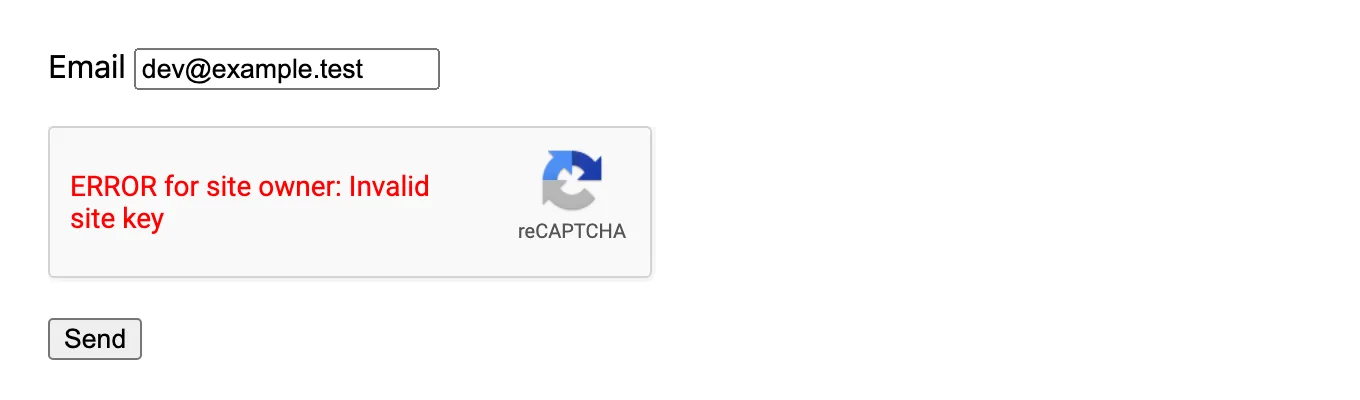
- Invalid site key. Google's reCAPTCHA FAQ says the key is no longer valid and needs a new registration. Check first for a typo or the secret pasted in the site-key field.
- Invalid domain for site key. The page's hostname is not on the key's domain list. Google's domain validation page says a key covers the domains and first-level subdomains you list. Add the exact domain that serves the form, including any staging host.
- Localhost is not in the list of supported domains. Localhost is not allowed by default. Google recommends a separate development key with
localhoston it, and keeping it off the production key. - Invalid key type. A v3 key loaded as a v2 checkbox, or the reverse, or an Enterprise key used through the classic script. Keys are not interchangeable between versions. If you inherited a site and do not know what it uses, our captcha detector shows the type on a live page, and our Enterprise explainer covers how its keys differ.
- "This site is exceeding reCAPTCHA quota." The FAQ says sites over 1,000,000 calls a month may see this on v2. On v3 the failure is silent: it may return a static score of 0.9 with "Over free quota." So check the console if v3 suddenly lets everything through.
"Verification expired. Check the checkbox again."
This one is normal behaviour, not a fault. The widget clears its token after a while and asks the user to tick the box again. Google's docs give the token two minutes. With Google's v2 test key, we saw the widget expire sooner:
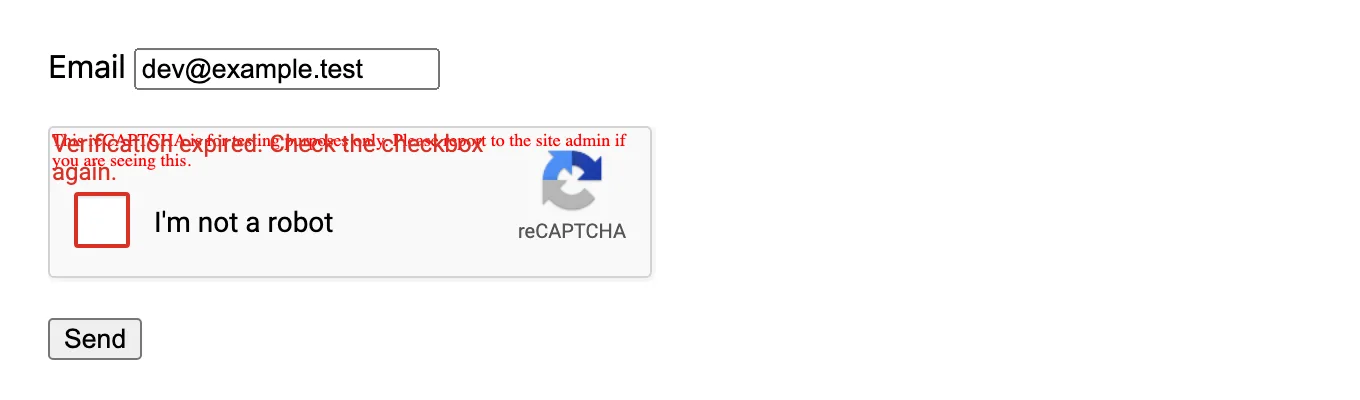
In two runs on 17 November 2026, data-expired-callback fired 60.0 seconds after the success callback and g-recaptcha-response went from 1,700 characters to empty. That was the test key only; production keys may differ. Either way, slow forms need an expired callback that disables submit or asks for a new tick.
The widget works, but the form still says verification failed
If the box turns green and the submission still fails, the token is being lost or rejected after the browser. The usual causes:
- Caching and JavaScript optimisers that serve stale pages or minify, combine or delay
api.js. - Two reCAPTCHA scripts on one page, often a theme and a form plugin with different keys.
- The server cannot reach Google. An outbound firewall on the host blocks the POST to
siteverify. Wherewww.google.comis unreachable, the FAQ says to usewww.recaptcha.netfor both the script and the verification call. - A strict Content Security Policy blocks the script or frame. Google recommends the nonce-based CSP3 approach.
- The widget is removed after the click by a re-rendering app. The FAQ ties this to the "Blocked a frame" SecurityError and recommends
grecaptcha.reset().
reCAPTCHA siteverify error codes and what they mean
When server-side verification fails, Google returns one of six error codes. Log the whole JSON reply, not just success, because the code narrows the search.
| Error code | Google's meaning | Usual cause | Fix |
|---|---|---|---|
missing-input-secret | The secret parameter is missing | Environment variable not loaded in production | Check the secret reaches the request |
invalid-input-secret | The secret is invalid or malformed | Site key pasted as secret, or keys from two different pairs | Copy both keys from the same registration |
missing-input-response | The response parameter is missing | Form field g-recaptcha-response not posted, or wrong field name | Read the field the widget actually fills |
invalid-input-response | The response is invalid or malformed | Truncated token, wrong key type, or (in our run) a bad secret | Check key pair and type before the token |
bad-request | The request is invalid or malformed | GET with a JSON body, wrong content type | POST form-encoded secret and response |
timeout-or-duplicate | Too old, or already used | Double submit, retry with the same token, verifying twice in middleware and controller | One verification per token; reset the widget after each submit |
What Google returned for bad input in our run
The codes do not always point at the real mistake. We sent deliberately wrong requests to siteverify on 17 November 2026, including a real 1,700-character token from Google's v2 test key:
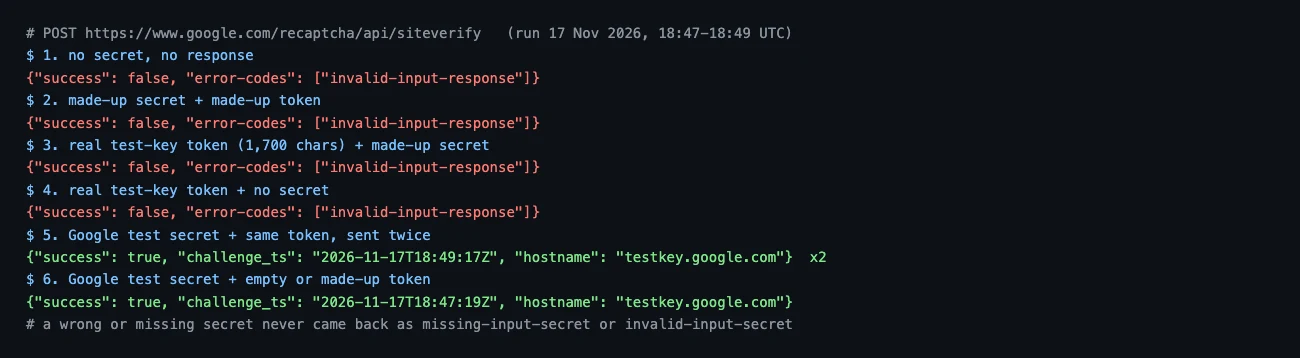
Two lessons. First, a missing or wrong secret returned invalid-input-response, not missing-input-secret or invalid-input-secret. If you see that code, check the secret and the key pair before you blame the token. Second, Google's test secret accepted an empty token, a made-up token and the same token twice, always with hostname: testkey.google.com. A test secret left in production therefore passes everything. Check that hostname matches your domain on every verification. We list the test keys and the guard we use in our test-key walkthrough.
reCAPTCHA v3: when "failed" means a low score
On v3, "verification failed" usually means success was true but the score fell below the site's threshold, or the action did not match.
Google's v3 docs suggest 0.5 as a default threshold and say to verify that the action name is the one you expect. They also say to call grecaptcha.execute when the user acts, not on page load, because tokens expire after two minutes. A token fetched on load and submitted three minutes later comes back as timeout-or-duplicate. Our breakdown of what each v3 score band means covers threshold tuning. If you are writing the client side, finding the page's real action name is the step most integrations miss.
A developer checklist that fixes most cases
Go through these in order; each step rules out a class of failure.
- Log the full
siteverifyJSON, includinghostnameand, on v3,scoreandaction. - Use a site key and secret from the same registration and type, with the serving hostname on its domain list.
- Verify each token once, within two minutes, then reset the widget or run
executeagain. - Make sure the server can reach
siteverifyand reCAPTCHA is excluded from caching and script optimisers. - For new builds, note that Google's Cloud documentation calls SiteVerify the legacy endpoint and recommends CreateAssessment.
When the token comes from automation
If your own script fills the form, tokens also fail when the session that earned them is not the one that spends them. We cover those four mismatches in why valid tokens still get rejected.
CaptchaNo returns reCAPTCHA tokens from our own solving infrastructure through one endpoint. The reCAPTCHA v2 solver handles checkbox, invisible and callback widgets. Classic v3 keys and checkbox-style Enterprise keys are supported too. Score-based Enterprise keys are not, and we say so rather than return tokens that fail. Tokens follow the rules above: single-use, so submit them at once, from the IP and user agent you sent with the task. Only successful solves are billed and credit does not expire. Rates are on the pricing page, and request formats and SDKs for Python, Node.js, Go and PHP are in the API docs. Questions go to the engineers who run the service at support@captchano.com.
A solver does not fix a site whose keys or domain list are wrong.
Frequently Asked Questions
Why does reCAPTCHA keep saying verification failed?
Either your browser never produced a usable token, or the website's server rejected the token it received. If it repeats on another device and network, the site is misconfigured: wrong keys, a missing domain, or verification code that reuses tokens. If it only happens to you, a VPN, a blocking extension or an outdated browser is the usual cause.
How long is a reCAPTCHA token valid?
Google's documentation says two minutes, and each token can be verified only once. The visible checkbox can expire sooner: with Google's v2 test key we watched it ask for a new tick after 60 seconds. So get the token just before submitting, verify it once on the server, and reset the widget before any retry.
What does timeout-or-duplicate mean?
It means Google already accepted that token once, or the token is older than two minutes. Common causes are a double-clicked submit button, a retry that resends the same token, a back-button resubmission, and server code that verifies the token in two places. Verify once per submission and fetch a fresh token for every new attempt.
Can a VPN cause reCAPTCHA verification to fail?
Yes. Many people share a VPN exit address, and if some of them send automated traffic, Google rates the whole address as risky. You then get harder image challenges, the automated-queries message, or a low v3 score that the site rejects. Turning the VPN off or switching servers is the quickest test.
How do I fix "Invalid domain for site key"?
Open the reCAPTCHA admin console, find the key the page loads, and add the exact hostname that serves the form. A listed domain covers its first-level subdomains, but staging hosts, preview URLs and localhost need their own entry or, better, their own development key. Then reload the page in a fresh tab to confirm the error is gone.
Fix the cause, then the token
Work out whose side the failure is on, read the actual error code, and fix the keys, domains or single-use handling before anything else. If you are building automation against forms you are allowed to test, get reCAPTCHA tokens from the CaptchaNo API. You pay only for tokens that solve.