Fix ERROR for Site Owner: Invalid Domain for Site Key
ERROR for site owner: Invalid domain for site key means the page's host isn't on the reCAPTCHA key's list. What we reproduced, and how to fix it fast.
ERROR for site owner: Invalid domain for site key means the hostname of the page showing the reCAPTCHA widget is not on that key's list of allowed domains. The fix is to add the exact host (or its parent domain) to the key in the Google Cloud console and wait up to 30 minutes. If the form also says verification failed after you submit, our full reCAPTCHA verification failed guide covers the server side.
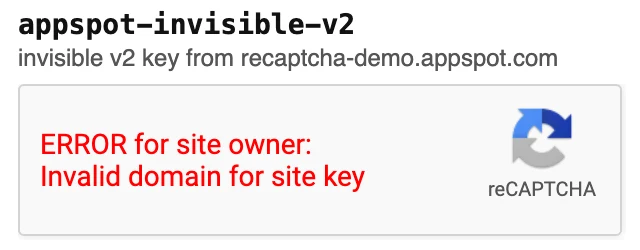
Our run, 20 November 2026: a real v2 key rendered on a hostname it doesn't list.
What "Invalid domain for site key" means
The site key is valid and the key type is right, but the page's hostname isn't on the key's domain list.
When a widget loads, reCAPTCHA opens an anchor iframe whose URL carries the page origin in a co parameter (base64 of something like https://www.google.com:443). Google compares that hostname against the key's list. Google's guide to creating website keys sets the rules that matter here:
- Listing a domain such as
example.comalso covers its subdomains. - A key holds at most 250 domains.
- Domain list changes can take up to 30 minutes to apply.
- Domain verification is on unless someone turned on the "Disable domain verification" toggle.
Typical causes: a domain move, a staging host never added, a form embedded from a vendor's domain, or a proxy that rewrites the hostname.
All four "ERROR for site owner" messages, reproduced
The red text tells you which check failed, and the checks run in a fixed order: key validity, then key type, then domain. We rendered six public keys as v2 checkbox widgets on one local test page and loaded it under different hostnames, using Playwright 1.62.1 with headless Chromium 151. Every hostname pointed at our own machine.
| Message in the widget | What triggered it in our run | What to fix |
|---|---|---|
| ERROR for site owner: Invalid site key | A real key with one character changed, and a random string in the key field | Copy the key again from the console. Check that the secret key wasn't pasted into the site-key field. |
| ERROR for site owner: Invalid key type | A v3 key rendered as a v2 checkbox, on every hostname we tried | Use a key that matches the integration: checkbox or invisible for v2, score-based for v3. |
| ERROR for site owner: Invalid domain for site key | A valid v2 key on shop-staging.test, staging.example.com and appspot.com | Add the hostname, or a parent domain you control, to the key's domain list. |
| Localhost is not in the list of supported domains for this site key. | The same v2 key on 127.0.0.1, although it loaded fine on localhost | Use a separate development key that lists the exact local host you use. |
A v3 key with a bad domain still showed "Invalid key type" when rendered as a checkbox. The type check came first, so fix the key type before you chase the domain.
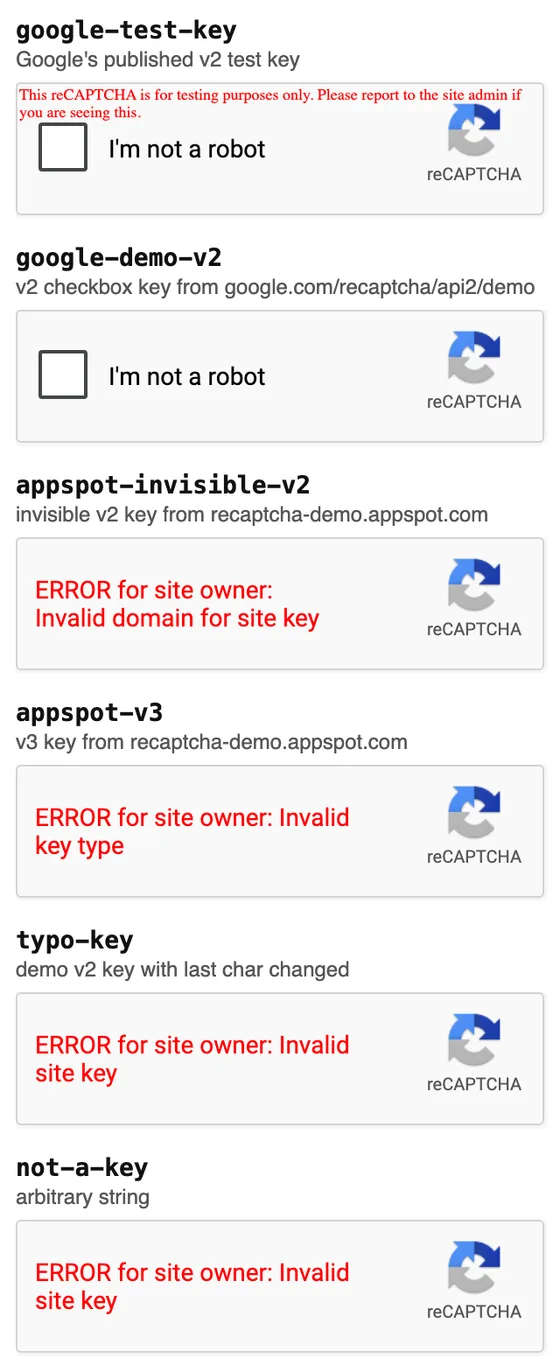
Six keys on one page served as shop-staging.test.
Five things the test showed that forum answers miss
These details explain why the error can persist after you think you've fixed it.
- 127.0.0.1 is not localhost. The invisible v2 key from Google's recaptcha-demo.appspot.com loaded on
localhostbut failed on127.0.0.1with the localhost message. If your dev server opens on the IP, list the IP too, or open it vialocalhost. - Ports don't matter. The same key behaved identically on
localhost:8793andlocalhost:8794. Enter bare hostnames only. - Subdomains pass, parents fail. The demo key, which belongs to
recaptcha-demo.appspot.com, loaded onqa.recaptcha-demo.appspot.combut failed onappspot.com. Listingexample.comcoverswww.example.com. Listing onlywww.example.comdoes not cover the bareexample.com. - Not every key enforces domains. Google's test key and the key from Google's own checkbox demo loaded on every hostname we tried. A key copied from a tutorial that "works everywhere" tells you nothing about your own key.
- v3 fails silently. A v3 key loaded the normal way (
api.js?render=KEY) on the wrong domain still returned a token fromgrecaptcha.execute(): 572 characters onshop-staging.test. The only visible sign was the error in the badge, and many sites hide the badge with CSS.
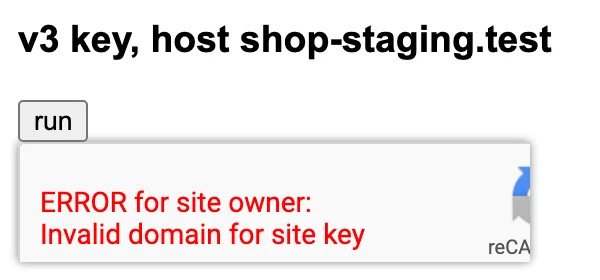
The v3 badge shows the error, yet execute() still returned a token.
The form submits and siteverify then fails or the score check rejects it. If v3 started failing after a domain change, check the badge before you tune thresholds. Our comparison of reCAPTCHA v2 and v3 explains why v3 never shows a challenge.
How to fix Invalid domain for site key
Find the key the page actually loads, add the hostname to that key, then wait and test.
- Confirm which key loads. Open DevTools on the broken page and search for
sitekey,render=andk=. Plugins and tag managers can inject their own key. Our guide to finding a reCAPTCHA site key on any page walks through each place it hides. The free captcha detector reports the key and type from a live URL. - Open that key in Google Cloud. Keys now live in the Google Cloud console under reCAPTCHA. Find the key whose ID matches. If it isn't there, it lives in another project or account.
- Add the bare hostname. Use
example.comto cover every subdomain, or list each host. Nohttps://, no port, no path, no trailing slash. Include staging, preview and checkout hosts. - Check embedded forms. If the form sits in an iframe served by a form builder, help desk or CRM, the widget runs on that vendor's hostname. Add the vendor's host as the vendor's docs specify.
- Wait, then hard reload. Allow up to 30 minutes for the change, then reload with the cache bypassed. Purge any page cache or CDN serving the old key.
Localhost and development keys
Use a separate key for development. Google's reCAPTCHA troubleshooting page says to keep localhost off production keys and add it only to a development key. List both localhost and 127.0.0.1 if your tools use either. Google's v2 test key loads anywhere; our walkthrough on testing forms with reCAPTCHA and Turnstile test keys covers its limits.
"I added the domain and it still shows the error"
Usually you edited a different key. Otherwise, check:
- Fewer than 30 minutes have passed since the change.
- Two plugins each inject their own key, and the other one wins.
- The key is v3 or Enterprise, but the page loads it as a classic v2 checkbox. That shows "Invalid key type", which is a different fix. Our reCAPTCHA Enterprise explainer covers its separate script.
- You listed
www.example.comand the page runs onexample.com. - A page cache still serves the old key.
Don't fix it by turning off domain verification
Turning off domain verification makes the error disappear, but anyone can then use your key on any site. Google's create-key guide calls that a security risk. Google's older domain validation page says that if you turn it off, you are required to check the hostname in every verification response and reject unexpected ones.
If you really need more than 250 hosts, compare the hostname field from siteverify, or tokenProperties.hostname on Enterprise assessments, against your own allowlist before trusting a token. If you've lost access to the Google account, create a new key you control rather than removing the captcha.
Seeing this error as a visitor?
You can't fix it from your side. The message is addressed to the site owner, and a different browser, clearing cookies or switching VPN won't change the domain list. The exception is a library or campus proxy that rewrites the address: open the site at its normal address. Otherwise, tell the site owner which page shows the error.
When the error shows up in automation
If a scraper or test runner sees this message on a site that works normally in a browser, your tooling changed the hostname. Typical causes are a local mirror, saved HTML or a rewriting proxy. A solving service can't fix this: tokens must be solved for the real page URL. Our post on why valid captcha tokens get rejected covers the hostname and session checks behind that.
Frequently Asked Questions
What does "ERROR for site owner: Invalid domain for site key" mean?
The page hostname is not on the domain list of the reCAPTCHA key that page loads. The key itself is valid and the key type is correct, so only the domain check failed. The site owner fixes it by adding the hostname, or a parent domain, to the key's settings in the Google Cloud console. Visitors can't fix it from their own browser.
How long does it take for a reCAPTCHA domain change to work?
Google says domain list changes can take up to 30 minutes to apply. Wait that long before deciding the fix didn't work, then reload with the cache bypassed. If the error still shows after that, the page is probably loading a different key than the one you edited, or a page cache is still serving old HTML with the previous key.
Do I need to add www and every subdomain separately?
No. Adding the parent domain, such as example.com, covers its subdomains, including www. The reverse doesn't hold: listing only www.example.com leaves the bare example.com uncovered. In our test, a key for a subdomain loaded on a deeper subdomain of it but failed on the parent domain. Don't include ports, paths or https:// in the entry.
Why does reCAPTCHA say localhost is not supported?
Localhost isn't on a key's domain list unless someone added it, and Google advises adding it only to a separate development key. In our test, 127.0.0.1 counted separately from localhost: a key that listed localhost still failed on the IP. If your development server opens on 127.0.0.1, add that too, or use Google's test key for local work.
What is the difference between Invalid site key and Invalid domain for site key?
Invalid site key means Google doesn't recognise the key at all. Usually it's a typo, a deleted key or the secret pasted in the wrong field. Invalid domain for site key means the key exists and is the right type, but this hostname isn't allowed to use it. The first needs a correct or new key. The second needs a domain list update.
Fix the domain, then test the whole flow
Once the widget loads on every host you use, test the full submit-and-verify path, not just the checkbox. If you also automate forms you're authorised to test, CaptchaNo returns tokens for reCAPTCHA v2 and v3 from our own solving infrastructure, and only successful solves are billed. Create a CaptchaNo account, read the API docs or see how reCAPTCHA v2 solving works. Replies at support@captchano.com come from the engineers who run the service.