Captcha Select Images: Why the Grid Keeps Coming Back
Why captchas ask you to select images, whether to click tiles with part of an object, why the grid keeps repeating, and what site owners can change.
When a captcha asks you to select images ("select all images with traffic lights", "click every square with a bus"), you are looking at the image challenge of Google's reCAPTCHA v2. It appears only when the checkbox could not clear you on its own, and it keeps coming back when Google's risk check still has doubts after your answer. If you want the background on how these checks work in general, start with our explainer on what a CAPTCHA test actually measures.
This guide covers the three questions people actually search for: what the grid is checking, whether to click the square with a sliver of a traffic light in it, and why the grid repeats. It then covers what site owners can change, and why automation should not try to click tiles at all. Everything about Google's behaviour below comes from Google's own documentation, read on 26 October 2026, with links.
What a "select images" captcha is
A select-images captcha is a grid of photos with an instruction, and you pass by clicking every tile that matches it. On most sites it is reCAPTCHA v2: you tick "I'm not a robot", and if that tick alone does not convince Google, a challenge window opens over the page.
You will see three layouts in the wild:
- A 3x3 grid of separate photos. "Select all images with buses." Each tile is its own picture.
- One photo split into a 4x4 grid. "Select all squares with traffic lights." The object crosses tile borders, which is where most of the confusion comes from.
- Grids that refill. Tiles you click fade out and new photos load in their place. You keep going until no matching tile is left, then press Verify. Some rounds also offer Skip when nothing matches.
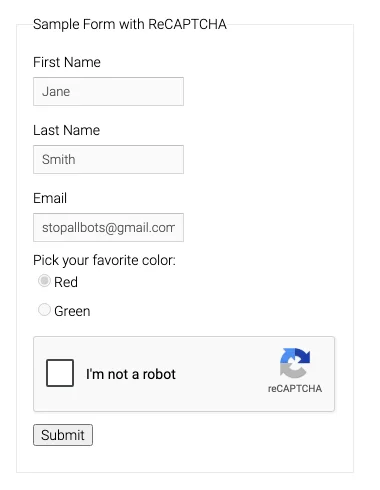
Google's public reCAPTCHA v2 demo form. The image grid only opens if the checkbox alone does not pass you. Captured 26 October 2026.
The checkbox is the real gate. When you click it, reCAPTCHA has already looked at your browser, cookies and network, and it decides whether a tick is enough. The images are the fallback for visitors it is unsure about. This is also why sites using the score-only reCAPTCHA v3 never show you a grid: v3 has no challenge, only a score (see how reCAPTCHA v3 grades a visit from 0.1 to 0.9).
Why you get images instead of a green tick
You get the image grid because reCAPTCHA's risk analysis was not confident you are a person, and the site's key settings told it to challenge in that case. Two things decide that: signals about you, and a setting the site owner picked.
On the first point, Google's own reCAPTCHA FAQ admits that good users get challenged too, and names the usual reasons: a shared network that others have used for abuse, an IP address your provider assigned recently that was flagged before, and sites that are under heavy attack at that moment. None of those are about you personally, which is why a VPN, office Wi-Fi or mobile carrier network can trigger grid after grid.
On the second point, every reCAPTCHA checkbox key has a challenge security preference. Google's reference lists three values: a usability setting that shows fewer and easier challenges, a balanced setting, and a security setting that shows more and harder ones.
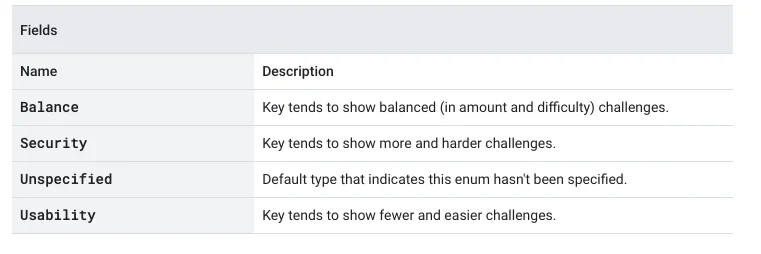
The three challenge levels a site owner can choose for a checkbox key, from Google Cloud's API reference. Captured 26 October 2026.
So two people on the same site can have very different days. One gets a tick, the other gets four rounds of fire hydrants, and the second one did nothing wrong.
Do you click squares with only a tiny part of the object?
Usually yes: on split-photo grids, select every square that contains any visible part of the object, including the edge of a sign or the housing of a traffic light. Leave out squares where the only thing showing is the pole or the post, unless the prompt mentions it.
Be clear about what that advice is. Google does not publish a grading rule for partial tiles, and nobody outside Google knows exactly how a borderline tile is scored. The rule above is the consensus from years of user threads, and it matches how the grids are built: the object is cut across tiles on purpose. User reports over the years suggest one ambiguous edge square is rarely what fails a round; a wrong answer usually just earns you another grid.
If a grid is genuinely unclear (a blurry photo, a sign seen from behind, an object hidden by a tree), do not agonise. Google's help page says it plainly: some captchas are hard, and you can press the reload arrow next to the image for a new one.
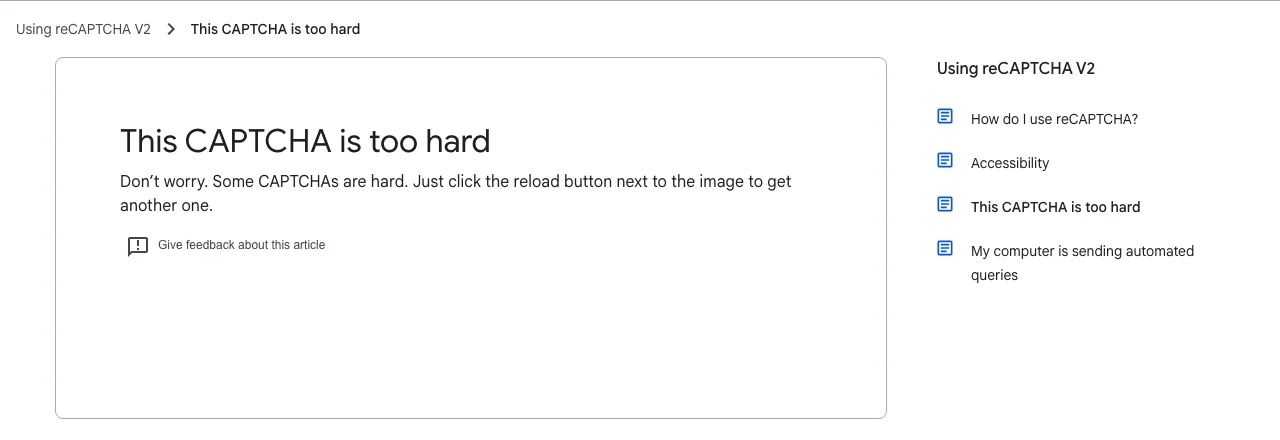
Google's reCAPTCHA Help article "This CAPTCHA is too hard". Captured 26 October 2026.
Why the captcha keeps asking you to select images
A repeating grid rarely means your clicks were wrong. It usually means the risk check is still unsure after your answer, so it asks for another round, or something in your browser stops the answer from being recorded.
The common causes, roughly in order of how often they explain a loop:
- Your network looks risky. VPNs, proxies, shared office or campus connections and some mobile carriers sit behind addresses with a bad history. More rounds is the expected outcome, not a bug.
- The site's key is set to security. On a high-security key, more and harder rounds are by design.
- Something blocks the widget. Google's help centre asks you to keep the browser fully updated, keep JavaScript on and disable plugins that conflict with reCAPTCHA. Aggressive privacy extensions that block Google scripts or cookies are a frequent culprit.
- The answer expired before you submitted. Google's server-side verification docs state that each response token is valid for two minutes and can be verified only once. Solve the captcha, spend three minutes on the rest of the form, press Submit, and the site rejects it and shows you a fresh grid. Do the captcha last.
- The site's integration is broken. Google's help centre notes that some sites integrate reCAPTCHA incorrectly. If the grid passes and the form still fails every time, the problem is on the site, and only the webmaster can fix it.
Developers see the same expiry and single-use rules from the other side; our guide to why a valid captcha token still gets rejected walks through each one.
How to get past the image grid faster
Most loops end once you remove whatever is making the risk check nervous. Work through this list from the top:
- Switch the VPN or proxy off for that site, or move from shared Wi-Fi to your home connection.
- Update the browser and allow JavaScript and cookies for the site.
- Pause privacy or ad-blocking extensions for that one site and reload the page.
- Use the reload arrow on any grid you cannot read, rather than guessing.
- Use the headphones icon for the audio challenge if images are hard for you; Google's accessibility guidance covers screen readers and the audio option.
- Fill in the form first and do the captcha last, then submit straight away.
- If it still loops on one site only, tell the site owner. That pattern points to their integration.
If you run the site: show fewer image challenges
As a site owner you control how often your visitors see the grid. The quickest change is the key's challenge security preference: move a checkbox key towards usability on low-risk forms, and keep the security setting for the endpoints attackers actually hit.
A few more changes that reduce grids without weakening protection:
- Put the checkbox only where it is needed. Sign-up, login and checkout need it; a newsletter form on a rate-limited endpoint may not.
- Verify every token on the server, right away. A two-minute lifetime is plenty if your backend checks it as the form posts.
- Use Google's test keys in automated tests. Google publishes v2 test keys for which every verification passes and no challenge is shown, so your end-to-end tests never meet a grid. Our legitimate ways to get around a captcha in testing covers test keys, staging switches and allowlists.
- Watch your own widget. The live reCAPTCHA and Turnstile test page shows real widgets, which helps when you are checking how a challenge behaves before shipping a form.
Why automation should not click the tiles
If you automate a browser and hit a select-images captcha, the reliable fix is not to recognise the pictures. The site never sees your clicks; it only sees the g-recaptcha-response token the widget produces, and that token is what its server verifies.
| Approach | What it does | Where it breaks |
|---|---|---|
| Click tiles with your own vision model | Screenshots each grid, guesses matching tiles, clicks them | Refilling grids, multiple rounds, and a session the risk check already distrusts; every extra round is another chance to fail |
| Send the grid image to a recognition API | Returns tile numbers to click, which your script then clicks | Same multi-round problem, plus you must capture every new grid in the right order |
| Request a token for the sitekey | Sends the sitekey and page URL, gets back a g-recaptcha-response token to inject | Token must be used within two minutes, from a session consistent with the one that requested it |
The token route skips the grid entirely, which is why our reCAPTCHA v2 Playwright tutorial in Python injects a token and fires the page callback instead of clicking images. Text-in-image captchas, the distorted letters you type into a box, are a different problem with a different fix, covered in our guide to reading text captchas with OCR or an API.
Only automate forms you own or have permission to automate, such as QA runs on your own site or monitoring you have agreed with the site owner. Our acceptable use policy spells out what we will not support.
How CaptchaNo handles image-grid captchas
CaptchaNo treats a select-images grid as what it is: a reCAPTCHA v2 challenge. You send the sitekey and page URL to the reCAPTCHA v2 solver, and our own solving infrastructure returns a token for the checkbox, invisible or callback variant. You are billed only for successful solves. You can pass your own proxy and user agent so the token is minted for the same session that will spend it.
The separate image captcha solver is for distorted-text images only. It does not return tile positions for picture grids, so use the reCAPTCHA v2 type for anything that says "select all images".
Frequently Asked Questions
Why does the captcha ask me to select images?
The image grid is reCAPTCHA v2's fallback challenge. When you tick "I'm not a robot", Google first checks signals such as your browser, cookies and network. If those are enough, you pass with a tick. If they are not, or the site has chosen a stricter security setting, Google asks you to identify objects in photos before it issues a pass.
Should I click the squares that only show a small part of the object?
On split-photo grids, the widely used rule is to select every square that contains any visible part of the object, such as the edge of a sign or traffic light, and skip squares showing only the pole. Google does not publish its exact grading rule for edge tiles, so a single ambiguous square is unlikely to be the whole story. If a grid is unclear, reload it.
Why does the captcha keep giving me more images after I answer?
More rounds usually mean the risk check is still unsure, not that you answered wrongly. A VPN, a shared or recently flagged IP address, a high-security site setting, or an extension blocking Google's scripts can all add rounds. Grids that refill with new photos also continue until no matching tile is left, then you press Verify to finish.
Is there a way to stop getting image captchas?
You cannot switch them off as a visitor, but you can make them rarer. Turn off the VPN or proxy for that site, update your browser, allow JavaScript and cookies, and pause privacy extensions that block Google scripts. Complete the captcha last and submit immediately, because the pass expires after two minutes and the site will then challenge you again.
Why do some sites show images and others only a checkbox?
It depends on the product and the settings. reCAPTCHA v3 and Cloudflare Turnstile never show a picture grid; they score or check the visit in the background. reCAPTCHA v2 shows a grid only when the checkbox alone is not enough, and a site whose key is set to the security preference will show grids more often than one set to usability.
Skip the grid in your own automation
If your QA runs or approved workflows keep stopping at "select all images", stop clicking pictures and request a token instead. Create a CaptchaNo account and start the free trial, send the sitekey and page URL to the reCAPTCHA v2 endpoint, and inject the token your form expects.