Selenium Cloudflare: Tell a Challenge From a Block
Selenium stuck on Cloudflare? Read cf-mitigated from the performance log, see why the Turnstile iframe is unreachable, and inject a token that verifies.
Selenium Cloudflare problems come in three shapes: a full-page challenge ("Just a moment..."), a Turnstile widget inside the site's own form, or a hard block such as error 1020. Each one needs a different fix, and only the first two can be answered at all. This guide shows how to tell them apart from inside Selenium, why you cannot click into the Turnstile frame the way most tutorials suggest, and how to get a token into the form so the server accepts it. If you want the general Selenium pattern for reCAPTCHA as well, start with our Selenium captcha solver walkthrough.
What we ran, and what we didn't
Everything below was measured on 22 November 2026 with Selenium 4.36 and Chrome 157 on macOS, against a local test page and Cloudflare's own Turnstile test keys. We did not run any solves through a live third-party site, and we make no claim about pass rates on real Cloudflare challenges: test keys always behave the same way, whatever browser you use.
- Four browser modes (headless, headed, each with and without the
AutomationControlledflag), checking what page JavaScript sees. - Response headers read through Chrome's performance log on our own Cloudflare-fronted home page, plus two locally simulated responses: one carrying
cf-mitigated: challenge, one plain 403. - All three Turnstile test sitekeys, a coordinate click on the interactive one, and an injected token posted to a server that called Cloudflare's
siteverifyendpoint with the pass and fail test secrets.
Why Cloudflare stops Selenium
Cloudflare stops Selenium because a stock Selenium browser announces that it is automated. The clearest signal is navigator.webdriver, which the WebDriver standard requires browsers to set to true while they are being driven, and which any script on the page can read. Cloudflare is open about it: its Turnstile testing page says Selenium, Playwright and Cypress are detected as bots, and points developers to test keys instead.
Our run showed how much of that changes with the usual flags. Default headless Chrome reported navigator.webdriver as true and sent HeadlessChrome/157 in its user agent. Adding --disable-blink-features=AutomationControlled flipped navigator.webdriver to false, but the headless user agent stayed. Headed Chrome dropped the HeadlessChrome string but still reported webdriver: true until the flag was added.
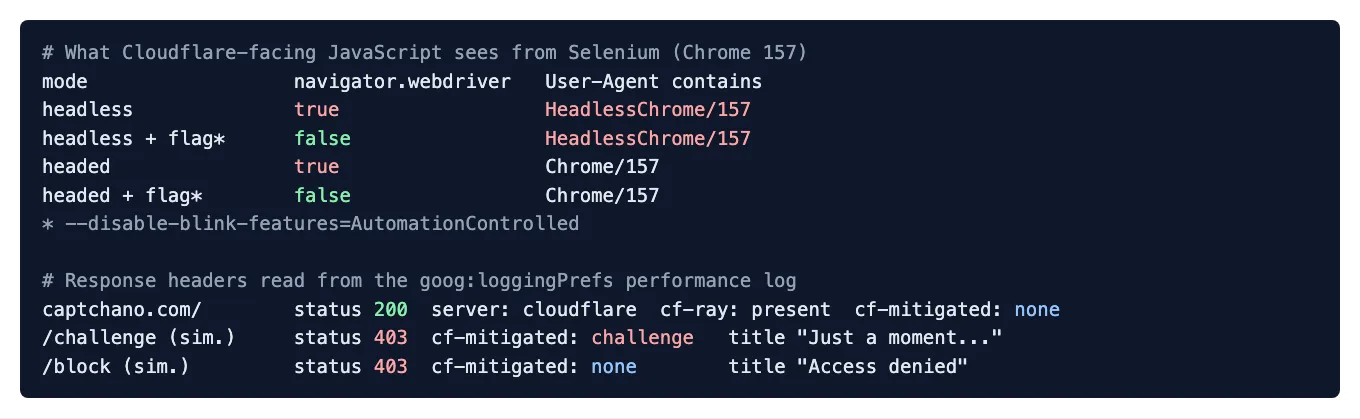
Those are only the visible signals. Cloudflare does not publish its full list, and the guides ranking for this query disagree on how much TLS, IP reputation and behaviour count. Treat the flag as table stakes, not a pass: a datacenter IP or a request rate no person could produce will still be challenged with webdriver set to false.
Step 1: Tell a challenge from a block in Selenium
Read the response headers, not the page title. Cloudflare documents that Challenge Page responses carry cf-mitigated: challenge, whatever the challenge type. The catch is that Selenium's WebDriver API gives you no way to read headers, which is why most Selenium guides fall back to matching "Just a moment" in driver.title. Puppeteer gets the same header straight from page.goto(), as our Puppeteer and Cloudflare walkthrough shows.
Chrome's performance log fixes that without a proxy or extra package. Turn it on with the goog:loggingPrefs capability and pick the document response out of the Network.responseReceived events:
import json
from selenium import webdriver

opts = webdriver.ChromeOptions()
opts.add_argument("--disable-blink-features=AutomationControlled")
opts.set_capability("goog:loggingPrefs", {"performance": "ALL"})
driver = webdriver.Chrome(options=opts)

def load(driver, url):
    driver.get_log("performance")          # clear old events
    driver.get(url)
    for entry in driver.get_log("performance"):
        msg = json.loads(entry["message"])["message"]
        if msg["method"] == "Network.responseReceived" and msg["params"]["type"] == "Document":
            resp = msg["params"]["response"]
            headers = {k.lower(): v for k, v in resp["headers"].items()}
            return resp["status"], headers
    return None, {}

status, headers = load(driver, "https://example.com/")
if headers.get("cf-mitigated") == "challenge":
    kind = "challenge"
elif status in (403, 429):
    kind = "blocked"
elif "cf-ray" in headers:
    kind = "ok-behind-cloudflare"
else:
    kind = "ok"
On our own home page the function returned status 200 with server: cloudflare and a cf-ray header. Against the simulated responses it separated a 403 carrying cf-mitigated: challenge from a plain 403, even though both were "errors" to Selenium. If you only need the status code, driver.execute_script("return performance.getEntriesByType('navigation')[0].responseStatus") returns it in current Chrome, but it cannot see the header, so it cannot tell a challenge from a block. That split decides everything that follows:
| What the log shows | What it is | What fixes it |
|---|---|---|
cf-mitigated: challenge | Full-page challenge in front of the site | Pass the challenge, then keep the clearance cookie with the same browser identity |
200, page contains .cf-turnstile | Turnstile embedded in a form | A Turnstile token submitted with the form |
| 403 without the header (1006, 1010, 1020) | A block: IP ban or firewall rule | Nothing in the browser; change what the rule matched or ask the site owner |
| 429 or error 1015 | Rate limiting | Slow down; no token helps |
If you keep landing in the third row, our guide to Cloudflare 403 and error 1020 explains what each block code means and who can lift it.
Step 2: Why you can't click into the Turnstile iframe
You cannot reach the Turnstile checkbox with switch_to.frame, because the widget's iframe sits inside a closed shadow root. This is the step most Selenium tutorials get wrong: they tell you to find the iframe, switch into it and click the box.
On our test page, with the widget fully rendered, driver.find_elements(By.TAG_NAME, "iframe") returned zero elements, .shadow_root on the widget's host element raised NoSuchShadowRootException, and driver.switch_to.frame(0) raised NoSuchFrameException. The same happened headed and headless. What Selenium can see is the widget's outer div and the hidden cf-turnstile-response input next to it.
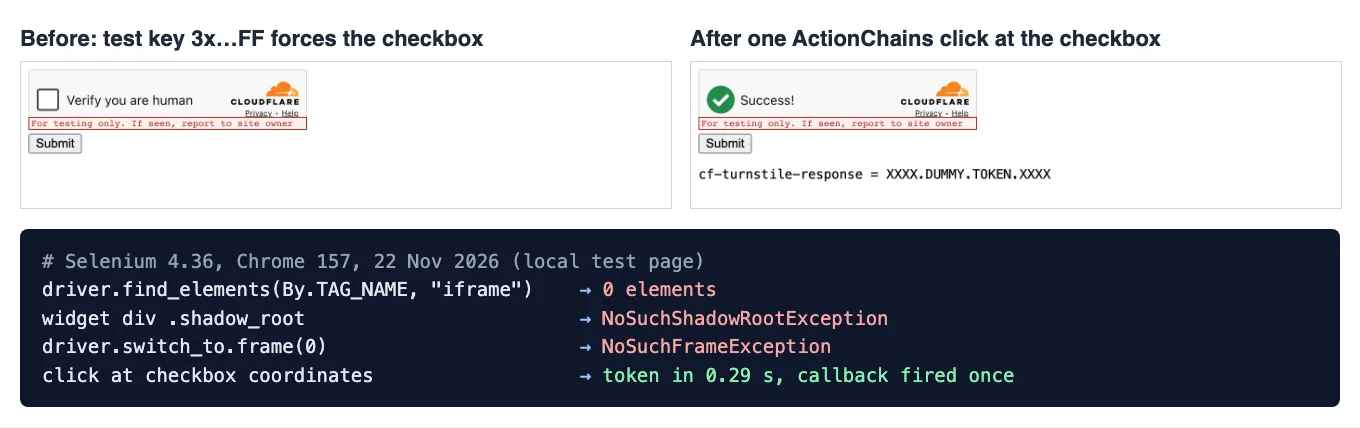
A coordinate click with ActionChains.move_to_element_with_offset on the outer div did tick the test widget, and the dummy token appeared 0.29 seconds later. Do not read too much into that. Cloudflare's test keys skip the checks a real widget runs, so a click that works on 3x00000000000000000000FF tells you nothing about a production sitekey. It does tell you two useful things: Selenium can read the result from the hidden input, and turnstile.getResponse() returned the same value.
Step 3: Read the widget's parameters
Collect the sitekey, action, cData and callback name before you request a token. A token issued for the wrong action or without the site's cData is rejected by the site's backend even though it looks valid. For widgets rendered with data- attributes, Selenium can read them directly:
from selenium.webdriver.common.by import By

def read_turnstile(driver):
    el = driver.find_element(By.CSS_SELECTOR, ".cf-turnstile[data-sitekey]")
    return {
        "sitekey": el.get_attribute("data-sitekey"),
        "action": el.get_attribute("data-action"),
        "cdata": el.get_attribute("data-cdata"),
        "callback": el.get_attribute("data-callback"),
        "field": el.get_attribute("data-response-field-name") or "cf-turnstile-response",
        "user_agent": driver.execute_script("return navigator.userAgent"),
    }
Widgets rendered with turnstile.render() have no data-sitekey on the page; the key only appears in the challenge frame's URL. Our free captcha detector lists the sitekey, action and widget type for a page, and the Python Turnstile solver guide covers hooking turnstile.render for JavaScript-rendered widgets.
Step 4: Request a Turnstile token
Send the sitekey, page URL, action, cData and the browser's user agent in one request, and use the same proxy your Selenium session browses through. With CaptchaNo that is a single blocking call that returns the token and the user agent it was produced with:
import os, requests

def solve_turnstile(widget, page_url, proxy=None):
    task = {"type": "turnstile", "sitekey": widget["sitekey"], "url": page_url,
            "userAgent": widget["user_agent"]}
    if widget["action"]:
        task["action"] = widget["action"]
    if widget["cdata"]:
        task["cData"] = widget["cdata"]
    if proxy:
        task["proxy"] = proxy
    r = requests.post("https://api.captchano.com/v1/solve", params={"wait": 60}, json=task,
                      headers={"Authorization": f"Bearer {os.environ['CAPTCHANO_API_KEY']}"},
                      timeout=75)
    data = r.json()
    if data.get("status") != "ready":
        raise RuntimeError(data.get("error") or data)
    return data["solution"]      # {"token": "...", "userAgent": "..."}
Field names, error codes and the challenge-page variant are in the CaptchaNo API reference. Solve as late as you can: Cloudflare's server-side validation docs say a token is valid for 300 seconds and can be redeemed once.
Step 5: Inject the token, fire the callback, submit
Write the token into the response field, call the page's callback if it has one, then submit the way a person would. Pass the token as an argument to execute_script rather than formatting it into the JavaScript string:
INJECT = """
const [token, field, callback, formSel] = arguments;
let input = document.querySelector(`[name="${field}"]`);
if (!input) {
  input = document.createElement('input');
  input.type = 'hidden'; input.name = field;
  document.querySelector(formSel).appendChild(input);
}
input.value = token;
if (callback && typeof window[callback] === 'function') window[callback](token);
"""

def submit_with_token(driver, widget, solution, form_sel="form"):
    if solution.get("userAgent") and solution["userAgent"] != widget["user_agent"]:
        driver.execute_cdp_cmd("Network.setUserAgentOverride", {"userAgent": solution["userAgent"]})
    driver.execute_script(INJECT, solution["token"], widget["field"], widget["callback"], form_sel)
    driver.find_element(By.CSS_SELECTOR, f"{form_sel} [type=submit]").click()
We checked the injection path end to end with test keys. The widget used the always-block key, so it never produced a token on its own; the script created the field, wrote Cloudflare's dummy token into it, fired the callback once and clicked Submit. Our server received the 21-character token and passed it to siteverify. With the always-pass test secret the answer was "success": true; with the always-fail secret it was "success": false and invalid-input-response. Same token, same browser, opposite results: acceptance is decided by the server's check, not by anything the page shows.
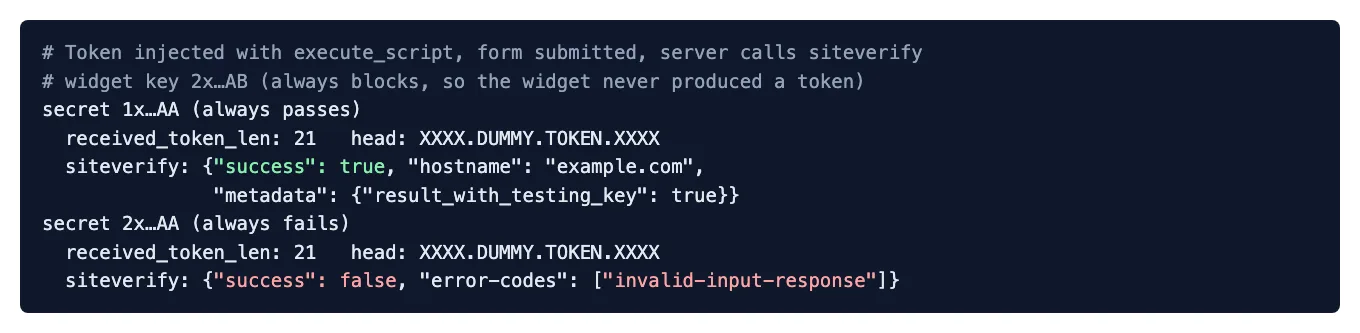
When a real token comes back rejected, the usual causes are a user agent or IP that differs from the solve, a missing action or cData, or a token used twice. Our checklist of why valid tokens get rejected walks through each one.
Full-page challenges and the cf_clearance cookie
A full-page challenge is passed once per session, not once per form. Passing it sets a cf_clearance cookie that lets later requests through, and that cookie is tied to the browser and IP it was issued to.
In Selenium that means keeping the same driver, proxy and user agent after the challenge, and not copying the cookie into requests or a second browser with a different fingerprint. Expect it to expire: when cf-mitigated: challenge shows up again in the performance log, handle it as a new challenge. Our Turnstile solver covers both the embedded widget and the standalone challenge page. If the challenge never clears even in a normal browser, the loop is usually on the network side; our explainer on the "Verifying you are human" loop sorts out which kind you are in.
undetected-chromedriver, SeleniumBase and other patched drivers
Patched drivers reduce the automation signals; they do not answer a challenge that has already been served. Most pages ranking for "selenium cloudflare" recommend undetected-chromedriver or SeleniumBase's UC mode, and both patch the driver so fewer of the signals above leak to the page.
That is worth trying when Cloudflare challenges you on every page load. It does not help with a Turnstile widget the site shows to every visitor, and it does nothing against a 1020 firewall rule or a banned IP. None of the ranking guides we read published a repeatable test of pass rates, so measure on your own target before you build on one. A practical split: patched driver or a cleaner residential IP to reduce how often you are challenged, and a token for the widgets you are shown anyway.
Testing your own site? Use test keys
If the Cloudflare-protected form is yours, don't solve anything in CI. Cloudflare's testing docs list sitekeys that always pass (1x00000000000000000000AA), always block (2x00000000000000000000AB) and force an interactive challenge (3x00000000000000000000FF), plus matching secrets for the server. In our run the always-pass key produced the dummy token 1.8 seconds after navigation in headless Selenium with no help; the other two left the field empty for 15 seconds. Our guide to testing reCAPTCHA and Turnstile with test keys has the full pattern for staging and CI.
What does not fix Selenium on Cloudflare
Several common fixes either do nothing or make the session less consistent:
- Changing only the user agent.
navigator.webdriverand other page-visible properties stay as they were. - Waiting longer with
time.sleep. An interactive challenge does not clear on its own; a block never does. - Clicking into the Turnstile iframe. Selenium cannot switch into it, as Step 2 showed.
- Requesting a token on a 403 or 429. There is no challenge to answer.
- Reusing a token, or solving through one IP while browsing through another. Both get the token rejected.
- Automating sites you have no right to automate. Our acceptable use policy sets out where that line is.
How CaptchaNo fits a Selenium stack
CaptchaNo solves Cloudflare Turnstile, reCAPTCHA v2, v3 and checkbox Enterprise keys, DataDome, GeeTest and image captchas on our own solving infrastructure, through the single request shown in Step 4. It does not solve hCaptcha, and it cannot turn a Cloudflare block into a pass.
- Billing on success only. Failed solves are never charged, and credit never expires.
- Support from the people who run it. Questions to support@captchano.com are answered by the engineers who operate the service.
- Python tooling. An official Python SDK, a Selenium integration page with copy-paste examples, and SDKs for Node.js, Go and PHP if your stack is mixed.
- The user agent comes back with the token, so the identity check in Step 5 is one comparison.
If you also drive Node.js browsers, the same flow is written up for Playwright on Cloudflare.
Frequently Asked Questions
Can Selenium bypass Cloudflare on its own?
Not reliably. Stock Selenium exposes navigator.webdriver as true, and headless Chrome adds HeadlessChrome to its user agent, both visible to Cloudflare's scripts. Selenium can load pages Cloudflare serves normally and can submit a Turnstile token obtained elsewhere, but it has no built-in way to pass an interactive challenge, and it cannot do anything about a firewall block.
Does disabling AutomationControlled stop Cloudflare detecting Selenium?
It removes one signal. In our November 2026 run the flag turned navigator.webdriver from true to false in both headed and headless Chrome 157, but headless mode still sent HeadlessChrome in the user agent. Cloudflare also weighs IP reputation, request patterns and signals it does not publish, so a session can still be challenged with the flag set.
How do I find the Turnstile iframe in Selenium?
You can't, with normal locators. The Turnstile frame is inside a closed shadow root, so in our test find_elements returned no iframes, shadow_root raised NoSuchShadowRootException and switch_to.frame raised NoSuchFrameException. Work with what Selenium can reach: the outer widget div, its data attributes, and the hidden cf-turnstile-response input that holds the token.
Is undetected-chromedriver enough to get past Cloudflare?
Sometimes, for sites that challenge you because the browser looks automated. It patches the driver so fewer automation signals reach the page. It does not help when the site shows Turnstile to every visitor, when your IP is blocked, or when a firewall rule returns error 1020. Test it on your own target before relying on it.
How long is a Cloudflare Turnstile token valid?
Cloudflare's documentation says a Turnstile token is valid for 300 seconds and can be validated only once. Request the token just before you submit, inject it, and submit straight away. A reused or expired token comes back from siteverify with the timeout-or-duplicate error, so request a fresh token for every submission.
Add Turnstile solving to your Selenium scripts
Detect the challenge from the performance log, read the widget, solve, inject and submit: that is the whole loop, and the four snippets above come to under 80 lines of Python. Create a CaptchaNo account, run the script above against your own target, and you only pay for tokens that come back solved.