Playwright Cloudflare: Solve Turnstile in Node.js
Playwright blocked by Cloudflare? Tell a challenge from a block with cf-mitigated, capture, solve and submit Turnstile in Node.js. Tested on test keys.
When Playwright meets Cloudflare, the first job is to work out which Cloudflare response you got, because only one of them can be solved. A Turnstile widget on a form needs a token. A full-page challenge needs a clearance cookie. A 403 with error 1020 is a refusal that no token will change, as our Cloudflare 403 and error 1020 explainer covers in detail. This guide shows how to tell them apart in Node.js, then capture and pass a Turnstile widget on a site you are allowed to automate.
We run CaptchaNo, a captcha solving API, so the solve step uses ours. Everything else here works with any token source.
What we ran, and what we didn't
Every result on this page comes from our own run on 16 November 2026 (UTC) with Playwright 1.62.1 and its bundled Chromium 151, against local test pages that load the real Turnstile script with Cloudflare's published test sitekeys and secrets. We ran the full script below end to end: it read the widget, sent the solve request, injected the token, submitted the form, and the server's siteverify call with the test secret returned success: true.
What we did not do: no real CaptchaNo solves ran in this test (the solve call was answered by a local stub returning Cloudflare's dummy token), and we did not try to get past any third-party site's Cloudflare protection. The log and scripts are in our repo's evidence folder for this post.
Why Cloudflare stops Playwright
Cloudflare says plainly that automated browsers are not supported: its supported browsers reference names Playwright, Puppeteer, Selenium and Cypress as unsupported for solving production challenges, and its Turnstile testing page says those tools are detected as bots. That is the honest starting point. No stealth flag makes Playwright an ordinary visitor.
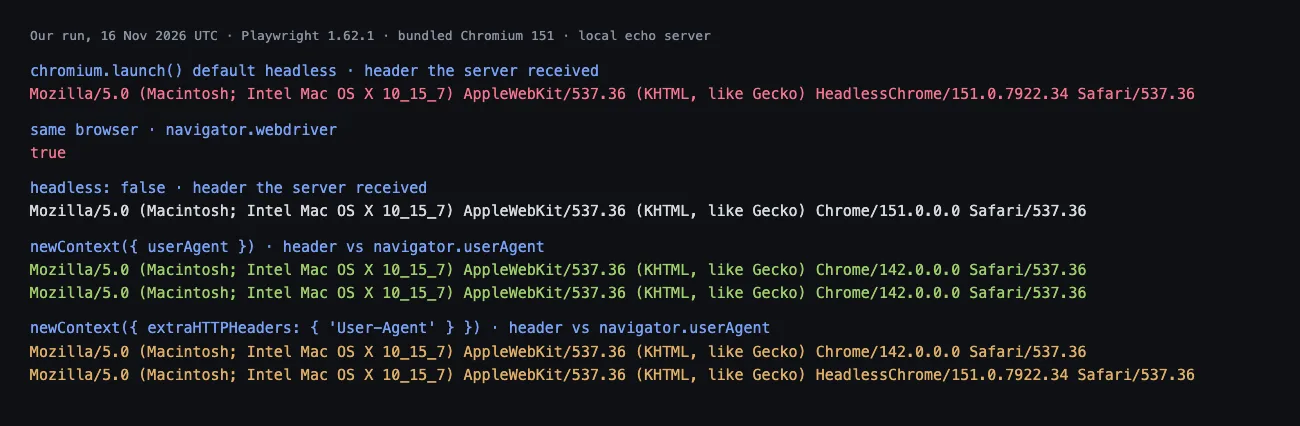
Some of the signals are visible from a two-line test. Launched with defaults, Playwright's headless Chromium put HeadlessChrome/151 in the User-Agent header our server received, and navigator.webdriver was true. In headed mode the header said Chrome/151.0.0.0, but navigator.webdriver was still true.
So the realistic aim is narrower: on automation you are authorised to run, keep the browser's identity consistent, solve the widget the page actually shows, and stop cleanly when Cloudflare blocks instead of challenging.
Step 1: Tell a challenge from a block
Check the cf-mitigated header on the response before you touch the page. Cloudflare documents that every Challenge Page response carries cf-mitigated: challenge, whatever the challenge type. Most Playwright guides look for the "Just a moment" title instead, which breaks as soon as the page is translated or restyled.
function classify(response) {
  const h = response.headers(); // lower-case names
  const behindCf = h["server"] === "cloudflare" || "cf-ray" in h;
  if (h["cf-mitigated"] === "challenge") return "challenge";
  if (!behindCf) return "not-cloudflare";
  if (response.status() === 429) return "rate-limited";
  if (response.status() === 403) return "blocked";
  return "ok";
}

const response = await page.goto(url, { waitUntil: "domcontentloaded" });
console.log(classify(response));
On a Cloudflare-fronted page that served normally (our own home page), the function returned ok with server: cloudflare and a cf-ray header present; on a GitHub-hosted page it returned not-cloudflare. Use the result to route the run:
| What you see | What it is | What fixes it |
|---|---|---|
cf-mitigated: challenge | Full-page challenge in front of the site | Pass the challenge, then keep the clearance cookie and identity |
200 page with a .cf-turnstile widget | Turnstile embedded in the site's own form | A Turnstile token submitted with the form |
| 403 with error 1006, 1010 or 1020 | A block: an IP ban or firewall rule matched | Nothing on the page; change what the rule matched, or ask the site owner |
| 429 or error 1015 | Rate limiting | Slow down; a solver will not help |
If you are stuck on the challenge screen in a normal browser rather than in code, the visitor-side causes are different; our guide to the "Verifying you are human" loop covers those.
Step 2: Give each context one identity
Set the user agent, proxy and locale on the browser context, not on individual requests. In Playwright the user agent belongs to the context: browser.newContext({ userAgent }) changed both the header and navigator.userAgent in our run.
The common shortcut, extraHTTPHeaders: { "User-Agent": ... }, is the wrong tool. In our run the server saw Chrome/142 while the page's JavaScript still read HeadlessChrome/151: two different browsers in one session, which is exactly the inconsistency a challenge script can see. The same rule applies to the solve: send the user agent your context uses, and route the solve through the same proxy as the browser when the site checks IP. Cloudflare says its clearance is tied to the visitor and device it was issued to, and a token solved under one identity and submitted under another is the classic cause of valid tokens being rejected.
Step 3: Capture the Turnstile widget's parameters
For widgets written in HTML, read the attributes: data-sitekey, data-action, data-cdata and data-callback on the .cf-turnstile element. Sitekeys start with 0x4. Our captcha detector reads them from a URL without opening a browser.
Explicitly rendered widgets are harder: the page calls turnstile.render() from its own JavaScript, so the values never appear in the DOM. You have to wrap render before the page calls it, and this is where we hit a real trap.
The hook that breaks Turnstile
The obvious approach is an Object.defineProperty trap on window.turnstile, so you can wrap the object the moment the script assigns it. In our run this stopped Turnstile from loading at all: the console showed "Turnstile already has been loaded. Was Turnstile imported multiple times?", the page's render call threw, and no token ever appeared. The script checks whether turnstile already exists on window, and the trap makes it look like it does. Our Python run in October hit the same error, so this is not a one-off.
The hook that works
Wrap render from the load event of the api.js script element instead. In our run that event fired after the script defined turnstile and before the page's onload callback ran, so the wrapper captured the sitekey, action, cData and callback every time:
const HOOK = () => {
  const wrap = () => {
    const t = window.turnstile;
    if (!t || t.__wrapped) return;
    const render = t.render.bind(t);
    t.render = (el, opts = {}) => {
      window.__ts = { sitekey: opts.sitekey, action: opts.action ?? null, cData: opts.cData ?? null };
      window.__tsCallback = opts.callback;
      return render(el, opts);
    };
    t.__wrapped = true;
  };
  new MutationObserver((muts) => {
    for (const m of muts) for (const n of m.addedNodes)
      if (n.tagName === "SCRIPT" && /turnstile\/v0\/api\.js/.test(n.src))
        n.addEventListener("load", wrap);
  }).observe(document, { childList: true, subtree: true });
};

await context.addInitScript(HOOK);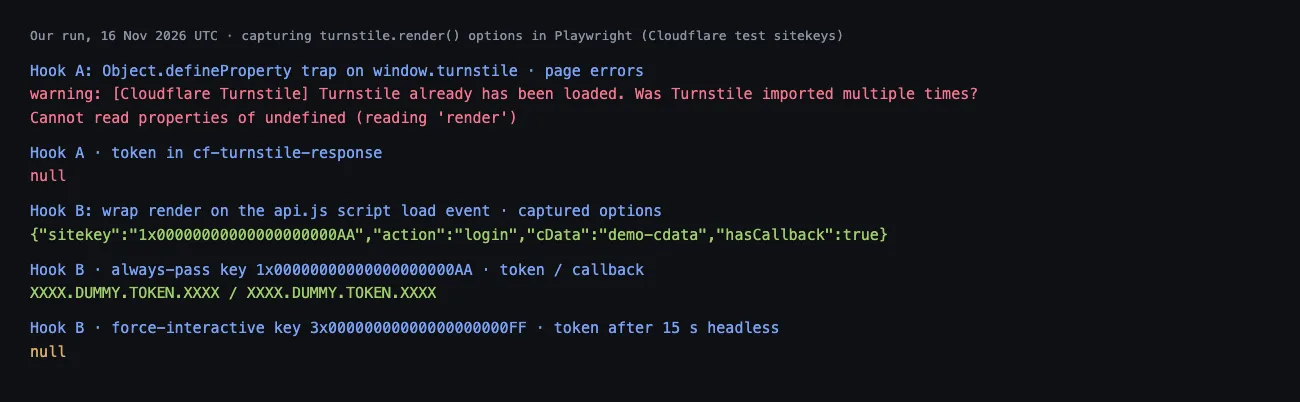
The same Node.js idea for Puppeteer, where evaluateOnNewDocument plays the role of addInitScript, is in our Turnstile walkthrough for Puppeteer.
Step 4: Request the token from Node.js
Send the page URL, sitekey and any action or cData to the solver in one blocking request, with the user agent your context uses. With CaptchaNo that is POST /v1/solve?wait=60 and a body of type: "turnstile" plus those fields; the request fields, including pageData for challenge pages, are listed in the API docs.
The response carries solution.token and solution.userAgent. Compare that user agent with yours and log a mismatch rather than ignoring it. Errors come back with a code you can branch on: a request with a bad key returned HTTP 401 and invalid_api_key when we checked on the same day, and the others include insufficient_balance, proxy_unreachable and unsolvable. A 202 response means the solve is still running and should be polled by id.
Step 5: Inject the token, fire the callback, submit
Write the token into every cf-turnstile-response field, then call the widget's callback, then submit. Skipping the callback is the step most guides miss. Our test form kept its Send button disabled until the callback ran: it was disabled before, enabled after we called the captured callback with the token, and the server then received both email and cf-turnstile-response.
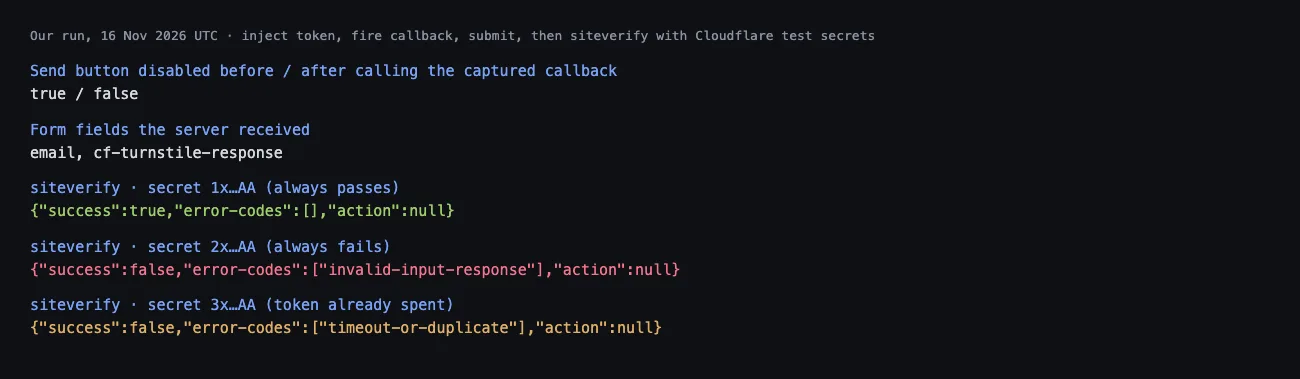
Submit quickly. Cloudflare's server-side validation docs say each token is valid for 300 seconds and can be used once; an expired or reused token fails with timeout-or-duplicate, which is the exact error the "already spent" test secret returned for us. Solve just before you submit, never at the start of a long flow.
The full Playwright script
This is the script we ran end to end. It classifies the first response, stops on blocks and full-page challenges, captures the widget from attributes or the render hook, solves, injects, fires the callback and submits. Set CAPTCHANO_API_KEY, TARGET_URL, and optionally PROXY_URL and SUBMIT_SELECTOR in the environment.
// playwright-turnstile.mjs: Node 18+, npm i playwright
import { chromium } from "playwright";

const API = process.env.CAPTCHANO_API_BASE ?? "https://api.captchano.com";
const KEY = process.env.CAPTCHANO_API_KEY;      // never hard-code it
const TARGET = process.env.TARGET_URL;          // a page you are allowed to automate
const SUBMIT = process.env.SUBMIT_SELECTOR ?? "form button";
const PROXY = process.env.PROXY_URL;            // http://user:pass@host:port (optional)
const UA =
  "Mozilla/5.0 (Macintosh; Intel Mac OS X 10_15_7) AppleWebKit/537.36 " +
  "(KHTML, like Gecko) Chrome/142.0.0.0 Safari/537.36";

// 1. Challenge, block or neither?
function classify(response) {
  const h = response.headers(); // lower-case names
  const behindCf = h["server"] === "cloudflare" || "cf-ray" in h;
  if (h["cf-mitigated"] === "challenge") return "challenge";
  if (!behindCf) return "not-cloudflare";
  if (response.status() === 429) return "rate-limited";
  if (response.status() === 403) return "blocked";
  return "ok";
}

// 3. Capture turnstile.render() options without breaking Turnstile
const HOOK = () => {
  const wrap = () => {
    const t = window.turnstile;
    if (!t || t.__wrapped) return;
    const render = t.render.bind(t);
    t.render = (el, opts = {}) => {
      window.__ts = { sitekey: opts.sitekey, action: opts.action ?? null, cData: opts.cData ?? null };
      window.__tsCallback = opts.callback;
      return render(el, opts);
    };
    t.__wrapped = true;
  };
  new MutationObserver((muts) => {
    for (const m of muts) for (const n of m.addedNodes)
      if (n.tagName === "SCRIPT" && /turnstile\/v0\/api\.js/.test(n.src))
        n.addEventListener("load", wrap);
  }).observe(document, { childList: true, subtree: true });
};

async function readWidget(page) {
  await page.waitForFunction(
    () => window.__ts || document.querySelector(".cf-turnstile[data-sitekey]"),
    null, { timeout: 15000 });
  return page.evaluate(() => {
    if (window.__ts) return window.__ts;
    const el = document.querySelector(".cf-turnstile[data-sitekey]");
    return { sitekey: el.dataset.sitekey, action: el.dataset.action ?? null, cData: el.dataset.cdata ?? null };
  });
}

// 4. One blocking request for the token
async function solveTurnstile({ url, sitekey, action, cData }) {
  const body = { type: "turnstile", url, sitekey, userAgent: UA };
  if (action) body.action = action;
  if (cData) body.cData = cData;
  if (PROXY) body.proxy = PROXY;
  const res = await fetch(`${API}/v1/solve?wait=60`, {
    method: "POST",
    headers: { Authorization: `Bearer ${KEY}`, "Content-Type": "application/json" },
    body: JSON.stringify(body),
  });
  const data = await res.json();
  if (!res.ok) throw new Error(`solve failed: ${data.error?.code}`);
  if (data.status !== "ready") throw new Error(`still solving, poll /v1/task/${data.id}`);
  if (data.solution.userAgent && data.solution.userAgent !== UA)
    console.warn("solver used another user agent:", data.solution.userAgent);
  return data.solution.token;
}

// 5. Put the token where the page reads it, then tell the page
async function injectToken(page, token) {
  await page.evaluate((t) => {
    document.querySelectorAll('[name="cf-turnstile-response"]').forEach((el) => { el.value = t; });
    const name = document.querySelector(".cf-turnstile[data-callback]")?.dataset.callback;
    const cb = window.__tsCallback ?? (name ? window[name] : null);
    if (typeof cb === "function") cb(t);
  }, token);
}

function playwrightProxy(p) {
  const u = new URL(p);
  return { server: `${u.protocol}//${u.host}`,
           username: decodeURIComponent(u.username) || undefined,
           password: decodeURIComponent(u.password) || undefined };
}

// 2. One identity per context: user agent, proxy, locale
const browser = await chromium.launch();
const context = await browser.newContext({
  userAgent: UA,
  locale: "en-US",
  ...(PROXY ? { proxy: playwrightProxy(PROXY) } : {}),
});
await context.addInitScript(HOOK);
const page = await context.newPage();

try {
  const response = await page.goto(TARGET, { waitUntil: "domcontentloaded" });
  const verdict = classify(response);
  console.log("first response:", response.status(), verdict);
  if (verdict === "blocked" || verdict === "rate-limited")
    throw new Error("Cloudflare refused this request; a token will not change that");
  if (verdict === "challenge")
    throw new Error("full-page challenge: handle it as a challenge page, not a widget");

  const widget = await readWidget(page);
  console.log("widget:", widget);
  const token = await solveTurnstile({ url: page.url(), ...widget });
  await injectToken(page, token);           // tokens last 300 s and are single-use
  await page.click(SUBMIT);
  await page.waitForLoadState("networkidle");
  console.log("after submit:", page.url());
} finally {
  await browser.close();
}
Against our local test page it printed the captured widget (sitekey 3x00000000000000000000FF, action login, cData demo-cdata), sent exactly those fields plus the context's user agent in the solve body, and the form's siteverify call with the always-pass test secret returned success: true. The Python version of the same flow, with the sync API, is in our Turnstile solver guide for Python and Playwright.
Full-page challenges and cf_clearance
A full-page challenge is not a form widget: passing it sets a cf_clearance cookie, and that cookie is what lets the rest of your requests through. Cloudflare's docs describe the cookie as tied to the visitor and device it was issued to, with a lifetime set by the site's Challenge Passage setting.
In Playwright that means three things. Keep the same context, proxy and user agent for every request after the challenge. Save the cookie with context.storageState({ path }) and load it into a new context with the same identity, rather than copying the cookie into a different browser or an HTTP client with another fingerprint. And expect it to expire: when cf-mitigated: challenge comes back, treat it as a new challenge, not a bug. Our Turnstile solver handles both the embedded widget and the standalone challenge page; for challenge pages, pass the extra values the page sets, as described in the docs.
Testing your own site? Use test keys, not a solver
If the Cloudflare-protected form is yours, do not solve anything in CI. Cloudflare's test sitekeys make the widget behave predictably on localhost and staging: 1x00000000000000000000AA always passes, 2x00000000000000000000AB always fails, and 3x00000000000000000000FF forces an interactive challenge.
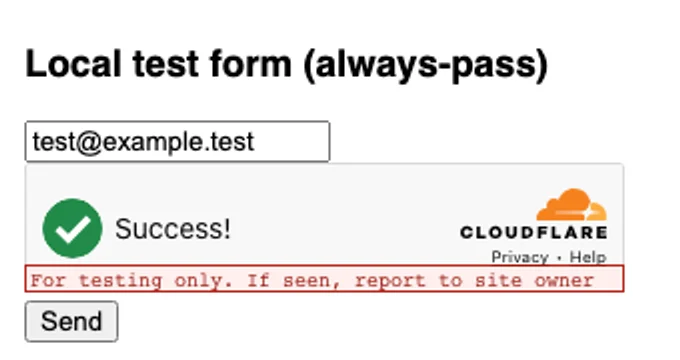
Two results from our run are worth knowing. The always-pass key produced XXXX.DUMMY.TOKEN.XXXX in headless Playwright without any help. The force-interactive key left the checkbox unticked and the field empty after 15 seconds, which makes it a good fixture for testing your injection path.
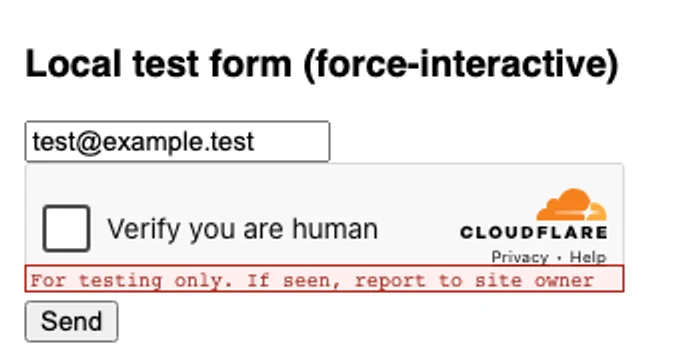
Pair the test sitekey with a test secret on the server, since production secrets reject the dummy token. Our post on testing reCAPTCHA and Turnstile with test keys has the full setup for both widgets.
What does not fix Playwright on Cloudflare
Several popular fixes either do nothing or make the session less consistent. Avoid these:
- Setting the User-Agent header only. As our run showed, the page's JavaScript still reports the real browser.
- Solving on a 403 or 429. A block or rate limit has no challenge to answer; a token changes nothing.
- Reusing a token. Each one is single-use and expires after 300 seconds.
- Solving through one IP and browsing through another. Route both through the same proxy when the site checks IP.
- Treating stealth plugins as a guarantee. The guides we read disagree on whether they still help against Turnstile, and none showed evidence. Measure on your own target.
- Automating sites you have no right to automate. Our acceptable use policy sets out where that line is.
How CaptchaNo fits a Playwright stack
CaptchaNo solves Turnstile, reCAPTCHA v2, v3 and checkbox Enterprise keys, DataDome and image captchas on our own solving infrastructure, through the single request shape used above. It does not solve hCaptcha, and it cannot turn a Cloudflare block into a pass.
- Billing on success only. Failed solves are never charged, and credit never expires.
- Support from the people who run it. Questions to support@captchano.com go to the engineers who operate the service.
- Tooling for Node.js. An official Node.js/TypeScript SDK, an MCP server for agents, and a Playwright integration page with copy-paste examples.
- The user agent comes back with the token, so the identity check in Step 4 is one comparison.
Frequently Asked Questions
Can Playwright bypass Cloudflare on its own?
Not reliably. Cloudflare lists Playwright among automated browsers it does not support for solving production challenges, and its Turnstile docs say Playwright is detected as a bot. Playwright can still load pages that Cloudflare serves normally, and it can submit a Turnstile token obtained elsewhere, but it cannot pass interactive challenges by itself on sites that challenge it.
Does Cloudflare detect headless Playwright?
The default headless mode is easy to spot. In our November 2026 run, headless Chromium sent HeadlessChrome in its User-Agent header and reported navigator.webdriver as true. Headed mode removed the HeadlessChrome string but navigator.webdriver stayed true. Cloudflare does not publish its full list of signals, so treat these as visible examples, not the complete picture.
How do I know if Cloudflare challenged or blocked my Playwright request?
Read the response headers. A challenge carries cf-mitigated set to challenge, which Cloudflare documents for every Challenge Page type. A 403 without that header, often showing error 1006, 1010 or 1020 in the body, is a block. A 429 or error 1015 is rate limiting. Only the challenge, or a Turnstile widget inside a normal page, can be solved.
How long is a Cloudflare Turnstile token valid?
Cloudflare's server-side validation documentation says each Turnstile token is valid for 300 seconds after it is generated and can be redeemed only once. An expired or reused token fails verification with the timeout-or-duplicate error. In practice that means requesting the token right before you submit the form, not at the start of a long multi-page flow.
How do I test a page with Turnstile in Playwright?
If the site is yours, swap in Cloudflare's test sitekeys and test secrets in your test environment. The always-pass sitekey returns a dummy token automatically, the always-fail key exercises your error path, and the force-interactive key leaves the widget waiting for a click. Production secret keys reject the dummy token, so change both sides together.
Add Turnstile solving to your Playwright tests
Copy the script, set your key and target, and run it on a form you're allowed to automate. Start with the classifier so blocks stop the run early instead of wasting solves. Rates and the free trial are on the pricing page.