Selenium Captcha Solver: reCAPTCHA and Turnstile
Build a Selenium captcha solver in Python: one script for reCAPTCHA v2 and Turnstile, plus the proxy, headless and callback bugs that get tokens rejected.
Selenium cannot answer a CAPTCHA by itself, so a working Selenium captcha solver in Python has three parts: read the widget's parameters with Selenium, get a token for them from a solving API, then write the token into the page with execute_script and fire the widget's callback. This guide gives one script that handles both reCAPTCHA v2 and Cloudflare Turnstile, and the three Selenium-specific problems other tutorials skip: proxy credentials, the headless user agent, and passing tokens into JavaScript safely. The short version lives on our Selenium integration page.
We run CaptchaNo, so the solving step below uses our API. Everything else (finding the sitekey, injecting the token, the failure modes) works the same with any token-based service.
Can Selenium solve CAPTCHAs on its own?
No. Selenium drives a browser; it has no way to recognise images or pass a risk check, and automated browsers are more likely to be challenged in the first place. Selenium's own documentation says CAPTCHAs are built to stop automation and recommends switching them off in test environments or adding a test hook (Selenium docs: CAPTCHAs, page modified September 2026).
That leaves four realistic options, and the right one depends on whose site it is:
| Approach | Good for | Limits |
|---|---|---|
| Provider test keys or a disabled CAPTCHA | Your own app in CI and staging | Does not test the real widget |
| Pause and solve by hand | One-off or exploratory runs | Not unattended; breaks CI |
| Audio or image libraries | Low volume reCAPTCHA v2 on your own machine | Depends on the audio challenge being offered; keeps the browser busy |
| Token from a solving API | Authorised automation on sites you don't control | Costs per solve; token must match your session |
The rest of this guide covers the last option. If the form is yours, skip to the section on test keys.
What we saw when we ran Selenium against the demo widgets
Before writing the script we ran a short Selenium probe on 19 October 2026 (Selenium 4.36.0, Chrome 155, headless) against Google's public reCAPTCHA demo and Cloudflare's public Turnstile demo. It only read the pages; no CAPTCHA was solved. Three findings shaped the code below.
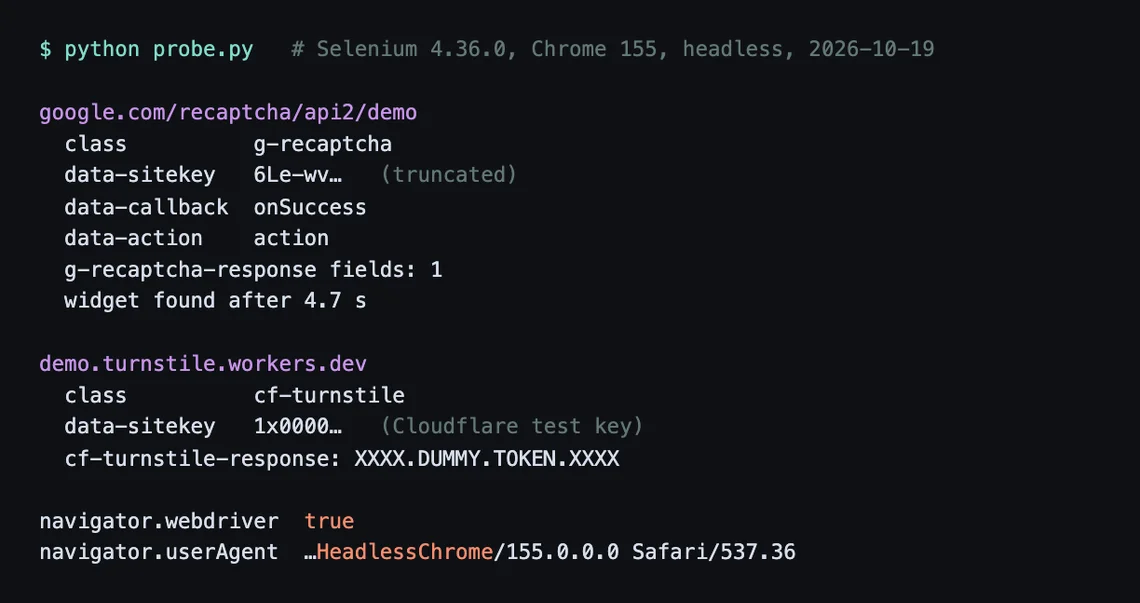
Our probe's output, 19 October 2026. Sitekeys truncated.
- Google's demo uses a callback. The widget carries
data-callback="onSuccess", so a script that only fills the hidden field skips what the page expects to happen next. - Cloudflare's demo runs on a test sitekey. Its key starts with
1x0000and the widget passes instantly, fillingcf-turnstile-responsewithXXXX.DUMMY.TOKEN.XXXX. Useful for checking your injection code, useless for judging a solver. - Headless Chrome announces itself.
navigator.webdriverwastrueand the default user agent containedHeadlessChrome. Send that user agent to a solving API and you hand the site a reason to distrust the token.
Step 1: Set up Selenium with a proxy and a normal user agent
Launch Chrome with a fixed, ordinary user agent and the same proxy you will give the solving API. Selenium 4.6 and later downloads the matching driver for you through Selenium Manager, so there is no separate driver install.
pip install selenium requestsfrom selenium import webdriver
USER_AGENT = "Mozilla/5.0 (Windows NT 10.0; Win64; x64) AppleWebKit/537.36 (KHTML, like Gecko) Chrome/130.0.0.0 Safari/537.36"
PROXY_HOST = "203.0.113.10:8000" # an IP-allowlisted proxy, no credentials in the URL
opts = webdriver.ChromeOptions()
opts.add_argument("--headless=new")
opts.add_argument(f"--user-agent={USER_AGENT}")
opts.add_argument(f"--proxy-server=http://{PROXY_HOST}")
driver = webdriver.Chrome(options=opts)The proxy line is where most Selenium scripts go wrong. Chrome's --proxy-server flag takes a host and port, with no place for a username and password, so user:pass@host proxies need another route:
- Allowlist your server's IP with the proxy provider and drop the credentials. Simplest and most reliable.
- Selenium's BiDi network module lists an
add_auth_handler(username, password)method in its Python API reference, but the docs say the public Python API is still being stabilised, so pin your Selenium version if you rely on it. - Avoid selenium-wire for new projects. Its repository was archived on 3 January 2024 and says it is no longer maintained.
Step 2: Detect the widget and read its parameters
Wait for an element with data-sitekey, then read its class to tell reCAPTCHA from Turnstile, plus any callback, action and cData. Both widgets use the same attribute pattern, which keeps detection to a few lines.
from selenium.webdriver.common.by import By
from selenium.webdriver.support.ui import WebDriverWait
from selenium.webdriver.support import expected_conditions as EC

def read_widget(driver, timeout=20):
    el = WebDriverWait(driver, timeout).until(
        EC.presence_of_element_located((By.CSS_SELECTOR, "[data-sitekey]"))
    )
    classes = el.get_attribute("class") or ""
    return {
        "kind": "turnstile" if "cf-turnstile" in classes else "recaptcha_v2",
        "sitekey": el.get_attribute("data-sitekey"),
        "callback": el.get_attribute("data-callback"),
        "action": el.get_attribute("data-action"),
        "cdata": el.get_attribute("data-cdata"),
    }
You don't need switch_to.frame for this. The sitekey sits on the host page; only the checkbox lives in an iframe. If a site renders the widget from JavaScript (grecaptcha.render or turnstile.render) there is no data-sitekey element, and the key is in that call's options in the page's own script.
Step 3: Request the token
Send the type, sitekey, page URL, proxy and user agent in one blocking request. With CaptchaNo that is POST /v1/solve?wait=60, which returns the token and, for Turnstile, the user agent it was produced with.
import requests

CAPTCHANO_KEY = "cn-YOUR_API_KEY"

def get_token(widget, url):
    task = {
        "type": "turnstile" if widget["kind"] == "turnstile" else "recaptcha_v2",
        "sitekey": widget["sitekey"],
        "url": url,
        "proxy": f"http://{PROXY_HOST}",
        "userAgent": USER_AGENT,
    }
    if widget["kind"] == "turnstile":
        if widget["action"]:
            task["action"] = widget["action"]
        if widget["cdata"]:
            task["cData"] = widget["cdata"]
    r = requests.post(
        "https://api.captchano.com/v1/solve",
        params={"wait": 60},
        json=task,
        headers={"Authorization": f"Bearer {CAPTCHANO_KEY}"},
        timeout=75,
    )
    data = r.json()
    if data.get("status") != "ready":
        raise RuntimeError(data.get("error") or data)
    return data["solution"]   # {"token": "...", "userAgent": "..."}
Read the key from an environment variable in real code rather than the source file. Request fields, Turnstile cData handling and error codes are in the CaptchaNo API reference.
Step 4: Inject the token with execute_script and fire the callback
Pass the token to JavaScript as an argument, never by pasting it into the script string. execute_script exposes extra Python values as arguments[0], arguments[1] and so on, which avoids the quoting bugs that f-string injection causes when a token contains unexpected characters.
INJECT = """
const [token, field, callback] = arguments;
document.querySelectorAll(`[name="${field}"]`).forEach(el => {
  el.value = token;
  if (el.tagName === 'TEXTAREA') el.innerHTML = token;
});
if (callback && typeof window[callback] === 'function') window[callback](token);
"""

def inject(driver, widget, solution):
    if widget["kind"] == "turnstile" and solution.get("userAgent") and solution["userAgent"] != USER_AGENT:
        driver.execute_cdp_cmd("Network.setUserAgentOverride", {"userAgent": solution["userAgent"]})
    field = "cf-turnstile-response" if widget["kind"] == "turnstile" else "g-recaptcha-response"
    driver.execute_script(INJECT, solution["token"], field, widget["callback"])
The field names come from the providers' own docs: Turnstile adds a hidden input named cf-turnstile-response and supports a data-callback (Cloudflare client-side rendering), and reCAPTCHA posts its token as g-recaptcha-response. The user agent override uses the Chrome DevTools Protocol, so it only works in Chromium-based drivers; on Firefox, launch with the right user agent instead.
Step 5: Put it together and check the result
Solve as late as possible, right before submitting. A reCAPTCHA token is valid for two minutes and can be verified once (Google verification docs); a Turnstile token lasts 300 seconds.
TARGET = "https://www.google.com/recaptcha/api2/demo"

try:
    driver.get(TARGET)
    widget = read_widget(driver)
    solution = get_token(widget, driver.current_url)
    inject(driver, widget, solution)
    driver.find_element(By.CSS_SELECTOR, "form [type=submit], #recaptcha-demo-submit").click()
    WebDriverWait(driver, 15).until(lambda d: "Success" in d.page_source or "error" in d.page_source.lower())
    print(driver.find_element(By.TAG_NAME, "body").text[:200])
finally:
    driver.quit()
Print what the page actually says. A script that logs "solved" after the click has verified nothing.
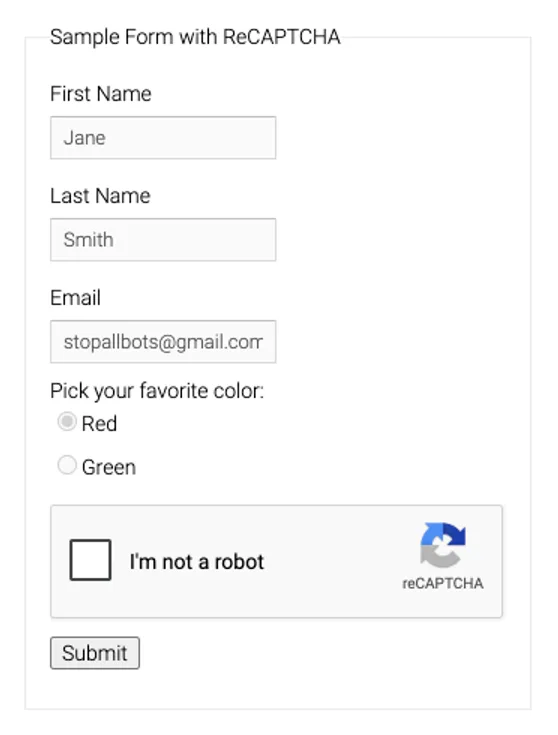
Google's reCAPTCHA demo as our headless Selenium session loaded it, 19 October 2026.
Why the token still gets rejected in Selenium
Most failures come from a mismatch between the token and the browser session, not from the token itself. Check these in order:
| Symptom | Likely cause | Fix |
|---|---|---|
| Field filled, nothing happens | Callback not called | Read data-callback and call it with the token |
| Works locally, fails on a server | Proxy credentials silently ignored, so the browser and the token use different IPs | Use an allowlisted proxy and confirm the browser's exit IP |
| Turnstile rejected though the field is set | User agent differs from the one the token was minted with | Send your UA in the request; override with CDP if the response differs |
| Fails only in headless | HeadlessChrome user agent sent to the site and the solver | Set an ordinary --user-agent at launch |
| Fails after a slow page step | Token expired | Solve right before submit; re-solve on every retry |
The full checklist, including server-side errors, is in our guide to why valid captcha tokens get rejected. Score-based reCAPTCHA v3 is a different problem: there is no widget to read, and you need the page's action name, which our v3 score explainer covers.
What about undetected-chromedriver and stealth plugins?
Stealth tools try to stop the CAPTCHA appearing; they don't solve one that does. They can lower how often you are challenged, but they need to keep pace with Chrome releases: undetected-chromedriver's latest release on PyPI is 3.5.5 from February 2024, while our probe ran Chrome 155. Treat them as a complement to a solving step, not a replacement, and check the release history before you depend on one.
Same pattern in Playwright, Puppeteer and Scrapy
The read-solve-inject-callback flow is identical across tools; only the API calls change. If you are choosing a runner for a new project, compare the Playwright version for reCAPTCHA v2 and the Puppeteer walkthrough for Turnstile. For crawls that don't need a browser at all, a Scrapy downloader middleware does the same job with far less memory.
Testing your own forms: use test keys instead
If you own the site, don't solve your own CAPTCHA in CI. Google publishes an always-pass reCAPTCHA v2 test key and Cloudflare publishes always-pass Turnstile test keys; as our probe showed, the Turnstile one passes instantly under headless Selenium and returns a dummy token. Swap them in per environment and never ship them to production. Our QA testing guide covers when a real solve is still worth running, such as an end-to-end check against a partner's staging site.
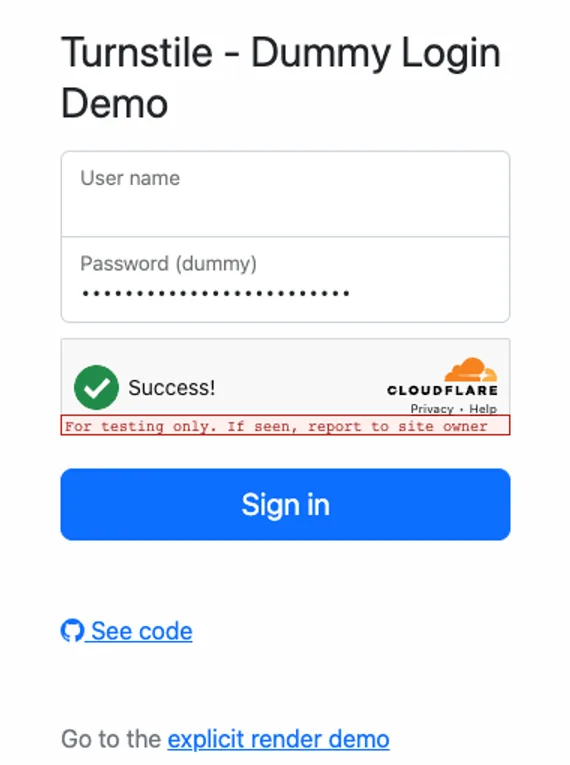
Cloudflare's Turnstile demo passing on its test sitekey in headless Selenium, 19 October 2026.
Frequently Asked Questions
Can CAPTCHA be automated using Selenium?
Not by Selenium alone. Selenium can click the reCAPTCHA checkbox, but it cannot answer the image challenge that automated sessions usually get. Automation works by combining Selenium with something that produces a valid token, such as a solving API, or by switching the CAPTCHA to test keys on sites you control. Selenium's own documentation recommends the second option for testing.
How do I find the reCAPTCHA sitekey with Selenium?
Locate the element with a data-sitekey attribute using a CSS selector and read the attribute with get_attribute. It sits on the host page, so no iframe switching is needed. If the widget is rendered from JavaScript there is no such element; look for the key in the options passed to grecaptcha.render in the page source, or in the k parameter of the anchor iframe URL.
Why does Selenium ignore my proxy username and password?
Chrome's proxy-server switch accepts only a scheme, host and port, so credentials written into the proxy URL are not used. The browser then connects directly or fails, while your solving request goes out through the proxy, and the IP mismatch causes rejections. Use a proxy that authorises your server by IP, or an authentication handler in Selenium's BiDi network module.
Does headless mode make CAPTCHAs harder in Selenium?
It makes your session easier to flag. In our run, headless Chrome reported navigator.webdriver as true and sent a user agent containing HeadlessChrome. Sites can read both. Setting an ordinary user agent at launch removes the most obvious signal, and sending that same user agent with the solve keeps the token consistent with the browser that submits it.
Can I solve hCaptcha or reCAPTCHA v3 with this script?
Not as written. This script handles widgets that expose a data-sitekey element, which covers reCAPTCHA v2 and Cloudflare Turnstile. reCAPTCHA v3 has no visible widget and needs the page's action name and a minimum score in the request. CaptchaNo does not support hCaptcha or score-based reCAPTCHA Enterprise keys, so don't build on it for those.
Run the script against your own target
Create a free CaptchaNo account, generate a key in the dashboard and drop it into the script. The reCAPTCHA v2 solver page and the Turnstile solver page list the options for invisible widgets, actions and cData.