Cloudflare 403 Forbidden and Error 1020 Explained
Cloudflare 403 Forbidden, error 1006 or 1020? What each code means, how to tell a block from a challenge in code, and why a solver can't fix a block.
A Cloudflare 403 Forbidden response means the site's Cloudflare configuration refused your request outright. Error 1006, 1007 and 1008 say your IP address is banned, and error 1020 says a firewall rule with a Block action matched. None of these is a captcha. There is no puzzle and no token to send back, so a captcha solver cannot fix them. A solver only helps when Cloudflare challenges you instead of blocking you, which is the situation covered in our guide to the "Verifying you are human" loop. Below: what each 1xxx code means per Cloudflare's documentation, how to tell the two apart in code, and what actually fixes a block.
We run CaptchaNo, a captcha solving API, so we have a reason to tell you when a solver is the wrong tool. For a 403, it is.
What a Cloudflare 403 Forbidden means
A 403 from Cloudflare is a decision, not a question: the request was matched by a security setting the site owner configured, and Cloudflare stopped it before it reached the website. Cloudflare's documentation says the HTTP status goes in the response header while the 1xxx code (1006, 1020 and so on) appears in the HTML body, so you need both to know what happened.
Three different things can produce a 403 on a Cloudflare-proxied site:
- A Cloudflare block with a 1xxx code. An IP ban (1006 family), a country or ASN ban, a browser-signature ban (1010) or a Block rule without a custom response (1020).
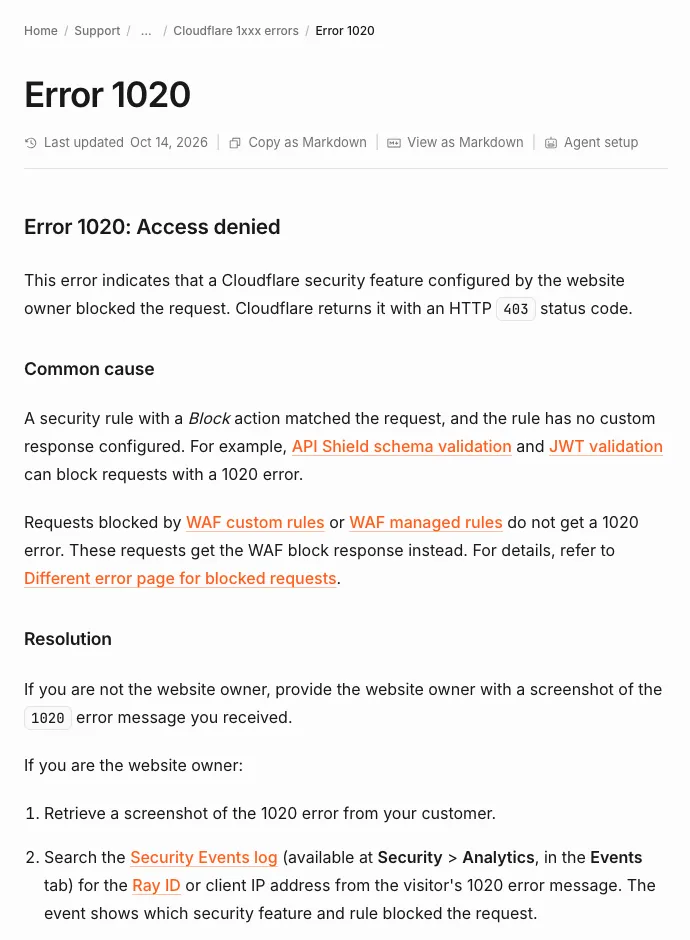
- A WAF block page. Cloudflare's 1020 page notes that requests blocked by WAF custom rules or WAF managed rules get the WAF block response instead of a 1020 page. Same meaning, different page.
- The website's own 403. Cloudflare passes through whatever the origin server returns. A login wall, a missing permission or a misconfigured server all look like "403" in your logs, with Cloudflare's headers still attached.
A challenge is different: a Managed, Non-Interactive or Interactive Challenge rule shows a page a real browser can pass. A Block rule never gives you that chance.
Cloudflare 1xxx error codes that come with a 403
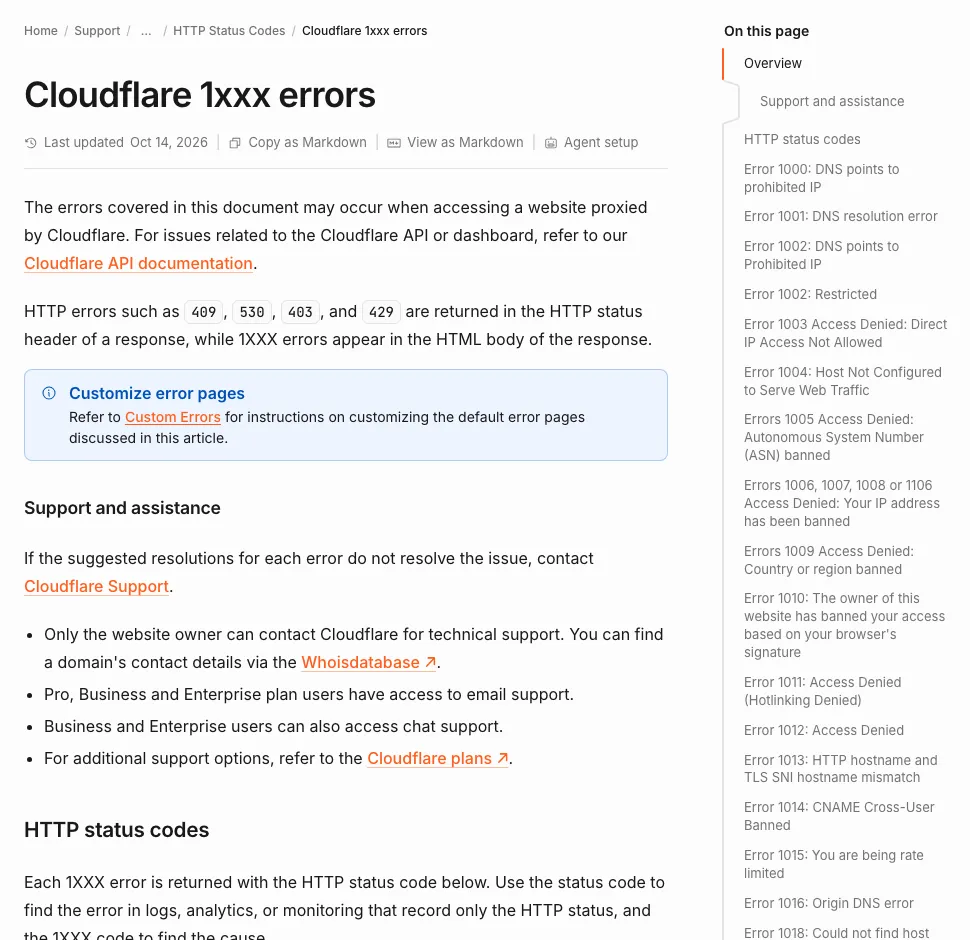
The 1xxx code in the page body tells you which setting blocked you. This table lists the access-denied codes from Cloudflare's 1xxx error index (last updated 14 October 2026), with the status code Cloudflare documents for each and what it means for automation.
| Code | Cloudflare's title | Status | What it means for a scraper | Does a solver help? |
|---|---|---|---|---|
| 1005 | Access denied: ASN banned | 403 | The whole network you exit from (often a hosting or cloud provider) is banned | No |
| 1006, 1007, 1008, 1106 | Access denied: your IP address has been banned | 403 | The owner banned your IP or a range that includes it | No |
| 1009 | Access denied: country or region banned | 403 | The site blocks the country your IP geolocates to | No |
| 1010 | Banned based on your browser's signature | 403 | Your client's fingerprint, not your IP, was banned | No |
| 1012 | Access denied | 403 | Access denied by the site's configuration; check the owner's settings | No |
| 1020 | Access denied | 403 | A security rule with a Block action and no custom response matched | No |
| 1015 | You are being rate limited | 429 | Too many requests in a window; not a 403 at all | No, slow down |
| (none) | Challenge page | varies | Cloudflare wants proof you are a browser; header cf-mitigated: challenge | Yes, if you are authorised |
Error 1006, 1007 and 1008: your IP address is banned
Error 1006 (and its siblings 1007, 1008 and 1106) means the site owner banned the IP address the request came from. Cloudflare's page for the code states plainly that a Cloudflare customer blocked traffic from your client, that only the owner can change it, and that Cloudflare support will not override the owner's settings.
Some guides describe 1006, 1007 and 1008 as different problems, or call 1006 a harsher 1020. Cloudflare groups the four codes under one title and one cause: treat them as one IP-level ban.
What that means in practice:
- It is not about your headers. Changing the user agent does nothing; the decision was made on the address.
- It can be inherited. Cloud IPs and shared VPN exits are reused, so a fresh server can arrive already banned (the same pattern sits behind Google's "unusual traffic" page).
- It has no visible expiry. Cloudflare does not tell the visitor whether a ban is temporary.
Error 1020: a firewall rule matched your request
Error 1020 means one of the site owner's security rules matched your request and its action was Block. Cloudflare's error 1020 page names the common cause as a Block rule with no custom response, and lists API Shield schema validation and JWT validation as other features that return 1020.
The rule can match on almost anything Cloudflare sees: the path, the query string, a header, the country, the ASN, the user agent, or a bot score. That is why the same scraper may get 1020 on /search and a normal page on /. To find out which part of your request matches:
- Request the same URL from a normal desktop browser on the same network. If the browser is also blocked, the rule is about your IP, ASN or country.
- If only your script is blocked, compare it with the browser request: the user agent, the
AcceptandAccept-Languageheaders, cookies and HTTP version. - Change one thing at a time and keep a note of what changed the result. Rotating everything at once hides the cause.
- Save the Ray ID from the error page. Cloudflare's Ray ID is an identifier given to each request, and the site owner can look it up in Security Events to see exactly which rule fired.
How to tell a block from a challenge in code
Check the cf-mitigated response header first: Cloudflare documents that every Challenge Page response carries cf-mitigated: challenge, whatever the challenge type. A 403 without that header, with a 1xxx code in the body, is a block. If the page instead loads scripts from challenges.cloudflare.com, it is a challenge; what that Cloudflare domain is and why it appears explains the difference.
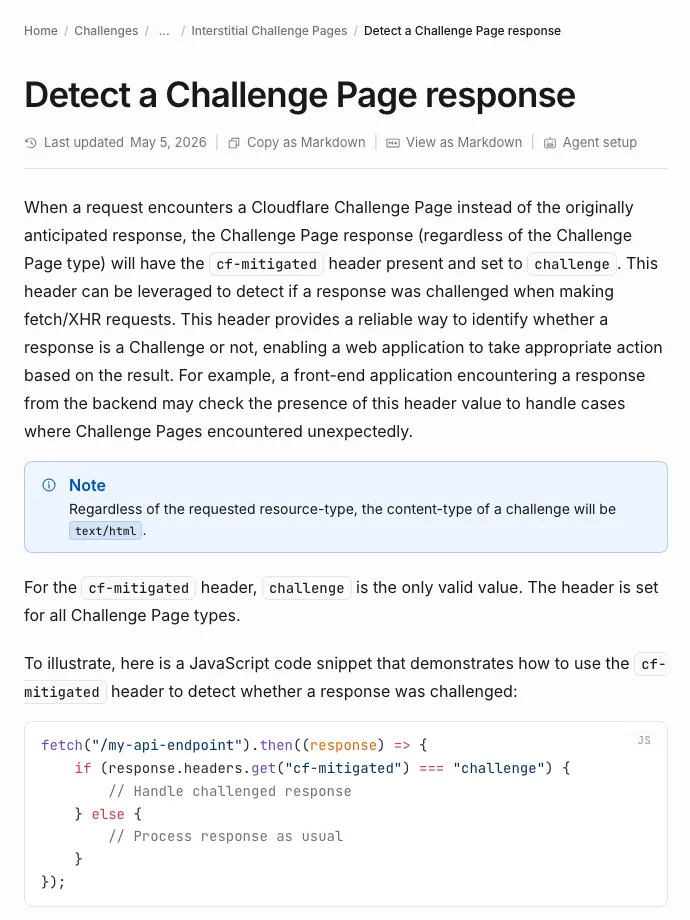
cf-mitigated header.A small Python function is enough to route each response to the right fix. This is a sketch to adapt, built from Cloudflare's documented behaviour; it uses requests, but the logic is the same for any HTTP client.
import re
import requests

def classify(resp: requests.Response) -> str:
    h = resp.headers
    behind_cf = h.get("server", "").lower() == "cloudflare" or "cf-ray" in h
    if h.get("cf-mitigated") == "challenge":
        return "challenge"                 # a challenge page: solvable
    if not behind_cf:
        return "not-cloudflare"            # something else answered
    if resp.status_code == 429:
        return "rate-limited"              # 1015 or a rate limiting rule
    if resp.status_code == 403:
        m = re.search(r"Error (?:code:?\s*)?(1\d{3})", resp.text)
        if m:
            return f"blocked-{m.group(1)}" # 1006, 1010, 1020...: a decision
        return "blocked-or-origin-403"     # WAF block page or the site's own 403
    return "ok"
Two details matter. The cf-ray header is on every response that passes through Cloudflare, including the site's own 403s, so it proves only that the site uses Cloudflare. And Cloudflare notes that a challenge response is always text/html, even when you asked for JSON, so an API client that suddenly fails to parse JSON may be looking at a challenge page.
If your scraper drives a real browser, our Playwright and Cloudflare walkthrough runs the same check on page.goto() responses in Node.js and stops before spending a solve on a block.
Why scrapers get a Cloudflare 403
Scrapers get blocked because they look different from the visitors the site expects, and the code tells you which difference was used:
- Where the request comes from: datacenter IPs, banned ASNs (1005), blocked countries (1009), addresses with a history of abuse (1006).
- What the client looks like: a browser-signature ban (1010), a default library user agent, or headers no real browser sends. Changing headers does not change a plain HTTP library's TLS fingerprint.
- How fast it goes: rate limiting returns 429 (1015) before any block.
- Where it goes: rules that guard search, login, checkout or API paths, which is why one URL works and another returns 1020.
If the block page mentions DataDome rather than Cloudflare, read how DataDome scores and blocks requests instead; the cookies and challenges differ.
What fixes a Cloudflare 403, and what does not
The only fix that always works for a block is the site owner changing the rule. Everything else is about making your traffic the kind the owner wants.
If you are authorised to automate the site
- Ask for an allowlist. Cloudflare's Skip action lets an owner exempt a known IP or user agent from specific security features. Give them your fixed IP and a descriptive user agent.
- Use the official API or data feed if the site has one.
- Send the Ray ID and timestamp of a blocked request. Owners search Security Events by Ray ID or client IP, so this turns a vague complaint into a quick lookup.
If you are a visitor who got 1020 or 1006
- Turn off the VPN or proxy and reload; a shared exit address is a common way to inherit an IP ban you did nothing to earn.
- Try another browser with extensions disabled.
- If the block stays, send the owner a screenshot of the error with the Ray ID, which is Cloudflare's own advice for 1020.
What does not work
- A captcha solver. There is no challenge on a 1006 or 1020 page to solve.
- Clearing cookies against an IP ban. The ban is on the address, not the session.
- Retrying in a loop. Each blocked request is another event in the owner's logs.
- Getting around a ban the owner set on purpose. Our acceptable use policy limits CaptchaNo to automation you are authorised to run, and a deliberate ban is a clear sign you are not.
When a captcha solver does help on Cloudflare
A solver helps when Cloudflare challenges instead of blocks: the response carries cf-mitigated: challenge, or the page contains a Turnstile widget with a data-sitekey. In that case there is a real question to answer, and a valid answer lets the request through.
- An embedded Turnstile widget on a form: the solver returns a token for the sitekey and page URL, and you submit it with the form. How Turnstile decides who passes explains what it checks.
- A full challenge page in front of the site: keep the same IP, user agent and cookies before and after, or the result is thrown away. Our Turnstile solver tutorial in Python with Playwright keeps that session intact.
If a challenge passes and the next request still returns 403, the session has changed between solve and use; the checks in why a valid token still gets rejected cover the usual causes.
How CaptchaNo handles Cloudflare
CaptchaNo solves Cloudflare challenges, not Cloudflare blocks. Our Cloudflare Turnstile solver handles both the embedded widget and the standalone challenge page, on our own solving infrastructure, through one API call. It will not turn a 1006 or 1020 into a 200.
What you get when the problem is a challenge:
- Billing only for successful solves. Failed solves are never charged, and credit does not expire.
- Help from the people who run it. support@captchano.com is answered by the engineers who operate the service; SDKs cover Python, Node.js, Go and PHP, plus an MCP server.
- One request shape for every type we support (reCAPTCHA v2 and v3, Turnstile, DataDome and image captchas), documented in the captcha solver API reference.
Frequently Asked Questions
What does 403 Forbidden mean on a Cloudflare site?
It means the request was refused. On a Cloudflare-proxied site the refusal can come from a Cloudflare security setting, such as an IP ban or a Block rule, or from the website's own server. Look at the page body: a 1xxx code like 1006 or 1020 means Cloudflare blocked it, while a plain page with no code is often the site's own permission check.
Is Cloudflare error 1020 my fault?
Not necessarily. Error 1020 means a rule the site owner wrote matched your request, and rules often match whole countries, networks or VPN exits. A shared VPN address or a header-changing browser extension can trigger it without you doing anything wrong. Turn those off, retry, and if it continues, send the owner the Ray ID from the error page.
How long does a Cloudflare 1006 IP ban last?
There is no fixed length. The ban lasts as long as the site owner keeps the rule or the IP list entry that matches your address, and Cloudflare does not show the visitor an expiry. Some owners remove entries after a while, others never do. Only the owner can lift it, and Cloudflare support will not override their settings.
What is the difference between error 1020 and 1015?
Error 1020 is a block: a security rule matched and Cloudflare returned a 403. Error 1015 is rate limiting: you sent too many requests in a time window and Cloudflare returned a 429. A 1015 usually clears when you slow down; a 1020 stays until the request stops matching the rule or the owner changes it.
Can a captcha solver fix a Cloudflare 403?
No. A 403 with error 1006, 1010 or 1020 is a decision with nothing to solve, so there is no sitekey and no token to return. A solver only helps when Cloudflare responds with a challenge page, marked by the cf-mitigated header set to challenge, or shows a Turnstile widget on a site you are authorised to automate.
Solve the challenges, fix the blocks
Run the classifier above on your failing requests before changing anything. Blocks go to the site owner with a Ray ID; challenges on sites you are allowed to automate can be solved. For those, open the CaptchaNo docs and send your first Turnstile solve, and see pay-per-successful-solve pricing.