Math Captcha: How It Works, Examples and Weaknesses
Math captcha explained: how arithmetic captchas work, examples, our OCR test on 300 images, and why WCAG 2.2 treats sums as a barrier for some users.
A math captcha is a form check that shows a small sum, such as "7 + 3 = ?", and accepts the submission only if you type the right answer. It is cheap to add and easy for people with no reading or vision problems, but it is one of the weakest captchas there is: a script that can read the question can work out the answer in one line, and the extra mental step is a real barrier for some people. The older distorted-text types of CAPTCHA test have the same core problem.
This guide explains how arithmetic captchas work on the server, shows the common variants, and reports a small test we ran on 13 November 2026: we generated 300 math captcha images and ran free OCR on them to see where the protection actually comes from. We run CaptchaNo, a captcha-solving API, so the last section says exactly what our image solver returns for a math captcha and what it does not do.
What is a math captcha?
A math captcha is a challenge that asks the visitor to solve an arithmetic problem, usually addition, subtraction or multiplication of two small numbers, and type the result into a field. It is sometimes called an arithmetic captcha, a mathematical captcha or a "captcha math question".
You see them most on contact, comment and registration forms of smaller sites, because form builders, CMS plugins and a few lines of PHP or Node.js offer them with no third-party service. WPForms' Custom Captcha field, for example, builds its question from a minimum, a maximum and a list of operators; its developer documentation (last updated 28 February 2024) gives the defaults as 1 to 15 with +, − and ×.
The question can be shown as plain text in the page or drawn into an image. That one choice decides most of how well it holds up, as the test below shows.
How an arithmetic captcha works
A math captcha works by having the server pick two numbers and an operator, show the question, remember the correct answer, and compare it with what the visitor submits. Everything that matters happens in that "remember" and "compare" step.
- Generate. The server picks random operands within a range (for example 1 to 15) and an operator.
- Store the answer. A sound design keeps the answer on the server, in the session or a short-lived store, keyed to this form view. A weak design puts it in a hidden field, a cookie or a JavaScript variable, where any client can read it.
- Render. The question goes into the page as text ("What is 4 + 9?") or as an image, sometimes with noise and rotated characters.
- Check. On submit, the server compares the typed number with the stored answer, then deletes the stored answer so it cannot be replayed.
- Fail. A wrong answer should produce a new question, not let the visitor retry the same one.
Implementation mistakes are where most math captchas fall over. A 2010 paper in Computers & Security, "Pitfalls in CAPTCHA design and implementation: the Math CAPTCHA, a case study" by Hernández-Castro and Ribagorda, broke a deployed math captcha completely through design and implementation flaws, with a low-cost side-channel attack and no character recognition at all.
Math captcha examples and variants
Math captchas come in a few common forms, and they differ mainly in how hard the question is for a program to read, not in how hard the sum is.
| Variant | Example | What a script needs to answer it |
|---|---|---|
| Plain-text sum | What is 4 + 9? | Read the page text and compute; no image work at all |
| Words instead of digits | What is four plus nine? | A word-to-number lookup, then compute |
| Clean image | A picture of "6 × 15 = ?" in a plain font | Basic OCR, then compute |
| Distorted image | Rotated, coloured characters with lines and dots | A trained recogniser or a solving API, then compute |
| Missing operand | 3 + ? = 11 | OCR plus one line of algebra |
A harder sum (three operands, larger numbers) does not slow a program down at all; it only makes the form harder for people.
Are math captchas secure? What our OCR test showed
Math captchas are only as strong as the hardest part of reading the question; the arithmetic itself adds nothing. To put numbers on that, we ran a small local test on 13 November 2026.
Method. A Python script generated 300 math captcha images, 100 in each of three styles: clean (plain bold font), noisy (per-character rotation up to 12°, mixed colours, two lines) and distorted (rotation up to 28°, vertical jitter, five lines, 500 noise dots and a light blur). Operands were 1 to 15, operators +, − and ×, with no negative results. Each image went through Tesseract 5.5.3 (single-line mode, digits and operators only, no preprocessing), a regular expression pulled out the sum, and the script computed the answer and compared it with the truth.
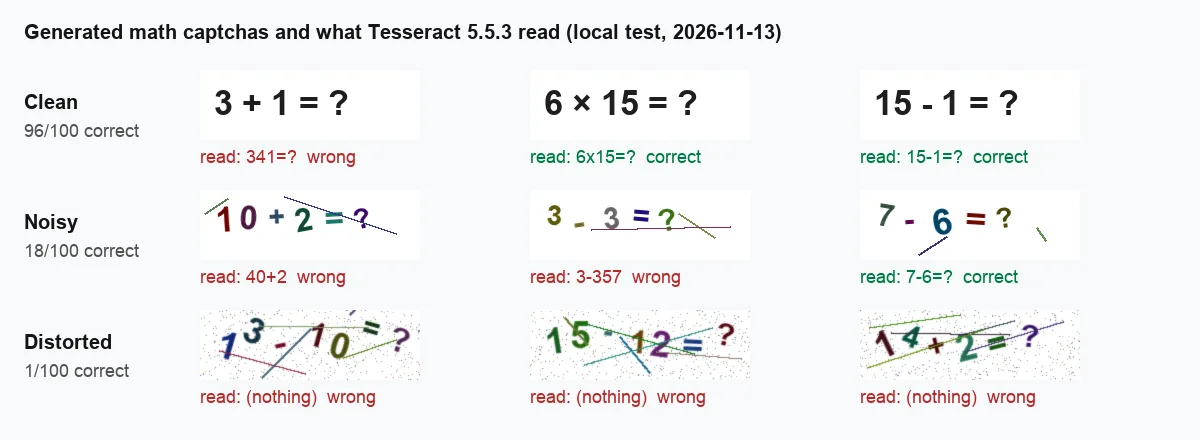
Three samples per style from our 13 November 2026 run, with Tesseract's raw output under each image.
| Style | Images | OCR output contained a sum | Correct answer |
|---|---|---|---|
| Clean | 100 | 99 | 96 |
| Noisy | 100 | 46 | 18 |
| Distorted | 100 | 5 | 1 |
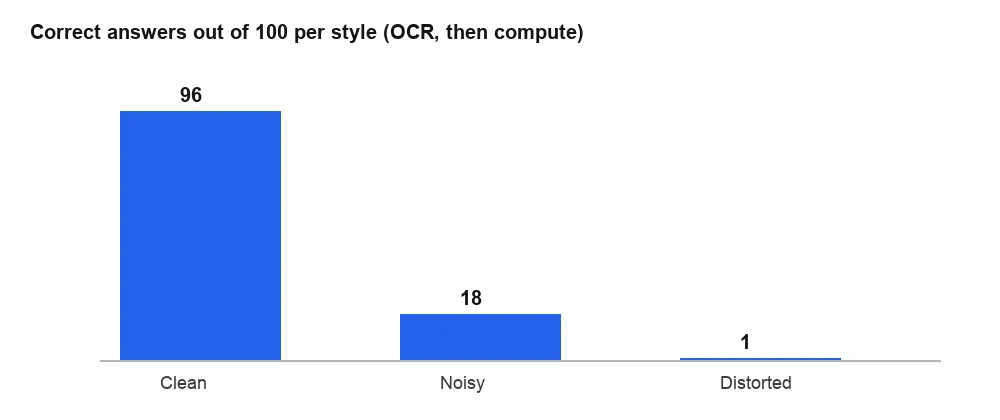
Correct answers per 100 images after OCR and computing the result.
What this does and does not show:
- The sum is free once the text is read. On clean images, free OCR plus one line of code answered 96 of 100. All four misses came from the plus sign: once it was read as a "4" ("3 + 1" came back as "341=?") and three times OCR added a stray "4" in front of it ("3 + 9" became "34+9=?"). A rerun with the same seed gave identical results.
- Distortion is doing all the work. The same arithmetic with heavy distortion stopped untuned Tesseract almost completely. That is the protection of a distorted text captcha, not of the maths.
- Plain-text questions were not tested because there is nothing to test. If the sum is in the page as text, any script that can read the page can read the question.
- It is a floor, not a ceiling. We used no image cleanup and no trained model. Thresholding, a captcha-specific recogniser or a vision model would read far more of the noisy and distorted images, so do not treat 1% as a security level.
Guessing is the other weakness. With two operands from 1 to 10 and addition only, there are just 19 possible answers, and always answering 11 is right 10% of the time. With our generator's settings (1 to 15, three operators) a fixed guess of 1 or 2 was right in 29 of 675 combinations, about 4%. Without rate limits, a bot can simply keep submitting.
Math captchas and accessibility
Math captchas trade a weak bot check for a real accessibility cost: some people cannot do mental arithmetic reliably, and accessibility guidance says so directly.
The W3C note Inaccessibility of CAPTCHA (section 2.1.3, Logic Puzzles) says simple maths or word puzzles create substantial barriers for people with language, learning or cognitive disabilities, and gives dyscalculia as the example. It advises offering a different kind of puzzle on request and doing usability research with disabled users.
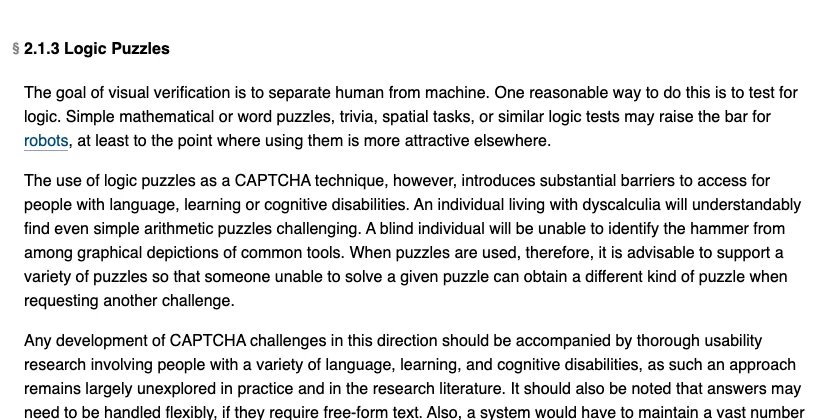
Section 2.1.3 of the W3C note, captured 13 November 2026.
WCAG 2.2 is stricter where logins are involved. Its explanation of Success Criterion 3.3.8, Accessible Authentication (Minimum), lists "performance of calculations" as a cognitive function test, shows a math captcha ("108 + 52 =") as an example, and states that this type of test is not excepted. If a math captcha guards a login, the site needs another way through that does not depend on solving it. The object-recognition exception covers recognising things like cars or animals, not arithmetic.
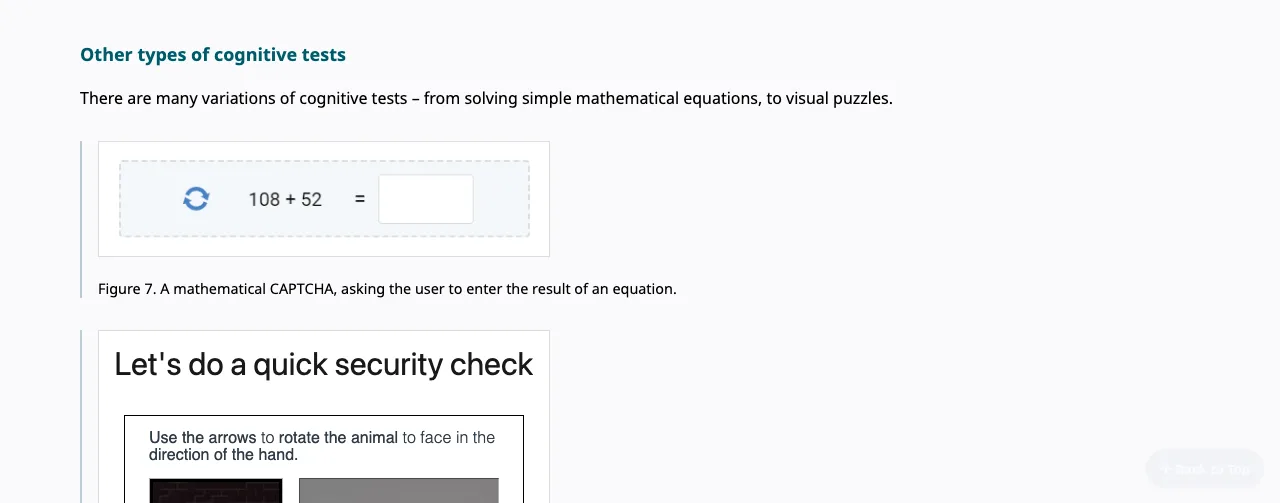
The WCAG 2.2 Understanding page for SC 3.3.8, captured 13 November 2026.
Should you use a math captcha on your own site?
Use a math captcha only as a light speed bump against untargeted spam on a low-value form, and never as the only protection on a login, signup or payment step. If you keep one, build it properly:
- Keep the answer on the server and delete it after one check; never put it in a hidden field, cookie or script.
- Expire questions after a few minutes and issue a new one after every wrong answer.
- Rate-limit submissions per IP and per session, since a fixed guess is right several percent of the time.
- Offer an accessible route that needs no arithmetic, especially on anything that counts as authentication.
- Check plugins before installing: the WordPress.org directory shows the plugin WP Advanced Math Captcha as closed since 7 April 2026 for a security issue.
For anything that matters, a risk-based check such as reCAPTCHA or Cloudflare Turnstile does more with less friction; our reCAPTCHA explainer covers how those score a visit. Whatever you choose, write test cases that check the server rejects reused and wrong answers, not just that the widget appears.
How to answer a math captcha in your own automation
To handle a math captcha in a script you are allowed to run (testing your own form, a QA suite, an internal workflow), read the question in the same session, turn it into numbers, compute the result safely, and submit it before the question expires.
- Read the question. If it is text, take it from the page. If it is an image, capture it with the same cookies as the form, as described in our guide to reading image captchas in Python with OCR or an API.
- Parse, do not eval. Never pass captcha text to
eval(); it is untrusted input. Match the expected pattern and compute it yourself. - Submit once. If the answer is rejected, fetch a fresh question rather than retrying the old one.
import re

OPS = {"+": lambda a, b: a + b, "-": lambda a, b: a - b,
       "x": lambda a, b: a * b, "×": lambda a, b: a * b, "*": lambda a, b: a * b}

def answer_math_captcha(text: str) -> int:
    """Turn '6 x 15 = ?' or '3+?=11' into the number to type."""
    t = text.replace("−", "-").replace(" ", "").lower()
    m = re.fullmatch(r"(\d+)([+\-x×*])(\d+)=\??", t)
    if m:
        a, op, b = int(m[1]), m[2], int(m[3])
        return OPS[op](a, b)
    m = re.fullmatch(r"(\d+)\+\?=(\d+)", t)  # missing operand
    if m:
        return int(m[2]) - int(m[1])
    raise ValueError(f"unexpected captcha text: {text!r}")
The fullmatch is deliberate: if OCR returns something that is not a sum, like the "341=?" in our test, the function raises instead of submitting a guess, and your loop can fetch a new captcha. It cannot catch a misread that still looks valid ("34+9=?"), so always check whether the form accepted the answer. This is the same principle that keeps image-grid challenges from looping forever: fail fast, then ask for a fresh challenge.
What CaptchaNo returns for a math captcha
For an image-based math captcha, CaptchaNo's image captcha solver reads the characters in the picture and returns them as text in solution.text; it is a text reader, so plan to compute the result in your own code with a parser like the one above.
- Input: the image as base64 with
typeset toimage; no site key or page URL. Fields and error codes are in the captcha solver API reference. - Output: the recognised text. We do not document a math mode, so treat the result as the expression and handle the case where it is already a number.
- No code: the CaptchaNo browser extension can read a captcha image with a right-click and type the text into the form.
- Billing: only successful solves are billed, failed solves are not, and credit does not expire; current rates are on the pricing page.
Plain-text math questions do not need a solver at all. Read them from the page. And if a site has put a captcha in front of something, check its terms before automating it; our post on legitimate ways to get past a captcha covers where that line sits.
Frequently Asked Questions
What is a math captcha?
A math captcha is a form check that shows a simple arithmetic problem, such as 7 + 3, and only accepts the form if you type the correct result. The server picks the numbers, stores the right answer for that page view, and compares it with your input when you submit. It is popular on small sites because it needs no third-party service.
Can bots solve math captchas?
Yes. Once a program can read the question, computing the answer is trivial. Plain-text questions can be read straight from the page, and in our November 2026 test free OCR answered 96 of 100 clean image sums. Heavy distortion stopped untuned OCR, but that protection comes from the image distortion, not from the arithmetic, and better recognisers read far more.
Why do some sites still use math captchas?
They are free, quick to add through form builders and plugins, keep visitor data on the site rather than sending it to a third party, and stop the crudest spam bots that fill every field blindly. For a low-traffic contact form that may be enough. For logins, signups or payments they are too weak to rely on alone.
Are math captchas accessible?
Not for everyone. The W3C notes that arithmetic puzzles are a barrier for people with dyscalculia and other cognitive or learning disabilities. WCAG 2.2 success criterion 3.3.8 treats performing calculations as a cognitive function test, so a login protected by a math captcha needs an alternative way through that does not require solving the sum.
What should I use instead of a math captcha?
For low-risk forms, a hidden honeypot field, a minimum time to submit and rate limits stop most automated spam without asking people anything. For higher-risk forms, use a risk-based check such as reCAPTCHA or Cloudflare Turnstile, verify its token on your server, and give people a fallback that does not depend on solving a puzzle.
Read image captchas, including math ones, in one call
If a math captcha sits in a workflow you are allowed to automate, send the image, get the text back and compute the answer in your own code. Try the CaptchaNo image captcha solver; failed solves are never billed, and the SDKs for Python, Node.js, Go and PHP cover the same call.