Solve Image Captchas in Python: OCR vs an API
Solve image captchas in Python: capture the image in-session, then read it with Tesseract, ddddocr or an API. Includes our OCR results on 200 captchas.
To solve an image captcha in Python, you capture the image in the same browser session that will submit the form, turn it into text, and type the text back. The hard part is the middle step. We ran three local OCR options against 200 generated captchas, and the results show when free OCR is enough and when you need a dedicated image captcha solver.
This guide covers the whole loop: grabbing the image without breaking the session, reading it with Tesseract, ddddocr or an API, and handling wrong answers. Only automate forms you own or have permission to automate, such as your own staging site or a client's QA environment.
What an image captcha is (and what it is not)
An image captcha is a picture of distorted letters or digits that you type into a text field. The server generated the text, stored the answer in your session, and compares what you submit against it. It is the oldest captcha format and still guards plenty of login, contact and download forms.
It is not the same as a picture grid ("select all images with traffic lights"). Those grids are part of reCAPTCHA v2 and are handled with a token, not OCR. If that is what you are facing, follow our reCAPTCHA v2 walkthrough for Playwright instead. For a wider tour of the formats, see how modern captcha tests work.
Step 1: capture the image in the same session
Capture the captcha from the session that will submit the answer. This is the most common reason correct text gets rejected. The image URL usually points to a script that draws a new random code on every request and saves that code in your session cookie.
If you copy the src and download it with a fresh requests.get(), you get a different image, and the session gets a different answer. Your OCR can read that second image perfectly and the form will still say "wrong code". Two safe ways to capture it:
- Browser automation: take a screenshot of the image element itself. Selenium's
WebElement.screenshot_as_pngreturns the pixels already on screen without making another request. - Plain HTTP: use one
requests.Session()for the form page, the image and the POST, so the cookie that holds the answer stays the same.
from selenium import webdriver
from selenium.webdriver.common.by import By

driver = webdriver.Chrome()
driver.get("https://staging.example.com/login")

img = driver.find_element(By.CSS_SELECTOR, "img#captcha")
png_bytes = img.screenshot_as_png  # what the user sees, no new request
Also, do not reload the page between capturing and submitting. A reload, or a click on the refresh icon, issues a new code and makes your answer stale.
Step 2, option A: read it locally with OCR
Local OCR is free and private, but it only works on simple captchas. We measured it on 25 October 2026 on a MacBook with Tesseract 5.5.3 (through pytesseract 0.3.13) and ddddocr 1.5.6, an MIT-licensed captcha model that runs offline on ONNX Runtime.
Our local OCR experiment
We generated two sets of 100 five-character captchas, each with a fixed random seed so the run can be repeated:
- Noisy set: the default 160x60 images from the open-source Python captcha library (version 0.7.1). It uses warped glyphs, overlapping letters, dots and a curve, with lowercase letters and digits.
- Simple set: bold uppercase letters and digits, each rotated up to 15 degrees, with three thin lines on a flat grey background. Ambiguous characters (O, I) were left out, as many real forms do.
Tesseract ran in single-word mode with a character whitelist, once on the raw image and once after preprocessing: grayscale, upscaling, a median filter, a threshold and a white border, following the Tesseract guide to improving output quality. We counted only exact matches of the whole code, because a form rejects a code with one wrong character.
| Engine | Noisy set (exact, of 100) | Simple set (exact, of 100) |
|---|---|---|
| Tesseract, raw image | 0 | 38 |
| Tesseract, preprocessed | 0 | 29 |
| ddddocr, default model | 18 | 100 |
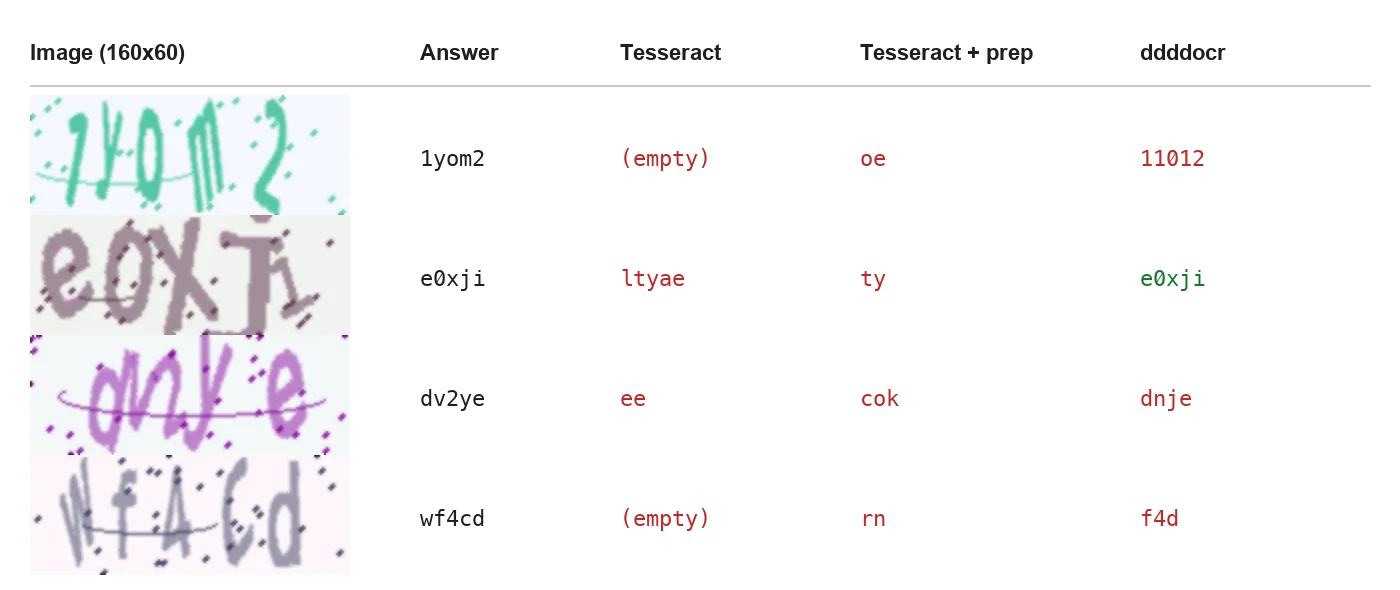
Noisy set: Tesseract returned empty strings or fragments; ddddocr got one of these four right.
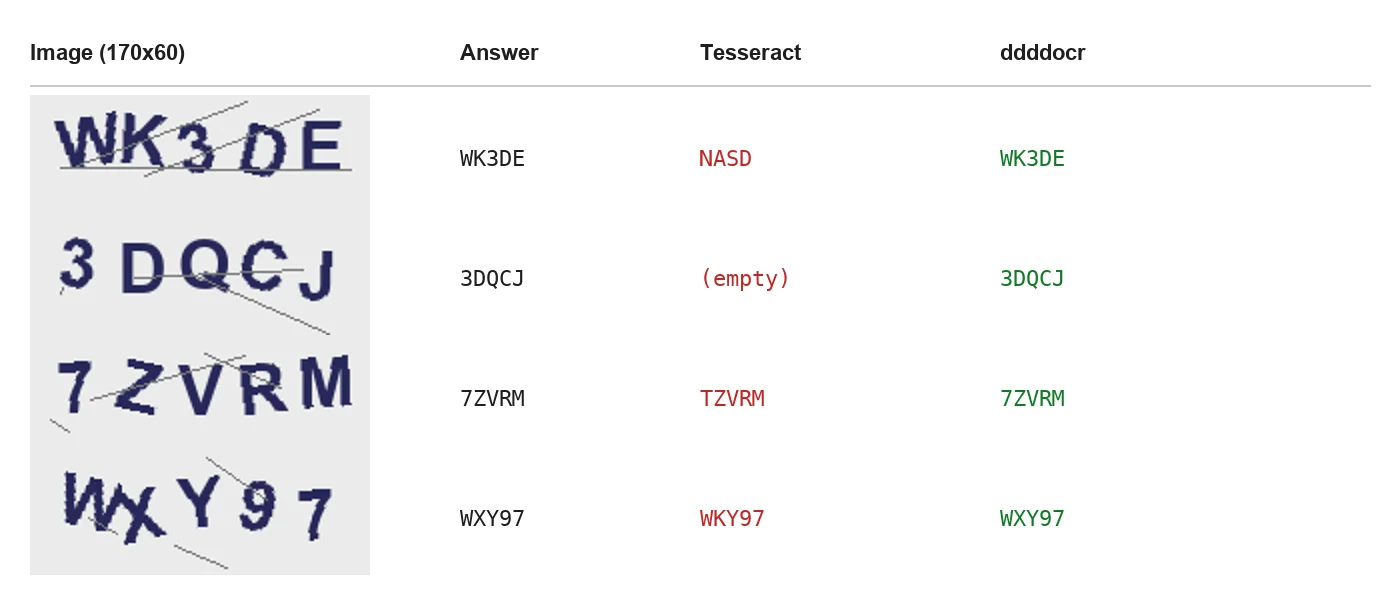
Simple set: ddddocr read every image correctly; Tesseract confused 7 with T and X with K.
What the numbers mean
Three findings matter more than the totals:
- Tesseract is the wrong tool for distorted text. It was built for documents, and it returned nothing usable on the noisy set. That matches a 2022 write-up from The Agile Way, where it read one of five simple captchas correctly in Selenium tests.
- Preprocessing can make things worse. Our generic threshold dropped Tesseract from 38 to 29 on the simple set, because it thinned strokes along with the lines. Filters only help when they are tuned to one specific captcha style.
- Small errors are often look-alike characters. On the noisy set, ddddocr returned a code of the right length only 53 times. If you treat o/0 and l/1/i as the same character, its exact matches rose from 18 to 25. Knowing a site's alphabet helps, but it does not close the gap.
The takeaway: if the captcha on your form looks like our simple set, a local model such as ddddocr may be all you need. If it looks like the noisy set, local OCR will fail most of the time, and every failure costs you a reload and another try.
import ddddocr

ocr = ddddocr.DdddOcr(show_ad=False)
text = ocr.classification(png_bytes)  # e.g. "WK3DE"
Step 2, option B: send it to an image captcha API
An API reads harder images without you training or tuning a model. You send the image as base64 and get the text back. With CaptchaNo it is one blocking call: type is image, body is the base64 image (raw or a data URL), and no site key or page URL is needed. Field names and error codes are in the captcha solver API reference.
import base64, os, time, requests

API = "https://api.captchano.com/v1"
HEADERS = {"Authorization": f"Bearer {os.environ['CAPTCHANO_API_KEY']}"}

def solve_image(png_bytes: bytes) -> str:
    body = base64.b64encode(png_bytes).decode()
    r = requests.post(f"{API}/solve?wait=60", headers=HEADERS,
                      json={"type": "image", "body": body}, timeout=75)
    data = r.json()
    while r.status_code == 202:  # still solving: poll every 5 seconds
        time.sleep(5)
        r = requests.get(f"{API}/task/{data['id']}", headers=HEADERS, timeout=30)
        data = r.json()
    if data.get("status") != "ready":
        raise RuntimeError(data.get("error", data))
    return data["solution"]["text"]
Keep the key in an environment variable, not in the script. Failed solves are not billed. You can try the request against the image tab of our live captcha demo page, which generates its captchas on our server and checks answers there.
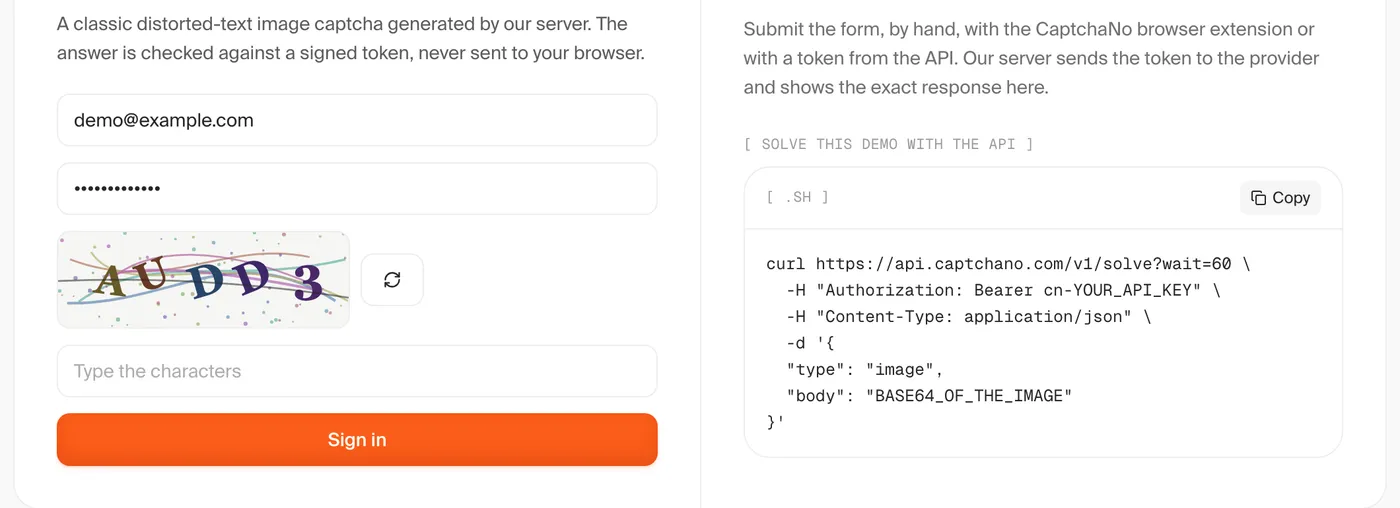
The image tab of the CaptchaNo demo, with the request that solves it (captured 25 October 2026).
Step 3: submit, check and retry
Type the text, submit, and confirm the page accepted it before moving on. A good OCR rate still means some wrong answers, so the loop should expect them:
for attempt in range(3):
    img = driver.find_element(By.CSS_SELECTOR, "img#captcha")
    text = solve_image(img.screenshot_as_png)
    field = driver.find_element(By.NAME, "captcha")
    field.clear()
    field.send_keys(text)
    driver.find_element(By.CSS_SELECTOR, "button[type=submit]").click()
    if "Incorrect code" not in driver.page_source:
        break
    # the site issues a new image after a wrong answer: read the new one
Things that break this loop in practice:
- Case sensitivity. Some forms compare case-insensitively, others don't. Don't lowercase the answer unless you know the site ignores case.
- Whitespace. Strip spaces and newlines from OCR output; Tesseract often ends lines with a newline.
- Expiry. Codes usually expire with the session or after a few minutes, so solve right before submitting.
- Checking the wrong signal. A successful click is not a successful login. Check for the error message or for the page you expect next.
If an answer looks right but is rejected every time, the cause is usually the session, not the OCR. Our guide to why valid captcha answers get rejected walks through the same failure for token captchas.
OCR or API: which should you use?
Use local OCR for one known, simple captcha style. Use an API when the style is noisy, changes over time, or varies across many sites. The table sums up the trade-offs:
| Situation | Better fit | Why |
|---|---|---|
| Your own app, captcha can be turned off in staging | Neither: disable it | A test flag beats any solver; see captchas in QA pipelines |
| One site, clean bold text | ddddocr locally | Free, offline, fast on simple styles |
| Noisy or overlapping characters | API | Local OCR scored 0 to 18 of 100 on our noisy set |
| Many sites with different styles | API | No per-style tuning to maintain |
| Picture grids or checkbox widgets | Token solving, not OCR | These are reCAPTCHA or Turnstile, not text images |
For a Selenium project that also meets reCAPTCHA or Turnstile, the Selenium captcha solver tutorial uses the same API for tokens, and the Selenium integration page has copy-paste setup. If you don't write code at all, the browser extensions in our comparison of auto captcha solver extensions can read an image with a right-click.
Limits and when not to automate
Solving a captcha does not grant permission to use a site. Automate your own forms, clients' forms you are contracted to test, and sites whose terms allow it. Our post on legitimate captcha bypass options lists the alternatives, from test keys to official APIs.
Our experiment also has limits. It used generated images, not a live site, and 100 images per style. Real captchas vary, so measure on a sample from your own target before you choose. The scripts use fixed seeds, so you can reproduce the numbers.
Frequently Asked Questions
Can Python solve image captchas without a paid service?
Yes, for simple ones. A local model such as ddddocr read all 100 of our simple bold-text captchas correctly. On noisy, overlapping text it matched only 18 of 100, and Tesseract matched none. Free OCR is worth trying first on one known captcha style, but it is rarely reliable across noisy or changing styles.
Is Tesseract good for captcha recognition?
Not on its own. Tesseract is a document OCR engine and expects clean, horizontal text. In our run it read 38 of 100 simple captchas and none of the noisy ones, even with single-word mode and a character whitelist. Generic preprocessing lowered its score on the simple set, so any filters must be tuned to one specific captcha style.
Why does my correct captcha answer get rejected?
Usually because the image you solved is not the one tied to your session. Downloading the image URL again generates a new code, and reloading the page does the same. Capture the image from the page already open, keep one session for the image and the form, and submit before the code expires. Also check case sensitivity and strip whitespace.
What format does an image captcha API expect?
Most image captcha APIs take the picture as a base64 string in a JSON body. CaptchaNo uses type image and the base64 data in the body field, raw or as a data URL, with no site key or page URL. The recognised characters come back as solution.text, ready to type into the form.
Are picture grid captchas solved the same way?
No. Grids that ask you to select traffic lights or crosswalks belong to reCAPTCHA v2, and the site checks a token, not typed text. You solve them by requesting a reCAPTCHA token for the page's site key and injecting it. OCR does not apply, because there are no characters to read.
Read your first image captcha
Capture the image in the session, read it locally if it is simple, and send it to the API if it isn't. Create a CaptchaNo account and get an API key, then point the solve_image function above at the demo page to see the whole loop work before you use it on your own forms.