CAPTCHA Test Cases: A Checklist That Tests the Token
CAPTCHA test cases for reCAPTCHA and Turnstile forms: 38 cases with expected results, siteverify error codes, test keys, WCAG 2.2 and outage checks.
CAPTCHA test cases for a modern form are mostly not about the puzzle. reCAPTCHA and Cloudflare Turnstile hand the browser a token, and your server decides whether to trust it, so the cases that catch real bugs check what your backend does with a missing, forged, reused, expired or foreign token, and what happens when the provider is unreachable. The checklist below covers those plus trigger rules, the widget, security, accessibility and resilience, and gives every case an ID, an expected result and a way to run it. If you need the background on how these checks decide, start with how a modern CAPTCHA test works.
How we made this guide: we run CaptchaNo, a captcha-solving API, and we wrote this for QA engineers and developers testing forms they own. On 3 November 2026 we read the current verification and testing documentation from Google and Cloudflare, took the screenshots of their error-code tables shown below, and sent five siteverify requests with the providers' public test keys (results further down). We did not run any captcha solves for this article, so it contains no solve times or success rates.
CAPTCHA test cases: the short answer
Test the token, not the picture. A complete suite for a captcha-protected form has seven groups, and the server-side group matters most:
- Trigger and placement: the captcha appears on every form that should have it, and only when your rules say so.
- Widget and client: the widget loads, the token reaches the request, and the widget resets after a failure or expiry.
- Server-side verification: every siteverify outcome maps to the right behaviour, with no side effect on rejection.
- Security: the protection cannot be skipped by calling your endpoint directly or by replaying a token.
- Accessibility: keyboard and screen-reader users can finish the flow, as WCAG 2.2 requires for authentication.
- Resilience and performance: blocked scripts, slow networks and provider outages produce a clear, safe result.
- Environment safety: test keys never reach production and production keys never run in CI.
Older checklists that rank for this query still test distorted text, case sensitivity and the two-word reCAPTCHA that Google retired years ago. Those cases only apply if you built your own image captcha. For reCAPTCHA v2, v3 and Turnstile, the widget is the provider's code; your code is the integration around it, and that is what needs test cases.
How to write a CAPTCHA test case
Write each case so a second person can run it and agree on pass or fail. That means a precondition, exact test data (which key, which token), steps, and an expected result that includes what must not happen. Here is one case written out in full, using the format the tables below shorten:
| Field | TC-SRV-05: replayed token is rejected |
|---|---|
| Precondition | Sign-up form protected by Turnstile; staging uses Cloudflare's test secret that returns a spent-token error |
| Test data | Secret 3x0000000000000000000000000000000AA, dummy token from a passing test sitekey |
| Steps | Submit the form once; capture the request; resend the identical request with the same token |
| Expected result | Second request rejected with your "please try again" message; siteverify returned timeout-or-duplicate |
| Must not happen | No second account row, no second welcome email, no 500 error |
| How to run | Automated, CI, against staging with the test secret |
The "must not happen" row is the one most suites skip. A test that only asserts an HTTP 403 passes even when the handler wrote the row before checking the token.
Trigger and placement test cases
These cases check that the captcha shows up where your requirements say, and nowhere else. If the captcha only appears after failed logins, define the threshold, the counter's scope (account, IP or session) and when it resets, because the test cannot be written without those numbers.
| ID | Case | Expected result |
|---|---|---|
| TC-TRG-01 | Open each protected form (sign-up, login, password reset, contact, checkout) | Widget present, or invisible/v3 call made on submit |
| TC-TRG-02 | Fail login N times, where N is your documented threshold | Captcha required from attempt N+1, not before |
| TC-TRG-03 | Succeed after the captcha was triggered | Counter resets as specified |
| TC-TRG-04 | Trigger from one IP, then try the same account from another | Behaviour matches the documented counter scope |
| TC-TRG-05 | Unprotected pages (search, product pages) | No captcha script loaded |
Widget and client-side test cases
Client-side cases confirm that a real token gets from the widget into the request your server receives. Turnstile writes it to a hidden field named cf-turnstile-response by default and reCAPTCHA to g-recaptcha-response; our explainer on what Turnstile checks before it issues a token covers the widget's side.
| ID | Case | Expected result |
|---|---|---|
| TC-UI-01 | Submit without completing a visible widget | Submit blocked or friendly message; no request sent, or request rejected by the server |
| TC-UI-02 | Complete the widget and submit | Request carries a non-empty token field |
| TC-UI-03 | Submit fails server-side (wrong password, validation error) | Widget resets; next attempt gets a fresh token |
| TC-UI-04 | Leave the page open past the token lifetime, then submit | Expired callback fires and the widget asks again, instead of sending a dead token |
| TC-UI-05 | Two protected forms on one page, or a single-page-app route change | Each form gets its own token; widget renders again after navigation |
| TC-UI-06 | Mobile viewport and each supported browser | Widget fits, is tappable and does not cover the submit button |
| TC-UI-07 | Set the page language (reCAPTCHA hl, Turnstile language) | Widget text matches the page language |
Server-side verification test cases
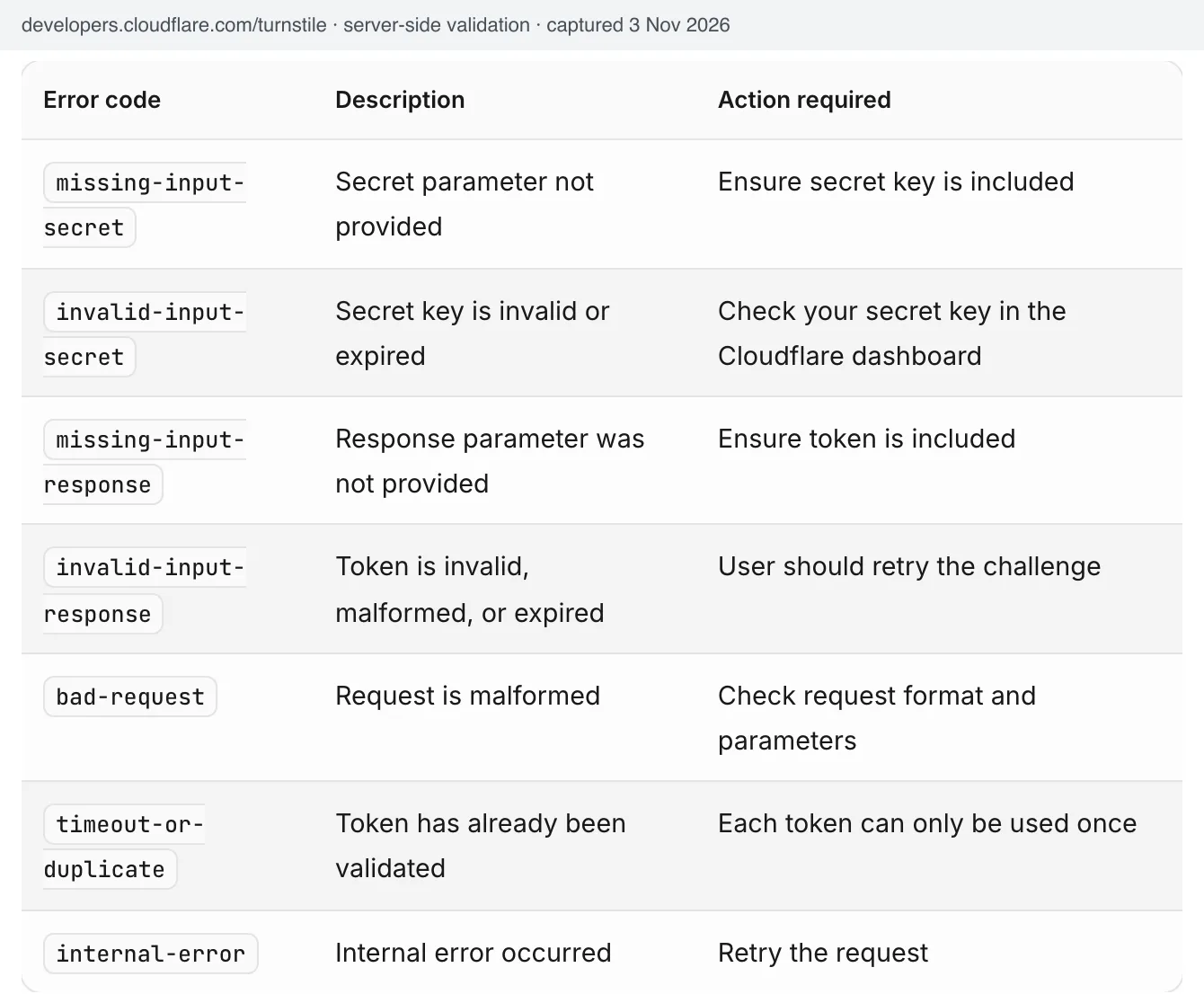
This is where most captcha bugs live, and every expected result can be pinned to a documented siteverify response. Both providers return success, challenge_ts, hostname and an error-codes array, and both use mostly the same code names.
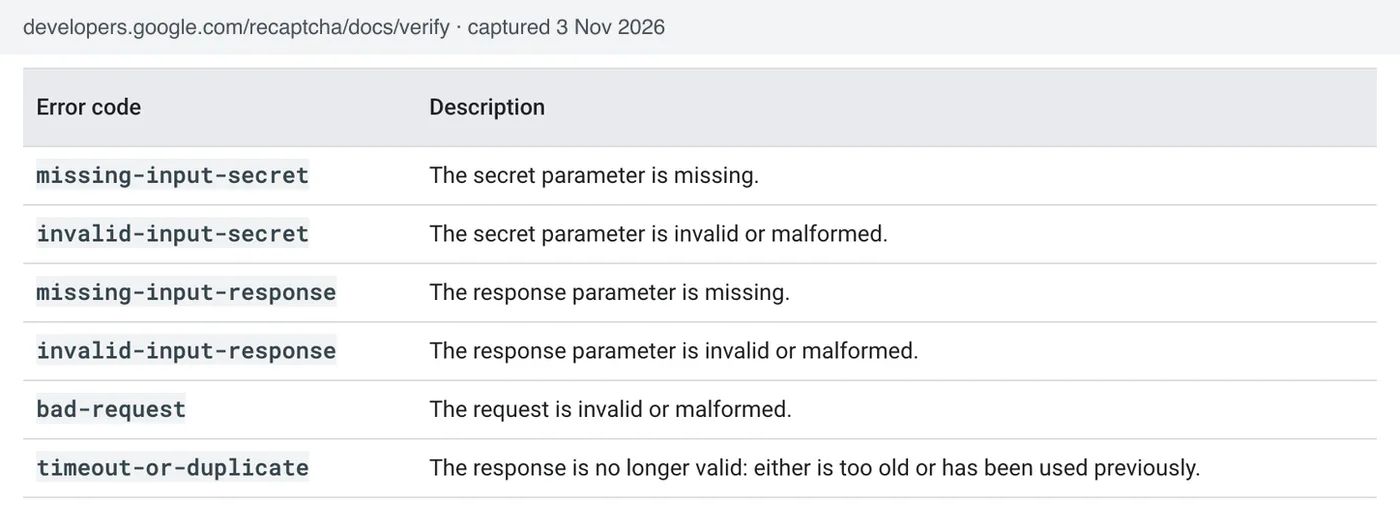
The differences matter for test data. According to Google's verification docs, a reCAPTCHA token is valid for two minutes and can be verified once. Cloudflare's server-side validation docs give Turnstile tokens 300 seconds, also single use, and add an internal-error code whose recommended action is to retry, plus an optional idempotency_key so a retry is not counted as a reuse.
| ID | Case | Siteverify returns | Expected result |
|---|---|---|---|
| TC-SRV-01 | Valid token from your own page | success: true, your hostname | Request processed |
| TC-SRV-02 | Token field missing or empty | Not called, or missing-input-response | Rejected before any side effect |
| TC-SRV-03 | Random or truncated token | invalid-input-response | Rejected; user asked to try again |
| TC-SRV-04 | Token older than the lifetime (2 min reCAPTCHA, 300 s Turnstile) | timeout-or-duplicate (reCAPTCHA); Turnstile's docs list both invalid-input-response and timeout-or-duplicate, so accept either | Rejected; widget reset |
| TC-SRV-05 | Same token sent twice | timeout-or-duplicate | Second request rejected, no duplicate side effect |
| TC-SRV-06 | Wrong or rotated secret in config | invalid-input-secret | Rejected and alerted as a configuration error, not shown as a user error |
| TC-SRV-07 | Token solved on a different hostname | success: true, other hostname | Rejected by your hostname check |
| TC-SRV-08 | reCAPTCHA v3 score below your threshold, or an unexpected action | score low or action mismatch | Your documented fallback runs (extra step), never a silent drop |
| TC-SRV-09 | Turnstile internal-error | internal-error | One retry with the same idempotency key, then fail closed |
| TC-SRV-10 | Siteverify times out or DNS fails | No response | Fail closed with a clear message; request not processed |
For TC-SRV-08, Google's v3 docs say to check that the action name is the one you expect and suggest 0.5 as a default threshold; our guide to what reCAPTCHA v3 scores mean explains how to pick yours. Turnstile also returns the action you set on the widget, so the same check works there. To drive these cases deterministically, stub the siteverify call in your server tests; the stubbing pattern and a production guard are in our article on testing reCAPTCHA and Turnstile with test keys.
A quick sanity check for the whole group: delete the siteverify call from your handler and run the suite. If it still passes, the suite is not testing the protection. And when a real user's token fails in production for reasons none of these cases reproduce, the session-level causes are in why a valid captcha token gets rejected.
Security test cases for a captcha
Security cases ask whether someone can get the protected action without a fresh, valid token. Run them against the API, not the page, because an attacker will.
| ID | Case | Expected result |
|---|---|---|
| TC-SEC-01 | POST to the form's endpoint with curl, no token field | Rejected exactly like TC-SRV-02 |
| TC-SEC-02 | Remove the widget or its required attribute in DevTools, then submit | Server still rejects; client-side checks are convenience only |
| TC-SEC-03 | Reuse one token across two accounts or two sessions | Second use rejected |
| TC-SEC-04 | Call a second endpoint that performs the same action (mobile API, GraphQL mutation, legacy route) | Same captcha requirement, or a documented reason it is exempt |
| TC-SEC-05 | Start the production build with a test secret configured | App refuses to start or rejects every token |
| TC-SEC-06 | Pass the captcha once, then send many requests in the same session | Rate limits still apply; one token authorises one action |
TC-SEC-04 is the one that finds real holes: teams protect the web form and forget the second route to the same database write.
Accessibility test cases
A captcha on login or sign-up is part of authentication, so it falls under WCAG 2.2 success criterion 3.3.8, Accessible Authentication (Minimum), a Level AA criterion. It requires a way through that does not depend on a cognitive function test; object-recognition challenges such as picking images are excepted at AA, but not at the AAA level (3.3.9).
| ID | Case | Expected result |
|---|---|---|
| TC-A11Y-01 | Complete the whole form with the keyboard only | Widget reachable by Tab, operable, focus returns to the form |
| TC-A11Y-02 | Screen reader (VoiceOver, NVDA) on the widget | Widget announced with a meaningful name; state change announced |
| TC-A11Y-03 | reCAPTCHA v2 image challenge, audio option | Audio challenge reachable and usable |
| TC-A11Y-04 | Invisible or score-based check decides the user is risky | The fallback is a usable step (email link, second factor), not a dead end |
| TC-A11Y-05 | Error message after a failed captcha | Text error linked to the field, not colour alone |
TC-A11Y-04 matters more than it looks. Invisible checks are friendly until they fail, and then the user sees whatever your fallback is.
Resilience, performance and privacy test cases
These cases check what happens when the provider's script or API is not there. Decide the policy first (fail closed for sign-up and login is the common choice) and test that the user sees a message instead of a frozen button.
| ID | Case | Expected result |
|---|---|---|
| TC-RES-01 | Block the provider's script host (ad blocker, DNS block, Playwright route abort) | Clear message telling the user what to allow; no silent failure |
| TC-RES-02 | Strict Content-Security-Policy in production headers | Widget loads; no CSP violations in the console |
| TC-RES-03 | Throttle to a slow 3G profile | Submit stays disabled until a token exists; no double submits |
| TC-RES-04 | Page-weight and load timing with the widget, compared with your own baseline | Within your performance budget; script loaded only on protected pages |
| TC-RES-05 | If your consent setup delays the captcha script, decline consent | Form explains what is needed or offers your alternative path |
Which CAPTCHA test cases can you automate?
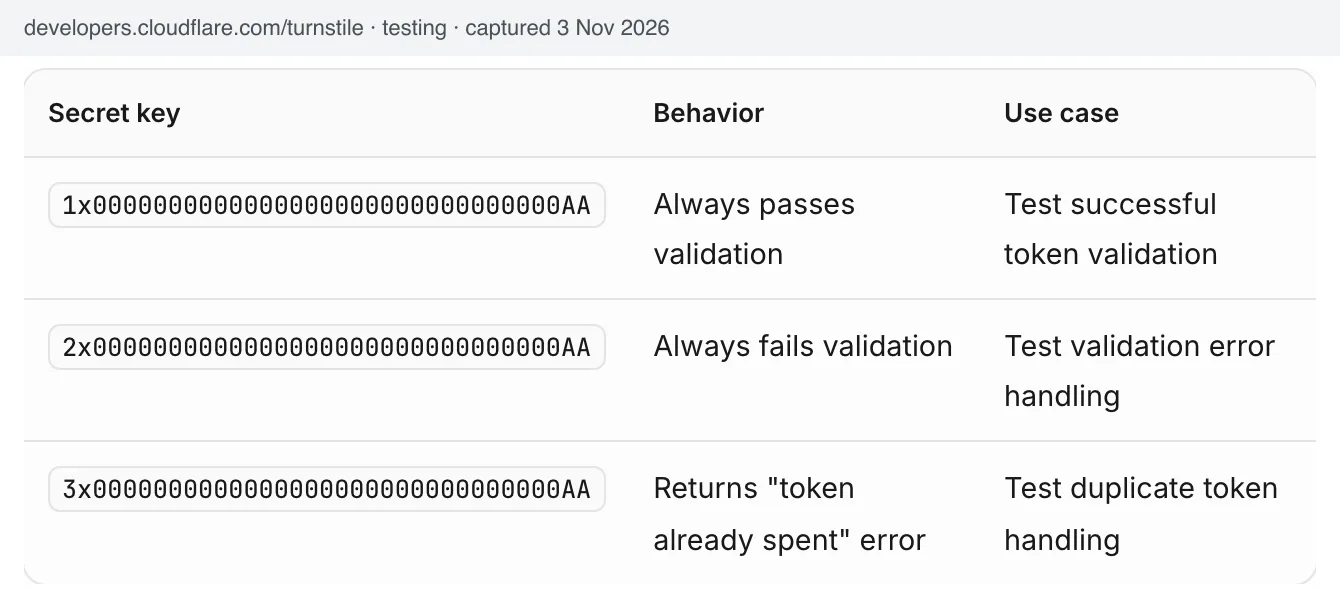
Almost all of them, if you use each provider's test keys for browser tests and a stubbed siteverify for server tests. Google's reCAPTCHA FAQ says its v2 test keys always pass and show a warning on the widget, and that v3 needs a separate key for test environments whose scores may not be accurate. Cloudflare publishes test sitekeys that always pass, always fail or force an interactive challenge, and test secrets that pass, fail or return a spent-token error.
| Group | Provider test keys | Stubbed siteverify | Real keys or manual |
|---|---|---|---|
| Trigger and placement | Yes | Not needed | No |
| Widget and client | Yes (Turnstile can force the interactive path) | Not needed | Expiry timing, real image challenge |
| Server-side verification | Partly (Turnstile pass, fail and spent secrets) | Yes, every case | Hostname and v3 score on real traffic |
| Security | Yes | Yes | Periodic manual review of new endpoints |
| Accessibility | Keyboard flow | Not needed | Screen reader and fallback with real users |
| Resilience | Yes, with route blocking | Outage and timeout | No |
The test secrets do not all behave the same way, which decides what each one can test. These are the five requests we sent on 3 November 2026 (19:02 UTC) with the public test secrets and a dummy token:
| Secret | Token sent | Siteverify returned |
|---|---|---|
| Google v2 test secret | None | success: true, hostname testkey.google.com |
| Google v2 test secret | The string garbage | success: true, hostname testkey.google.com |
Turnstile 1x…AA (pass) | None | success: false, missing-input-response |
Turnstile 2x…AA (fail) | Dummy | success: false, invalid-input-response |
Turnstile 3x…AA (spent) | Dummy | success: false, timeout-or-duplicate |
Two things follow. Google's v2 test secret passes even with no token, so it cannot test TC-SRV-02 or TC-SEC-01; use the stub for those. And it reports testkey.google.com as the hostname, so a correct hostname check (TC-SRV-07) will reject test-key traffic unless your test config allows that host. Turnstile's pass secret still rejects a missing token, so it can drive TC-SRV-02 directly. If your end-to-end suite drives the widget in a real browser, our Playwright walkthrough for the reCAPTCHA v2 flow shows how the token is found and placed in the page.
Where CaptchaNo fits in a test plan
For the few cases that need a real token on real keys, a solving API gives your suite one without a person at the keyboard. That covers a staging environment locked to production keys, a nightly smoke test of the live sign-up on your own site, and the v3 handling you cannot judge with a test key.
- CaptchaNo returns real tokens for reCAPTCHA v2, classic reCAPTCHA v3 and Cloudflare Turnstile from our own solving infrastructure, plus DataDome and image captchas. Score-based reCAPTCHA Enterprise keys and hCaptcha are not supported.
- Only successful solves are billed and credit does not expire, so an occasional smoke test does not burn a monthly plan. Current rates are on the CaptchaNo pricing page.
- Replies to support@captchano.com come from the engineers who run the service, and the API documentation and SDKs cover Python, Node.js, Go and PHP.
The QA and test-automation page shows the setup for Selenium, Puppeteer and Playwright, and the captcha demo tool lets you see a solve end to end before you wire it into CI. Use it on sites you own or are allowed to test.
Frequently Asked Questions
What are the test cases for CAPTCHA?
Group them into trigger and placement, widget behaviour, server-side verification, security, accessibility and resilience. The most important are server-side: a missing, invalid, expired, reused or foreign-hostname token must be rejected with no side effect, and a provider outage must fail safely. Distorted-text cases only matter if you built your own image captcha rather than using reCAPTCHA or Turnstile.
How do you test a CAPTCHA in automation without disabling it?
Use the provider's published test keys in browser tests and stub the verification call in server tests. Google's v2 test keys always pass, and Cloudflare offers Turnstile keys that pass, fail, force an interactive challenge or return a spent-token error. Keep a production guard so test keys can never be deployed, and run a small real-key smoke test separately.
Should a CAPTCHA be validated on the client or the server?
On the server, always. The browser only collects a token; your backend must send it to the provider's siteverify endpoint and check success, hostname and, for reCAPTCHA v3, the score and action. Client-side checks improve the experience but can be removed in developer tools, so a test that edits the page and still gets through means the protection is not enforced.
How do you test CAPTCHA token expiry?
Hold a token past its lifetime, then submit it. Google documents two minutes for reCAPTCHA tokens and Cloudflare documents 300 seconds for Turnstile. Expect a rejection and a widget reset. In automated server tests, stub the expired response rather than waiting, and in browser tests check that the expired callback re-arms the widget before the user submits.
Is CAPTCHA testing functional testing or security testing?
Both, and it also overlaps accessibility testing. Functional cases prove a real person can complete the form. Security cases prove the protected action cannot be reached without a fresh, valid token, including through other endpoints. Accessibility cases prove keyboard and screen-reader users can finish authentication, which WCAG 2.2 criterion 3.3.8 requires at Level AA.
Run the cases that need a real token
Most of this checklist runs on test keys and a stub. For the real-key smoke test on your own staging or live form, create a CaptchaNo account, send the sitekey and page URL from the form you own, and assert the same expected results you wrote above.