Cloudflare Error 600010: What It Means and Fixes
Cloudflare error 600010 is a Turnstile challenge failure. See what each code means, who can fix it, and what our tests showed about retries and CSP.
Cloudflare error 600010 is a Cloudflare Turnstile code that means the challenge ran and decided not to issue a token. It is not a server outage and not a ban on your account. Cloudflare files every 600xxx code under "generic challenge failure", the same family the "Verifying you are human" loop comes from. If you are a visitor, the fix is almost always on your side: the browser, an extension, a VPN or the network. If you run the site, the code is telling you something different, and the codes around it matter more.
We run CaptchaNo, a captcha-solving API, so we spend a lot of time reading Turnstile failures. For this post we rendered Turnstile widgets in Playwright 1.62.1 (Chromium 151, headless) on 18 November 2026 UTC and logged every code the widget passed to its error-callback. The results are below, including two that the usual guides get wrong.
What does Cloudflare error 600010 mean?
Error 600010 means Turnstile's challenge failed: Cloudflare's checks treated the browser as possibly automated or unusual, so no token was issued. Cloudflare's own Turnstile error code reference (updated 25 September 2026) lists the family as 600*, "Generic challenge failure", with the note "Bot behavior detected" and "Retry: Yes".
Two details are worth knowing before you start changing settings:
- 600010 itself is not documented. The table only lists the
600*family. Cloudflare says the trailing digits of starred codes vary and are for internal use, so nobody outside Cloudflare can tell you exactly which signal "010" stands for. Guides that claim to know are guessing. - The message varies by site. Some sites show the widget's own "Verification failed" text. Others catch the code and print their own message, such as "An error has occurred. Reference code: 600010". It is the same Turnstile failure either way.
If you want the background on what Turnstile checks before it issues a token, our explainer on how the Turnstile widget decides covers the three widget modes.
What we saw when we triggered each code
Cloudflare publishes test sitekeys that force a result, so you can see each failure without guessing. We put six widgets on one local page, used a hostname that is not on our own sitekey's allowed list, and recorded every callback for 40 seconds.
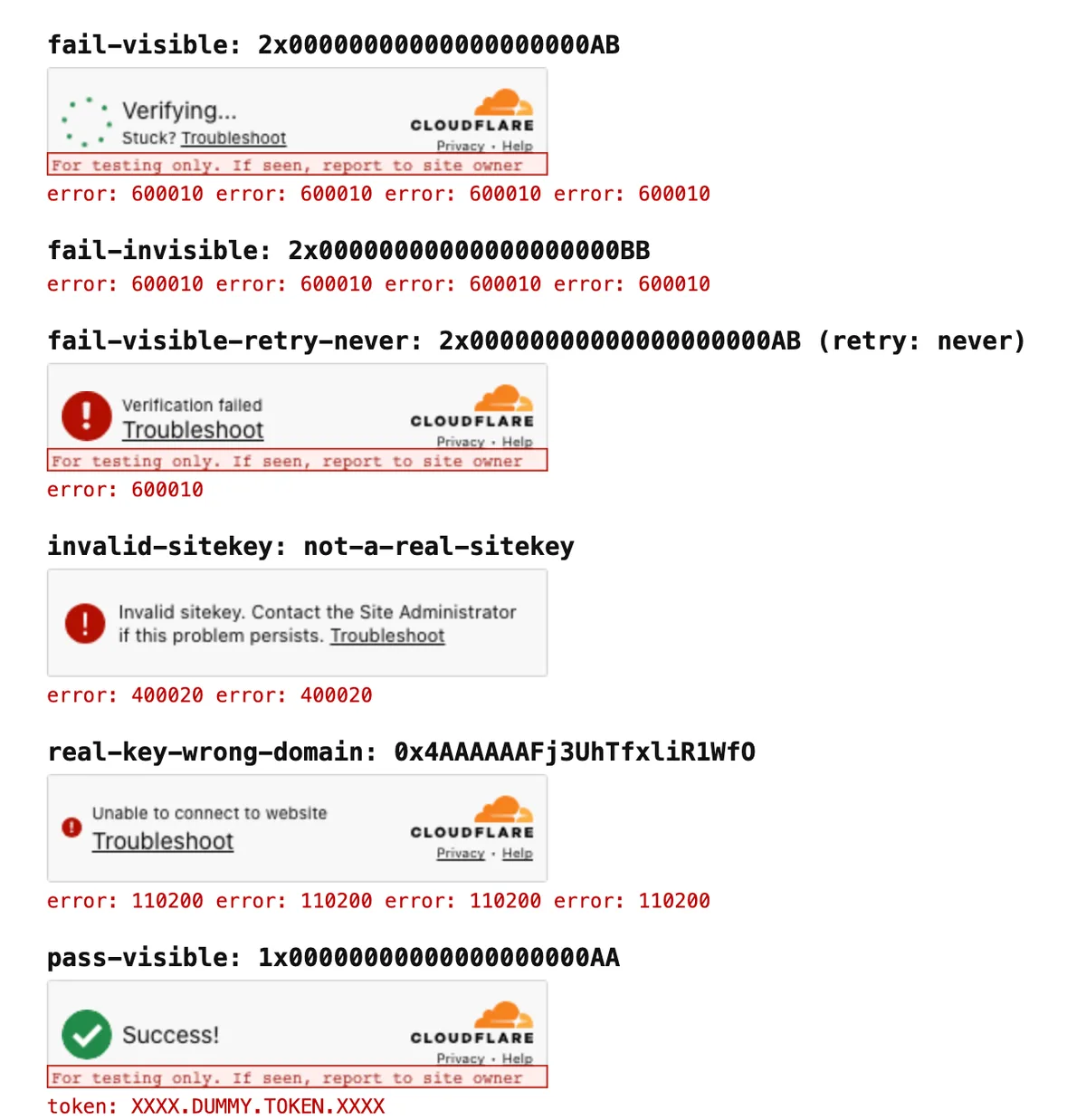
Our test page, 18 Nov 2026 UTC: the red line under each widget is every code its error-callback received in 40 seconds.
| Widget setup | Code received | What the visitor saw | Callbacks in 40 s |
|---|---|---|---|
Always-fail test key, visible (2x00000000000000000000AB) | 600010 | "Verification failed" with a Troubleshoot link | 4, about 11.6 s apart |
Always-fail test key, invisible (2x00000000000000000000BB) | 600010 | Nothing on screen | 4, about 11.6 s apart |
Always-fail key with retry: "never" | 600010 | "Verification failed" | 1 |
| Sitekey that does not exist | 400020 | "Invalid sitekey. Contact the Site Administrator" | 2, then it stopped |
| Real sitekey on a hostname it does not allow | 110200 | "Unable to connect to website" | 4, about 10.2 s apart |
Always-pass test key (1x00000000000000000000AA) | none | "Success!" and a dummy token | 0 |
Two things stand out. First, with the default retry: "auto", a single failing widget fires the error callback again and again. If you send each callback to your logs or analytics, one unlucky visitor looks like four failures in 40 seconds. Second, the 110200 widget kept retrying even though Cloudflare's table marks that code "Retry: No". In practice "No" means retrying will not help, not that the widget stops trying.
The site-side failure that looks like a bot error
A strict Content Security Policy can produce a 300xxx code, which falls in the same "bot behavior" bucket as 600010, even when the visitor is a perfectly normal browser. We served the always-pass test key behind a CSP that allowed Turnstile's script but set frame-src 'self', so the browser refused to frame challenges.cloudflare.com.
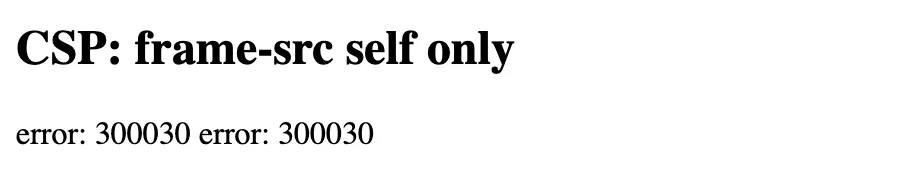
CSP with frame-src 'self': no widget at all, then 300030 at about 43 s and again at about 86 s.
- For the first 43 seconds nothing happened: no widget, no callback, only a CSP violation in the console.
- At about 43 seconds the callback received 300030, then again at about 86 seconds.
- Blocking the challenge iframe at the network level instead of with CSP gave the same result: 300030 at 43 s and 86 s, not the 200500 "iframe load error" the table suggests.
- Adding
frame-src https://challenges.cloudflare.comfixed it: the same key returned a token in about 1.7 seconds.
So if your own users report 300030 or 600xxx errors in clusters, check your CSP and anything that strips or blocks third-party frames before you blame their browsers. Our guide to what to allow for challenges.cloudflare.com lists the hosts and directives involved.
Whose problem is it? Turnstile codes by owner
The first digits of the code tell you who can fix it. Codes starting 110, 400 and 200100 point at the site's configuration or the visitor's clock, while 300xxx and 600xxx are challenge failures that are usually, but not always, on the visitor's side.
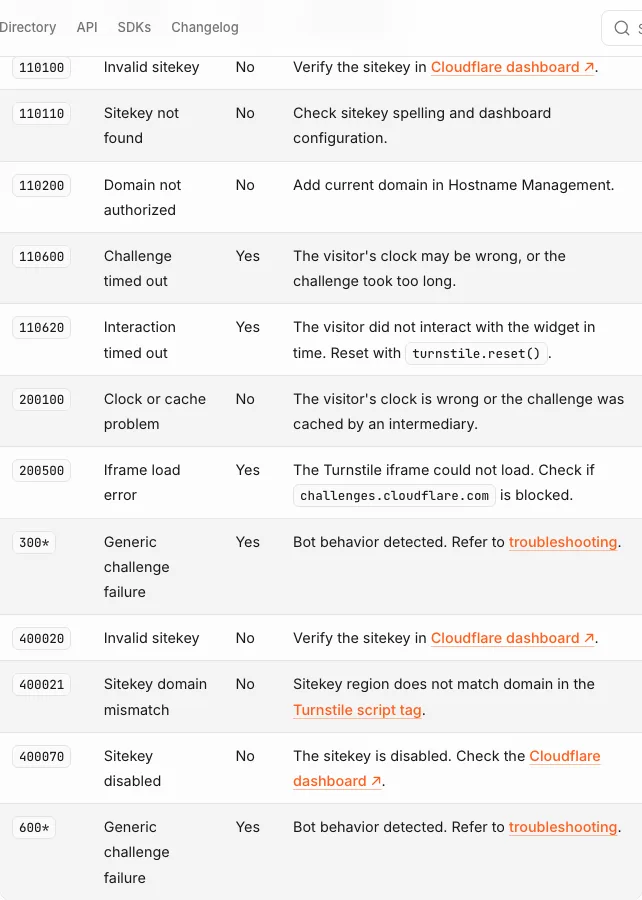
Cloudflare's error code table as published on developers.cloudflare.com, captured 18 Nov 2026.
| Code | Cloudflare's meaning | Who fixes it | First thing to try |
|---|---|---|---|
| 110100, 110110, 400020 | Invalid or unknown sitekey | Site owner | Copy the sitekey again from the dashboard |
| 110200 | Domain not authorised | Site owner | Add the hostname in Hostname Management |
| 400021, 400070 | Sitekey region mismatch or key disabled | Site owner | Check the script tag and the key's status |
| 110600, 110620 | Challenge or interaction timed out | Visitor, then site | Retry; the site can call turnstile.reset() |
| 200100 | Clock or cache problem | Visitor or a cache in between | Fix the device clock; stop caching the challenge |
| 200500 | Iframe failed to load | Visitor's network or the site | Unblock challenges.cloudflare.com |
| 300xxx, 600xxx | Generic challenge failure | Usually the visitor | Fixes below; site owners check CSP first |
How to fix error 600010 as a visitor
Start with whatever changed most recently on your device, because 600010 usually follows a new extension, VPN, browser update or network. Work through these in order and reload the page after each one:
- Try a private window. It disables most extensions and starts with clean cookies. If the error goes away, an extension or stored data is the cause.
- Turn off privacy and ad-blocking extensions one at a time, especially script blockers and anything that rewrites your user agent or fingerprint.
- Disconnect the VPN or proxy, and turn off DNS filtering apps for a moment. Shared VPN addresses carry a lot of automated traffic.
- Check the date, time and time zone are set automatically. A wrong clock causes the timeout and 200100 codes and makes everything else less reliable.
- Update the browser, or try a mainstream one. Cloudflare's supported browsers page gives only limited support to heavily modified engines, embedded browsers and in-app webviews. Users of Vivaldi and Opera have reported 600010 on those browsers' own forums while the same sites passed in Chrome or Firefox.
- Switch networks, for example from office Wi-Fi to mobile data, to rule out a filtering proxy or a flagged IP address.
If none of that works, the site may simply be strict. Send its support team the code and the Ray ID from the page, which identify your exact request. If you see a full-page "403 Forbidden" or "Error 1020" instead of a widget, that is a firewall block rather than a challenge, and our post on Cloudflare 403 and 1020 blocks explains the difference.
How to diagnose 600010 on your own site
Log the code, count each widget once, and separate configuration errors from challenge failures. Cloudflare's client-side errors guide says the error callback receives the code as its first argument, and returning a truthy value stops Turnstile from logging it again. Without any error callback, Turnstile throws a JavaScript exception.
const seen = new Set();
turnstile.render("#cf-widget", {
  sitekey: "YOUR_SITEKEY",
  "error-callback": (code) => {
    const family = Math.floor(Number(code) / 1000); // 600010 -> 600
    const key = family + ":" + location.pathname;
    if (!seen.has(key)) {          // auto retry fires this repeatedly
      seen.add(key);
      navigator.sendBeacon("/turnstile-error", JSON.stringify({ code, family }));
    }
    if (family === 110 || family === 400) {
      showMessage("Our verification is misconfigured. Please contact support.");
    }
    return true;                   // we handled it
  },
});- Spikes of 110xxx or 400xxx are yours to fix today: wrong key, missing hostname, disabled key.
- Spikes of 300xxx across many browsers after a deploy point at your CSP, a script optimiser that defers or rewrites
api.js, or a page that loads the script twice. - A steady trickle of 600xxx from scattered visitors is normal background. Show a clear retry button rather than a dead form.
Before you change production settings, reproduce each case with Cloudflare's test keys. Our guide to testing with captcha test keys shows the passing, failing and forced-interactive keys in automated tests.
Why automation and Electron apps hit 600010
Automated and embedded browsers hit 600010 more often because that is what the challenge is designed to catch. Cloudflare's supported browsers page says Selenium, Puppeteer, Playwright and Cypress are not supported for solving production challenges, and that webviews and embedded browsers have limited functionality. Electron apps embed Chromium in exactly that way. We did not test Electron in this run, so we won't claim a specific cause there.
If you automate a site you are allowed to automate and the widget keeps failing, changing headers or hiding navigator.webdriver rarely helps; our Playwright Cloudflare walkthrough shows why. The usual route is to read the widget's sitekey and parameters, get a valid token for that page from a solving API, and pass it to the site's callback.
How CaptchaNo handles a failing Turnstile widget
CaptchaNo's Cloudflare Turnstile solver returns a token in one API call, solved on our own solving infrastructure, for the sitekey and page URL you send. It does not fix every Cloudflare problem, and we say so up front:
- It helps when a Turnstile widget or a challenge page stands between your automation and a page you are permitted to access.
- It does not help with 110xxx or 400xxx codes on your own site (fix the configuration), with a CSP that blocks the frame, or with firewall blocks like 403 and 1020.
- Billing is per successful solve. Failed solves are never billed and credit does not expire; the rates are on our pricing page.
- Support comes from the team that runs the service. The API documentation covers request fields, and support@captchano.com answers integration questions.
Frequently Asked Questions
Is Cloudflare error 600010 a virus or a hack?
No. Error 600010 is a normal Cloudflare Turnstile result that means the challenge did not pass, and it does not mean your device is infected or that the site was hacked. Turnstile runs on many legitimate sites to filter automated traffic. If the error appears on every site you visit, check for extensions or security software that inject scripts into pages, then run a scan only if something looks unfamiliar.
Why do I get error 600010 in one browser but not another?
Turnstile reads signals from the browser itself, so a browser with unusual settings, a modified engine or aggressive privacy extensions can fail while another browser on the same computer passes. Cloudflare gives only limited support to heavily customised engines and embedded webviews. Comparing a private window with extensions disabled against your normal profile quickly shows whether the cause is the browser build or your add-ons.
Can the website owner fix error 600010 for visitors?
Partly. Site owners cannot change how Cloudflare scores an individual browser, but they can rule out their own mistakes. They should confirm the Content Security Policy allows frames from challenges.cloudflare.com, make sure the Turnstile script loads once and is not rewritten by an optimiser, keep the hostname list complete, and give visitors a clear retry option instead of a form that silently fails.
What is the difference between error 600010 and 300030?
Cloudflare puts both in the generic challenge failure group, and neither exact number is documented. In our test, 600010 came straight from Cloudflare's always-fail test keys, while 300030 appeared after about 43 seconds when a Content Security Policy blocked the widget's iframe. Treat a sudden burst of 300030 on your own site as a possible loading problem, and scattered 600010 as individual visitors failing the check.
Does a captcha solver fix error 600010?
For automation you are allowed to run, a solving API can supply a valid Turnstile token instead of relying on your automated browser to pass the check. It cannot fix a misconfigured sitekey, a hostname that is not authorised, a blocked iframe or a firewall rule. As a regular visitor you do not need a solver at all: changing extensions, the VPN or the browser normally clears the error.
Get past Turnstile in your own stack
If you are building automation that keeps meeting failing Turnstile widgets, create a CaptchaNo account and send the sitekey and page URL to the Turnstile endpoint; you only pay for solves that succeed. If you run the site, start with the code family table above: most 110xxx and 400xxx errors take minutes to fix in the dashboard.