What Is challenges.cloudflare.com and Is It Safe?
challenges.cloudflare.com runs Cloudflare's Turnstile and bot checks. What it loads, why sites say to unblock it, how to fix that, and what to allow.
challenges.cloudflare.com is the Cloudflare domain that serves its bot checks: the Turnstile widget script, the iframe that runs the check, and the requests that check sends back. It is safe and run by Cloudflare. When a page says "Please unblock challenges.cloudflare.com to proceed", something on your side (an ad blocker, a DNS filter, a VPN or a firewall) or a Cloudflare outage stopped that check from loading. If the check loads but keeps repeating, that is a different problem, covered in why Cloudflare keeps asking you to verify you are human.
This guide explains what the domain does, what a real page load asks it for (we recorded one on 11 November 2026), how to unblock it as a visitor, what site owners need to allow, and what it means if your own automation runs into it.
What is challenges.cloudflare.com?
It is the host for Cloudflare's Challenge Platform, the system Cloudflare uses to check whether a visitor is a person or a bot. Cloudflare's docs say Challenge Pages are issued through this platform, "which uses the same underlying technology as Turnstile". So the same domain sits behind two things you may have seen:
- The Turnstile widget, the small "Verify you are human" box a site places on a login, signup or checkout form. The site loads
https://challenges.cloudflare.com/turnstile/v0/api.js, and the box itself is an iframe served from the same host. - The full-page challenge ("Just a moment...", "Verifying you are human"), which Cloudflare shows in front of a site that it proxies when a firewall rule, Bot Fight Mode or Under Attack Mode decides to check a visitor.
A detail most explainers miss: Turnstile works on sites that do not send their traffic through Cloudflare at all, which Cloudflare's Turnstile overview states directly. Seeing challenges.cloudflare.com in a page does not mean the site is hosted on Cloudflare; it may only use the widget. For how the widget decides, see how Turnstile scores a visitor and issues its token.
What a page load actually asks challenges.cloudflare.com for
A single Turnstile widget makes several requests to the domain, and some of them are meant to fail. To show this, we loaded the Turnstile tab of our own reCAPTCHA and Turnstile test page once in Playwright's Chromium on 11 November 2026 and logged every request to a Cloudflare host. This is one load, not a benchmark; the long path segments are internal to Cloudflare and change, so we shortened them.
| Time after load | Request | Result | What it is |
|---|---|---|---|
| 0.38 s | GET /turnstile/v0/api.js | 302 | The stable script URL sites embed; it redirects to a versioned copy |
| 0.39 s | GET /turnstile/v0/b/<version>/api.js | 200 | The actual widget script |
| 0.51 s | GET /cdn-cgi/challenge-platform/h/b/turnstile/... | 200 | The iframe document that runs the check (sitekey and widget mode are in the path) |
| 0.77 s | POST /cdn-cgi/challenge-platform/h/b/fo/... | 200 | The check sending its results back (it posted again at 2.7 s) |
| 1.70 s | GET .../pat/... | 401 | A Private Access Token attempt; Cloudflare documents the 401 as expected |
| 1.70 s | GET to a random subdomain of challenges.cloudflare.com | no response | A lookup Cloudflare documents as expected to fail sometimes, and non-blocking |
| 2.08 s | GET .../ci/... | 200 | A small image request from inside the iframe |
Two of those seven lines look like errors in DevTools, and both are normal. Cloudflare's challenge solve issues guide says DNS lookup failures for subdomains under challenges.cloudflare.com are "part of Turnstile's normal execution" and should not be treated as the cause of a failure, and that a 401 on a Private Access Token request is expected.
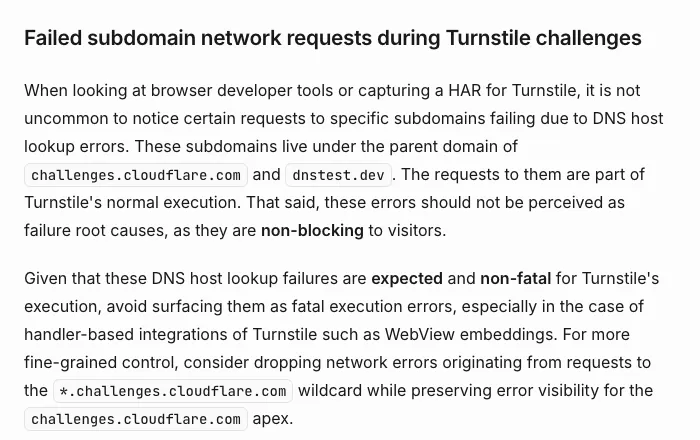
Cloudflare's own docs: failed subdomain requests under challenges.cloudflare.com are expected (captured 11 November 2026).
challenges.cloudflare.com vs /cdn-cgi/challenge-platform/ on the site itself
The same /cdn-cgi/challenge-platform/ path also appears on the site's own domain, for a different reason. Cloudflare adds a /cdn-cgi/ endpoint to every domain it proxies, and its bot products use example.com/cdn-cgi/challenge-platform/ for JavaScript Detections, a script injected into ordinary HTML pages that runs without stopping the visitor. That means a normal 200 page can contain the string "challenge-platform" without any challenge being shown. A full-page challenge is also served at the site's own address, with its scripts under that domain's /cdn-cgi/challenge-platform/; the checkbox you click can still be an iframe from challenges.cloudflare.com, which is why blocking the domain breaks both.
Is challenges.cloudflare.com safe?
Yes. It is a Cloudflare-owned domain on cloudflare.com, and the requests to it are the security check the website chose to run. It does not install anything, and Cloudflare's challenge docs state that its challenges do not use puzzles such as picking images or typing distorted letters. Blocking it does not make you safer; it only stops the sites that use it from letting you in.
Two things are worth checking, though:
- The exact host. It should be
challenges.cloudflare.comover HTTPS (or a subdomain of it). A lookalike such as a different spelling, or a page on an unrelated domain styled like Cloudflare, is not Cloudflare. - What the page asks you to do. A real check is a click at most. Nothing in Cloudflare's challenge documentation asks a visitor to copy a command into the Windows Run box, PowerShell or a terminal. If a "verification" page asks for that, close it. Our explainer on what a CAPTCHA test is and how to spot a fake one shows how the real widgets identify themselves.
Why you see "Please unblock challenges.cloudflare.com to proceed"
The website shows this message when the Turnstile script or iframe from challenges.cloudflare.com did not load. ChatGPT is where most people meet it, but any site that uses Turnstile can show the same text. The usual causes, from most to least common:
- An ad, script or privacy blocker. Cloudflare's supported-browsers page names ad blockers, privacy or canvas blockers and VPN or proxy extensions as things that interfere with challenges.
- A DNS filter. Pi-hole, NextDNS, AdGuard DNS, a router blocklist or a hosts file that blocks challenges.cloudflare.com or its subdomains.
- A work, school or public network firewall that filters the domain. Only the network's admin can change that.
- JavaScript or cookies turned off for the site, or a very old browser. Internet Explorer is not supported.
- A Cloudflare incident. On 18 November 2025, Cloudflare's outage postmortem says, "Turnstile failed to load" while its network returned 5xx errors from about 11:28 to 14:30 UTC, with all services back by 17:06 UTC. During that window the message appeared for people who had blocked nothing, and no setting on their side could fix it.
How to unblock challenges.cloudflare.com
Work through these in order and reload the page after each step; stop when it works.
- Rule out an outage. Check cloudflarestatus.com. If there is an active Turnstile or network incident, wait; changing settings will not help.
- Run Cloudflare's compatibility check at
debug.challenges.cloudflare.com. It loads a widget and reports what it found in your browser. - Allow the site in your blocker, or pause extensions for it. In uBlock Origin, AdGuard or Ghostery, add the site you are trying to use to the trusted list rather than turning protection off everywhere.
- Allowlist the domain in DNS filters. In Pi-hole, NextDNS or AdGuard DNS, add
challenges.cloudflare.comand, if your tool supports wildcards,*.challenges.cloudflare.com, then check the query log while you reload to confirm nothing else is blocked. - Turn off the VPN or proxy, or switch to another server, and try a different network such as mobile data.
- Check the clock. Turnstile error 200100 means the device clock is wrong or the check was cached by something in between; set the time to automatic.
- On a managed network, ask IT to allow challenges.cloudflare.com and its subdomains. You cannot change their firewall from the browser.
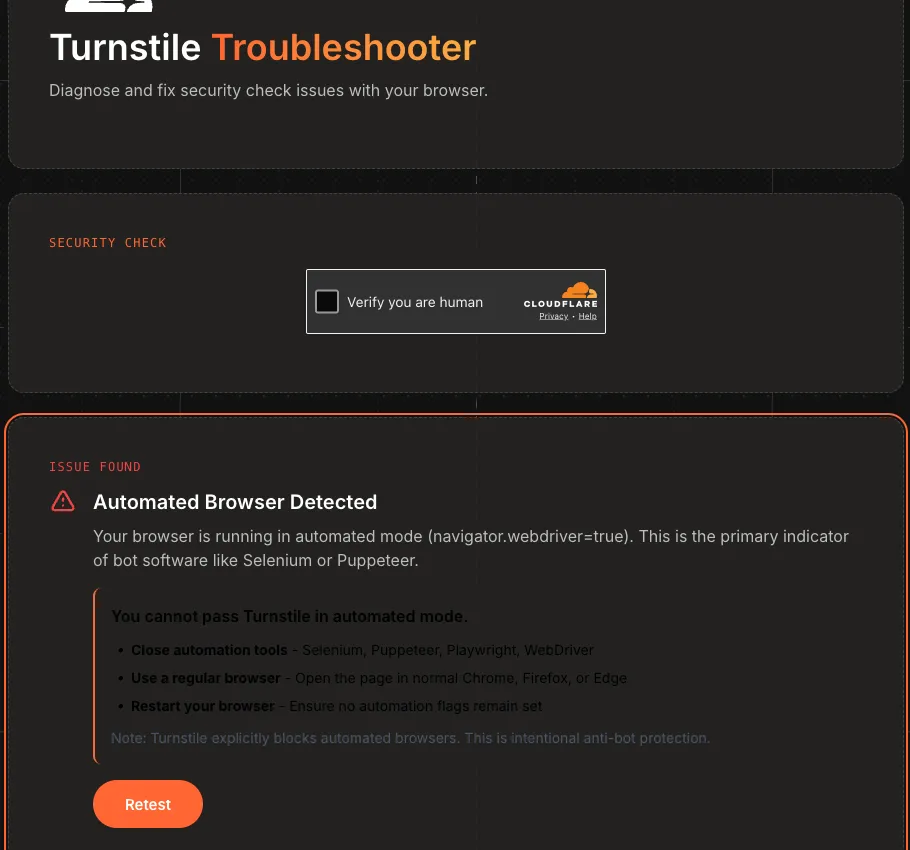
debug.challenges.cloudflare.com on 11 November 2026. We opened it from Playwright, so it correctly flagged an automated browser; in a normal browser it reports the issue it finds instead.
If the widget loads but shows an error code, the code tells you where to look. Cloudflare's Turnstile error code table maps 200500 to "Iframe load error" with the advice to check whether challenges.cloudflare.com is blocked, 110600 to a timed-out challenge, and 300* and 600* to a generic failure where bot-like behaviour was detected.
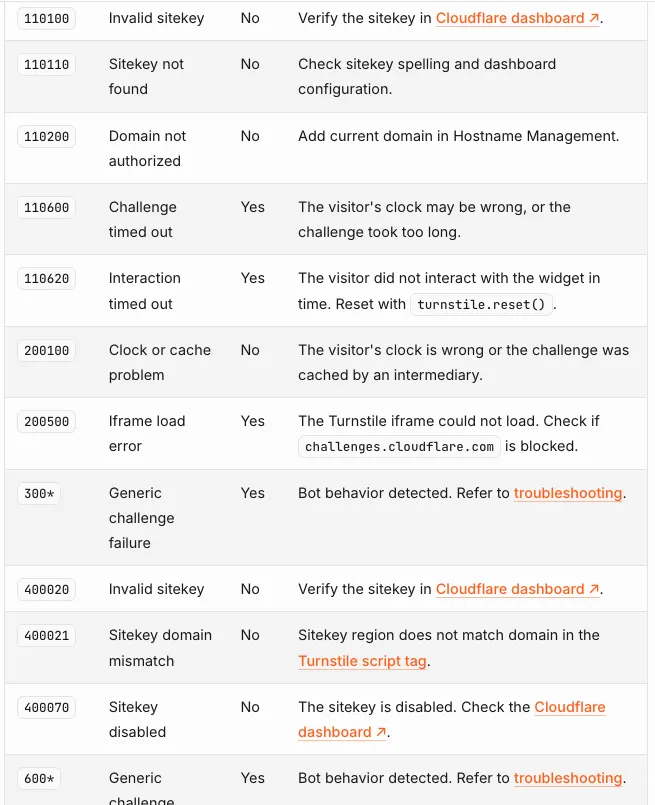
Cloudflare's Turnstile error codes page (last updated 25 September 2026, captured 11 November 2026).
For site owners: what to allow for challenges.cloudflare.com
If your site uses Turnstile and sends a Content Security Policy, the policy must allow challenges.cloudflare.com or the widget will not load. Cloudflare's Turnstile CSP reference recommends a nonce on the api.js script tag (Turnstile works with strict-dynamic), and otherwise these values:
script-src https://challenges.cloudflare.comframe-src https://challenges.cloudflare.comconnect-src 'self'if you use Turnstile pre-clearance, because thecf_clearancecookie is set through a request to/cdn-cgi/on your own domain.
Three more points from Cloudflare's docs that save support tickets:
- Do not report failed lookups to random subdomains of challenges.cloudflare.com, or PAT 401s, as errors in your monitoring or WebView error handlers. Cloudflare suggests dropping errors from
*.challenges.cloudflare.comwhile keeping the apex visible. - Challenge Pages cannot be embedded in cross-origin iframes, and a Managed Challenge solved from one IP is not valid from another, which shows up as a loop.
- For your own automated tests, use Turnstile's test sitekeys rather than real widgets; our guide to testing reCAPTCHA and Turnstile with test keys lists them.
For developers: when your automation hits challenges.cloudflare.com
If your script sees challenges.cloudflare.com, it is facing a Turnstile widget or a challenge, not a block. Cloudflare's supported-browsers page lists automated browsers (Selenium, Puppeteer, Playwright and Cypress by name) as unsupported for solving production challenges, which matches what its troubleshooter told our Playwright session above. Three rules keep the diagnosis straight:
- Detect challenges by header, not by string. Cloudflare sets
cf-mitigated: challengeon every Challenge Page response, and challenge responses are alwaystext/html. Searching the body for "challenge-platform" gives false positives, because JavaScript Detections puts that path in normal pages. - A 403 with error 1006, 1010 or 1020 is a block, not a challenge. Nothing loads from challenges.cloudflare.com and there is nothing to solve; see what Cloudflare 403 and error 1020 mean for scrapers.
- A widget means there is a sitekey. Read it from the widget's
data-sitekeyor from theturnstile.rendercall, along with anyactionandcData. Our Python and Playwright Turnstile walkthrough shows how to capture them, including on pages that render the widget from JavaScript.
Only automate sites you own or are authorised to test. A Turnstile token is also single-use by default and expires, so if one is accepted once and then fails, the cause is usually reuse, expiry or a mismatch between the solving and submitting session, covered in why a valid captcha token gets rejected.
How CaptchaNo handles challenges.cloudflare.com widgets
CaptchaNo returns Turnstile tokens from our own solving infrastructure in one API call. Our Cloudflare Turnstile solver takes the sitekey and page URL, plus the action and cData when the page sets them, and handles both the embedded widget and the standalone challenge page. It does not unblock a DNS filter, and it cannot turn a 1020 block into a 200.
- Billing only for successful solves. Failed solves are never charged, and credit does not expire.
- Help from the people who run it. support@captchano.com is answered by the engineers who operate the service, with SDKs for Python, Node.js, Go and PHP and an MCP server for agents.
- A page to test against. The test page used for the request log above verifies tokens against Cloudflare's siteverify and shows the raw response.
Frequently Asked Questions
Is challenges.cloudflare.com a virus?
No. It is a Cloudflare domain that serves the Turnstile widget and the bot check behind Cloudflare challenge pages. Websites load it on purpose to tell people from bots, and it does not install anything. Be wary only of lookalike domains or pages that copy Cloudflare's look and ask you to paste a command into a terminal or the Run box; a real check never asks that.
Why does ChatGPT say to unblock challenges.cloudflare.com?
ChatGPT runs a Cloudflare Turnstile check, and the message appears when that check cannot load. The usual cause is an ad blocker, privacy extension, DNS filter such as Pi-hole, VPN or a work firewall blocking the domain. During a Cloudflare incident, such as the one on 18 November 2025, it can appear even when nothing on your side is blocked.
Should I whitelist challenges.cloudflare.com in Pi-hole?
Yes, if you want sites that use Cloudflare's checks to work. Add challenges.cloudflare.com to the allowlist, and add a wildcard for its subdomains if your setup supports one, because the check also contacts random subdomains. Then reload the page while watching the query log to confirm nothing else related is still being blocked.
Why do I see failed requests to challenges.cloudflare.com in DevTools?
Some of them are meant to fail. Cloudflare documents that DNS lookup errors for random subdomains of challenges.cloudflare.com and a 401 on the Private Access Token request are part of normal Turnstile execution and do not block the visitor. Look instead for a failed api.js or iframe load, or a Turnstile error code such as 200500.
Does seeing challenges.cloudflare.com mean a site uses Cloudflare?
Not necessarily. Cloudflare's Turnstile documentation says the widget can be embedded on any website without sending its traffic through Cloudflare. A site that loads challenges.cloudflare.com may only use Turnstile on a form. Full-page "Just a moment" screens are different: they come from Cloudflare's proxy, so a site showing one does route its traffic through Cloudflare.
Handle the Turnstile check in your own stack
If challenges.cloudflare.com is in front of a site you are authorised to automate, read the sitekey, send it with the page URL, and inject the token where the widget would. Open the CaptchaNo docs and send your first Turnstile solve, and see pricing per successful solve.