Google Unusual Traffic Error: What It Means and Fixes
Google's unusual traffic from your computer network message, explained: why it appears, how to clear it, and what scrapers should do instead of retrying.
Google's "Our systems have detected unusual traffic from your computer network" message means Google Search thinks the IP address you are using is sending automated queries. As a person, you usually clear it by solving the reCAPTCHA on the page and then removing whatever made the traffic look automated: a VPN exit shared with thousands of users, a busy office network, a browser extension, malware, or your own script. If you are a developer and your scraper or rank tracker is the cause, a captcha solver is not the fix. Slowing down or using an official API is. This guide covers both cases, and explains how the challenge relates to the image grids that keep asking you to select squares.
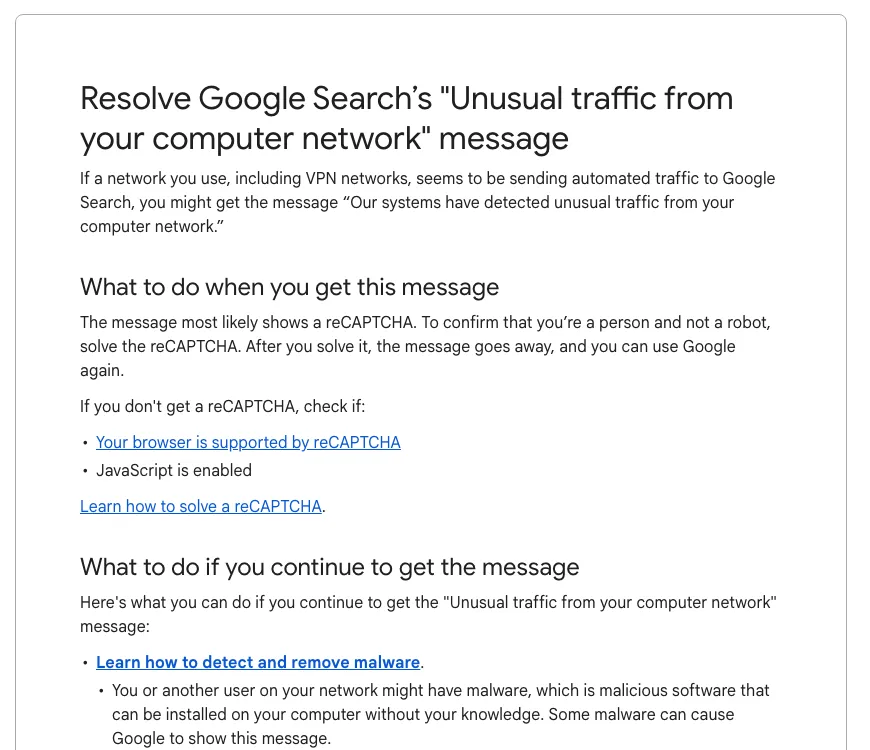
What does "unusual traffic from your computer network" mean?
It means Google Search has rate-limited your IP address because requests from it look like they come from a program rather than a person. It is a judgement about the network address, not about your Google account, so signing in does not always make it go away.
Google's help page for the message lists what it counts as automated traffic: robots, computer programs, automated services, search scrapers, and software that sends searches to check where a website ranks. It also names the indirect causes that catch ordinary people: malware on any device on the network, shared networks such as schools and offices, VPNs whose other users send automated searches, and IPv6 tunnel services.
Some versions add that your computer or network "may be sending automated queries". Copies of the page that users post in help forums show it also prints the IP address Google saw and a timestamp. Note that IP: it tells you which exit Google is judging, which matters when you are behind a VPN or proxy.
Why Google keeps asking if you're a robot
Google keeps asking because the signal it reacts to is still there. Solving one reCAPTCHA proves a human is present right now; it does not change the reputation of an IP address that thousands of other people, or one busy script, are still using.
The common triggers, roughly in the order we would check them:
- A VPN or proxy exit. Free and popular VPN servers put many users behind one address. If any of them scrape Google, everyone on that exit gets the challenge.
- A shared network. Offices, universities, hotels, mobile carriers using carrier-grade NAT: hundreds of people appear as one IP to Google.
- Software on your own machine. SEO and rank-tracking extensions, "auto refresh" add-ons, and malware can send searches in the background.
- Your own searching pattern. Many fast queries in a row, or long strings of advanced operators such as
site:andinurl:, are widely reported to raise the odds of a challenge. - Your own code. A script hitting
google.com/searchfrom one IP is the most direct trigger there is.
Score-based reCAPTCHA works on the same idea of judging traffic rather than solving puzzles, which we cover in what a reCAPTCHA v3 score actually measures.
If you are not sure which check you are looking at, our guide to telling reCAPTCHA, Turnstile and other CAPTCHAs apart lists what each one looks like and where it loads from.
How to fix the unusual traffic message as a person
Solve the reCAPTCHA once, then remove the cause so it does not return. Work through these in order and stop when the message stops appearing.
- Solve the challenge. Google says the message goes away after you solve it. If no reCAPTCHA appears, check that JavaScript is enabled and your browser is supported.
- Turn off your VPN or proxy, or switch to a different server. If the message disappears, the exit address was the problem.
- Test another network. Load Google over your phone's mobile data. If it works there, the problem is your network, not your device.
- Disable extensions, especially SEO, scraping, auto-refresh and "free VPN" add-ons, then try a private window.
- Scan for malware if the message follows the same computer across several networks. Google links its own malware guidance from the help page.
- Wait. Google does not publish how long the block lasts. In practice it lifts once the traffic pattern stops, so retrying the same pattern every minute only keeps it alive.
- On a work or school network, tell the IT team. Google's advice to administrators is to find the sources of automated traffic and block them.
Quick diagnosis table
Match what you see to the most likely cause before you change anything.
| What you see | Most likely cause | What fixes it |
|---|---|---|
| Only happens with the VPN on | Shared VPN exit with bad reputation | Change server or turn the VPN off for search |
| Everyone in the office gets it | One device or tool on the network sending queries | IT finds and stops the source |
| Follows one laptop to every network | Extension or malware on that laptop | Remove extensions, run a malware scan |
| Starts minutes after your script runs | Your own automated queries | Stop the script; use an official API |
| No reCAPTCHA shown, just the message | JavaScript blocked or unsupported browser | Enable JavaScript, update the browser |
Why your scraper or script hits "unusual traffic"
Your script hits it because scraping Google Search results is exactly what the check is built to stop. Google's help page names "search scrapers" and rank-checking software as automated traffic, and every request from a datacenter IP with no browser history adds to the signal.
When it triggers, a request to google.com/search is redirected to a page under google.com/sorry/ that holds the challenge, so a scraper that only checks for HTTP 200 and parses the HTML will quietly collect empty results. Detect the redirect and stop, rather than retrying in a loop: retries from the same IP keep the block active.
This is also a terms question, not only a technical one. Google's Terms of Service (effective 30 July 2026) list "bypassing our systems or protective measures" and using automated means to access content in violation of machine-readable instructions among the things users must not do. Solving Google's own block-page reCAPTCHA by machine so that a scraper can keep querying Search is the textbook case of bypassing a protective measure, and our acceptable use policy limits CaptchaNo to automation you are authorised to run.
What developers should use instead of scraping Google
Use an official data source where one exists, and check your plans against the dates below: the obvious official route is closing.
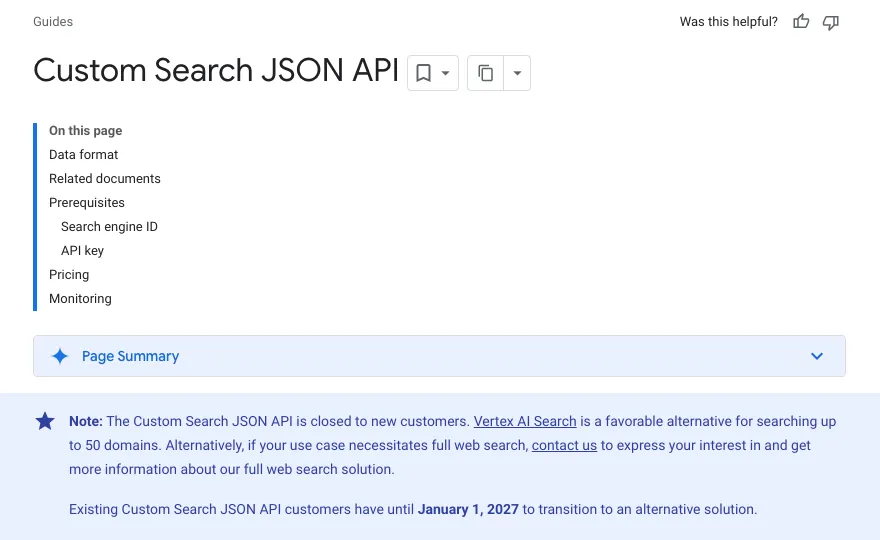
- Custom Search JSON API. Google's overview page now says it is closed to new customers, and existing customers have until 1 January 2027 to move to an alternative. If you already use it, plan the migration now. Google points to Vertex AI Search for searching up to 50 domains.
- Search Console. If what you really want is how your own site ranks, the Search Console Performance report and its API give you your own queries, clicks and positions without scraping anything.
- Licensed SERP data. For rankings across sites you do not own, a commercial data provider that takes on the collection is the honest route.
- If you must make the occasional request, keep it to human-like volume from a stable IP, do not rotate through proxy pools to dodge the limit, and stop on the first redirect to the block page.
We give the same advice for every Google property on our Google automation page: the official APIs cover most of what people try to scrape. For a broader view of the legitimate routes around a captcha, see six legitimate captcha bypass options and their limits.
Is "unusual traffic" the same as a Cloudflare check?
No. Google's message is Google Search protecting itself; Cloudflare's "Verifying you are human" page is a website's own bot protection, served by Cloudflare in front of someone else's site. They feel alike because both judge your IP and browser before they show a challenge.
The practical difference for automation: on a site you are authorised to automate, a Cloudflare Turnstile widget returns a token your code can submit, which is a normal captcha-solving job. Google's block page is a rate limit on Google itself. A Cloudflare 403 with error 1020 is different again: a site owner's firewall rule, covered in our guide to Cloudflare access-denied errors. If you are stuck on the Cloudflare version, our guide to Cloudflare's verification loop walks through the three kinds of loop and which ones a solver can help with.
Where CaptchaNo fits, and where it does not
We run CaptchaNo, so to be plain about it: CaptchaNo does not fix Google's "unusual traffic" block, and we would not point a solver at Google's own block page.
What CaptchaNo does is solve the reCAPTCHA v2, reCAPTCHA v3, Cloudflare Turnstile, DataDome and image challenges that appear on sites you are allowed to automate: your own staging and QA flows, partner portals, and data jobs you have permission for. The reCAPTCHA v2 solver returns a token from our own solving infrastructure in one API call, failed solves are never billed, and credit never expires. If you are not sure which protection a page uses, the free captcha detector tells you before you write any code, and questions go straight to the engineers who run the service at support@captchano.com.
Frequently Asked Questions
How long does Google's unusual traffic block last?
Google does not publish a fixed duration. In practice the block lifts once the automated-looking traffic from your IP address stops, so it tends to clear sooner on a private connection you control than on a crowded VPN exit that other people keep using. Retrying the same pattern every few seconds keeps it active, so stop the cause, solve the reCAPTCHA once and give it time.
Does "unusual traffic" mean my computer has a virus?
Not necessarily. Google lists malware as one possible cause, but VPNs, shared office or school networks and browser extensions are far more common. If the message follows the same computer across several different networks, such as home Wi-Fi and mobile data, then a malware scan and an extension clean-up are worth doing.
Why do I only get the unusual traffic message on a VPN?
A VPN server puts many users behind one IP address. If some of them send automated searches, Google flags that address and every user on it sees the challenge. Switching to another VPN server or turning the VPN off for search usually tells you within a minute whether the exit address was the cause.
Can a captcha solver get my scraper past Google's unusual traffic page?
It should not be used for that. The block page is Google rate-limiting automated searches, and Google's terms prohibit bypassing its protective measures. Solving the challenge by machine would only feed more queries into the same limit. Use Search Console for your own site's data or a licensed data source, and keep solvers for sites you are authorised to automate.
Is there an official Google search API for developers?
The Custom Search JSON API exists but, as of November 2026, Google says it is closed to new customers and will stop working for existing ones on 1 January 2027. Google suggests Vertex AI Search for searching up to 50 domains. For data about your own site, the Search Console API is the right tool.
Solve captchas only where you are allowed to
If Google is challenging you, fix the network or stop the script; no solver changes an IP's reputation. If your real problem is a reCAPTCHA or Turnstile widget on a site you are authorised to automate, read the CaptchaNo API reference, check pay-per-successful-solve pricing, and send your first request in a few minutes.