Captcha MCP Server: Add a Solver to Claude and Cursor
Set up a captcha MCP server in Claude Code, Claude Desktop, Cursor or VS Code, cap what the agent can spend, and inject the token with Playwright MCP.
A captcha MCP server gives an AI agent one more tool: it sends the captcha's details to a solving API and gets back the token the page needs. On its own it can't get the token into the page. That is the browser tool's job, and most setup guides skip that half. This guide covers both halves for Claude Code, Claude Desktop, Cursor and VS Code, plus the two settings that keep an unattended agent from spending your balance. For the wider picture of agents and captchas, start with our overview of why agents fail quietly at captchas.
What we ran, and what we didn't
We build CaptchaNo and its MCP server, captchano-mcp, so this guide uses it for the examples. Everything below was run on 27 November 2026 (18:50 to 18:52 UTC) with captchano-mcp 1.0.0, the official MCP TypeScript client 2.4.0, Playwright MCP 0.0.86 and Node 26 on macOS:
- A real stdio session:
initialize,tools/list,list_captcha_types, andget_balanceagainst the live API with a deliberately fake key. - The argument check, the spend cap and the slow-solve handoff, run against a local mock API that counts every request it receives. The mock's cost values are made up and are not our prices.
- Playwright MCP on Google's public reCAPTCHA v2 demo page, reading the sitekey and writing a placeholder string into the response field. Nothing was submitted.
We ran no real solves this time: no test key was available, so this post makes no claim about solve speed or pass rates. The plumbing is what we tested.
What is a captcha MCP server?
It is a small program that speaks the Model Context Protocol and exposes captcha solving as a tool an AI client can call. The client (Claude, Cursor, Copilot) starts it, reads its tool list, and lets the model call solve_captcha when a page blocks the task.
The server never touches the browser. It takes inputs the agent collected (page URL, sitekey, maybe an action name or a proxy), calls the solving API, and returns a token, a cookie or text. The agent still needs a second tool that drives the page, such as Playwright MCP, to put that value where the site expects it. Treat the setup as two servers working together, not one.
Here is what our server exposed in the stdio session. The MCP annotations matter: solve_captcha is the only tool marked as not read-only, so clients that ask before side effects will ask before a solve, while balance and task lookups can run freely.
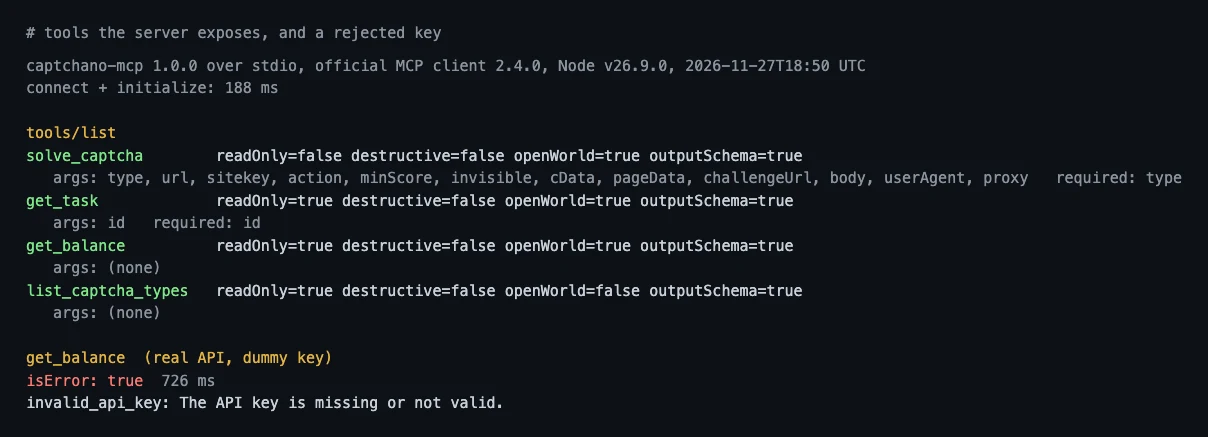
Connecting took 188 ms. A fake key came back after 726 ms as a tool result with isError: true and the code invalid_api_key, plus a hint telling the model not to retry until the key is fixed. That matches the MCP tools specification, which puts execution errors in the result so the model can read them and change course instead of crashing the session.
Set up the captcha MCP server in your client
Every client needs the same three things: the command npx, the arguments -y captchano-mcp, and an environment variable CAPTCHANO_API_KEY. Node.js 20.3 or newer is required. You create the key in the dashboard. Keys start with cn-.
Claude Code
claude mcp add captchano --env CAPTCHANO_API_KEY=cn-your-key --env CAPTCHANO_MAX_SPEND_USD=1.00 -- npx -y captchano-mcpThis writes to local scope (this project, your machine only). The Claude Code MCP documentation lists --scope user for every project and --scope project for a shared .mcp.json. Don't use project scope with a literal key in it, because that file is meant to be committed.
Claude Desktop and Cursor
Both use the same mcpServers block. Claude Desktop keeps it in claude_desktop_config.json (Settings, Developer, Edit Config). Cursor reads ~/.cursor/mcp.json globally or .cursor/mcp.json per project.
{
  "mcpServers": {
    "captchano": {
      "command": "npx",
      "args": ["-y", "captchano-mcp"],
      "env": {
        "CAPTCHANO_API_KEY": "cn-your-key",
        "CAPTCHANO_MAX_SPEND_USD": "1.00"
      }
    }
  }
}
In Cursor you can keep the key out of the file: write "CAPTCHANO_API_KEY": "${env:CAPTCHANO_API_KEY}" and export the variable in your shell. Cursor fills in ${env:NAME} when it starts the server.
VS Code (Copilot agent mode)
VS Code's .vscode/mcp.json uses a servers key and supports an inputs entry of type promptString with "password": true. VS Code then asks for the key the first time and stores it itself, so the key is never in the repository. The full snippet is on our MCP server setup page.
Windsurf, Cline, Zed and other stdio clients take the same command, arguments and environment variable.
Find the sitekey and inject the token with Playwright MCP
The solving server needs inputs from the page, and the token has to go back into the page. Playwright MCP covers both through its browser_evaluate tool, which runs a JavaScript function in the current page. Of the 25 tools Playwright MCP 0.0.86 exposed in our session, that is the one this job needs.
On Google's v2 demo page, one evaluate call returned the sitekey from data-sitekey. The k= parameter of the anchor iframe held the same value, and the hidden #g-recaptcha-response textarea was present. A second call wrote a 36-character placeholder into that textarea and read it back. A real token from solve_captcha goes in the same way:
// 1. browser_evaluate: collect the inputs solve_captcha needs
() => ({
  sitekey: document.querySelector('[data-sitekey]')?.dataset.sitekey,
  url: location.href,
  userAgent: navigator.userAgent
})

// 2. solve_captcha { type: "recaptcha_v2", url, sitekey, userAgent }

// 3. browser_evaluate: put the token where the form reads it
() => {
  const el = document.querySelector('#g-recaptcha-response');
  el.value = 'TOKEN_FROM_SOLVE_CAPTCHA';
  return el.value.length;
}
For Cloudflare Turnstile the field is usually the hidden input named cf-turnstile-response. Turnstile widgets rendered from JavaScript often have no data-sitekey attribute at all. Our guide to finding a reCAPTCHA or Turnstile sitekey shows where the key hides in each case.
Two details decide whether the site accepts the token. Pass the browser's real navigator.userAgent to solve_captcha, so the token is minted for the same client that submits it. And if the page uses a JavaScript callback instead of reading the field when the form is submitted, setting the value is not enough: the callback has to run. If a correct-looking token is still refused, work through our list of reasons valid captcha tokens get rejected.
Cap what the agent can spend
Set CAPTCHANO_MAX_SPEND_USD. The server adds up the cost the API reports for each task it submitted. Once the total reaches the cap, solve_captcha refuses new solves without contacting the API.
We checked this against the counting mock with the cap set to 2.5 times the mock's per-task cost. A call missing its sitekey was rejected as invalid_arguments with zero requests sent, so a malformed call costs nothing. Calls 1 to 3 went through. Call 4 returned budget_exhausted, and the request counter stayed at 3.
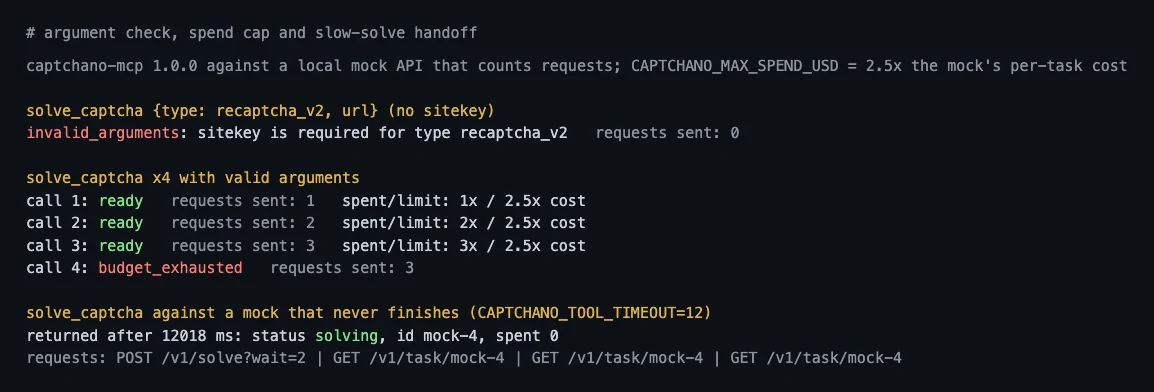
Notice what call 3 did: it started under the cap and finished over it, at 3 times the per-task cost against a 2.5 times cap. The cap is checked before each solve, not during one. Set it a little below the most you are willing to lose. The cap also resets when the client restarts the server, so for a hard ceiling across sessions, give the agent its own API key with a small balance. Per-key usage in the dashboard then shows exactly what that agent spent.
The same idea, budget outside the model's control, is how we built the tools in our OpenAI Agents SDK solver with spend limits and the Browser Use solve action. With MCP it is a single environment variable.
Slow solves and client timeouts
Many MCP clients cancel a tool call after about 60 seconds. Rather than letting a slow solve die, captchano-mcp returns a resumable result before then. By default it waits up to 50 seconds (CAPTCHANO_TOOL_TIMEOUT), then hands back status: "solving" with a task id.
In our run we set the limit to 12 seconds against a mock that never finished. The call returned after 12.0 seconds with solving, a task id and zero spend, after one POST and three five-second polls. The text told the model to call get_task with that id and not to submit a new solve. That instruction matters: an agent that re-submits on every timeout pays for duplicate work. Nothing is billed until a task is ready, and failed solves are never billed.
Keep a human in the loop
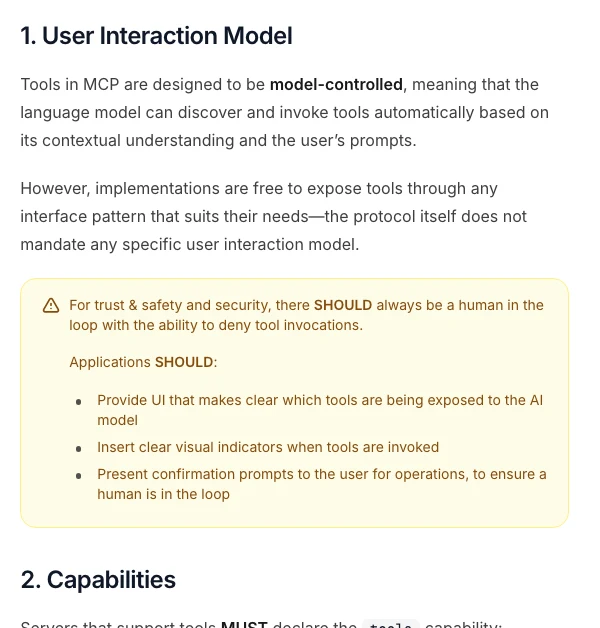
The MCP specification says a human SHOULD always be able to deny tool calls, and that clients SHOULD show confirmation prompts. For a tool that spends money, take that advice.
- Don't click "always allow" for
solve_captcha. A page the agent visits can contain text that tries to make it solve captchas on other sites. Approving each solve is how you catch that. Read-only tools are safe to auto-approve. - Keep the key out of tool arguments and committed files.
captchano-mcpreads the key only from its environment, never returns it in results, and strips anything that looks like acn-key from its logs. - Solve only where you are allowed to. Your own forms, QA of your own sites, monitoring you are permitted to run, or sites whose terms allow automation.
Which captcha types work through MCP?
Version 1.0.0 of captchano-mcp handles reCAPTCHA v2 (checkbox and invisible), reCAPTCHA v3, reCAPTCHA Enterprise checkbox widgets, Cloudflare Turnstile, DataDome and image captchas. list_captcha_types returns each one's required fields and where to find them on the page.
- DataDome needs the
challengeUrlfrom the blocked response and a proxy, because the cookie it returns is tied to the IP that earned it. - Score-based reCAPTCHA Enterprise keys and hCaptcha are not supported. Don't expect a token for them.
- GeeTest v3/v4 and Yandex SmartCaptcha are supported by our captcha solver API but are not in the MCP server's catalog at 1.0.0. Call the API directly for those.
How the CaptchaNo MCP server compares
We read ten listing and README pages for other captcha MCP servers on 27 November 2026. Most document a tool per captcha type and stop at "returns a token". Few say how the token reaches the page, and none of the ten described a spend cap for the server process. Those are the two gaps we built captchano-mcp to close, and we would rather you judge it on the behaviour shown above than on our say-so.
- Support from the people who run it. Questions go to support@captchano.com and are answered by the engineers who run the service. The same team maintains the Python, Node.js, Go and PHP SDKs, the browser extension and the solver playground.
- Our own infrastructure. Every solve runs on our own solving infrastructure. The server handles retries, polling and error hints, so the model gets a typed result instead of a stack trace.
- Billing that suits agents. Only successful solves are billed, credit never expires, and each key has its own usage. Rates are on our captcha solver pricing page.
Frequently Asked Questions
What is a captcha MCP server?
It is a Model Context Protocol server that exposes captcha solving as a tool for AI clients such as Claude, Cursor or VS Code Copilot. The model calls it with the page URL and sitekey, the server asks a solving API for a token, and the agent receives that token as a structured result. A separate browser tool then puts the token into the page.
Does an MCP server solve the captcha inside the browser?
No. A solving server only talks to the solving API and returns a token, cookie or text. Getting that value into the page is a browser tool's job, for example Playwright MCP's browser_evaluate writing the token into g-recaptcha-response or cf-turnstile-response. If the site uses a JavaScript callback, the callback must also run before the form is submitted.
How do I stop an agent from spending too much on captchas?
Set CAPTCHANO_MAX_SPEND_USD in the server's environment. The server sums the cost of every task it submits and refuses new solves once the total reaches the cap, without calling the API. The check runs before each solve, so set the cap slightly below your real limit, and give the agent its own key with a small balance.
Is it safe to put my API key in mcp.json?
It works, but the key then sits in a plain-text file, and project-level files are often committed to git. Prefer user-level config, Cursor's ${env:NAME} interpolation, or VS Code's password input prompt. Never pass the key as a tool argument. The CaptchaNo server reads it only from its environment and keeps it out of results and logs.
Why did the agent get a "solving" status instead of a token?
The solve took longer than the server's tool timeout, which defaults to 50 seconds because many MCP clients cancel calls at about 60. The server returns the task id rather than failing. The agent should call get_task with that id a few seconds later. Submitting a fresh solve instead would pay for duplicate work.
Give your agent a captcha tool
Add the server to your client, set a spend cap, and pair it with a browser tool that can write the token into the page. Create a CaptchaNo account to get a cn- key. Failed solves are never billed, and your credit never expires.