OpenAI Agents SDK Captcha Solver With Spend Limits
Build an OpenAI Agents SDK captcha solver tool with a per-run solve budget, safe timeouts, token refs kept out of traces and a host allowlist.
The OpenAI Agents SDK has no built-in captcha solver, so an OpenAI Agents SDK captcha solver is a function tool you write: it sends the sitekey and page URL to a solving API and hands the token to the page. The tool takes about 20 lines. The harder part is stopping a model from looping on it, leaking the token into traces, or retrying a paid call because an error message told it to. This guide builds that tool with the guards in place, and the OpenAI Agents SDK integration page has the short version.
Does the OpenAI Agents SDK have a captcha solver?
No. The SDK's hosted tools are web search, file search, code interpreter, hosted MCP, image generation and tool search, and none of them solves a captcha. ComputerTool can drive a browser, but nothing in the SDK turns a challenge into a token that the site's server will verify.
That leaves three options:
- A function tool that calls a solving API. This guide covers it. It works with any model the SDK can run.
- An MCP server that exposes solving as tools. The SDK can attach MCP servers, and we publish an open-source one; see the captcha MCP server setup.
- A managed browser with solving built in. Less code to write, but you can't see or limit each solve.
We run CaptchaNo, and the code below calls our API. The structure (budget, timeout, token handling, allowlist) applies to any solving API.
What we ran, and what we didn't
We ran every guard in this post through the real Runner.run loop of openai-agents 0.24.0 on Python 3.12, on 8 November 2026. Two parts were replaced, and the results only cover the SDK side:
- The model was scripted. A small
Modelsubclass returned fixed tool calls, so the loop, guardrails, timeouts and turn limit were the SDK's own code, but no LLM was called. - The solve API was a stub (an
httpx.MockTransport), so no real captcha was solved. We are not reporting solve times or success rates here. - The Playwright helper tools in Step 5 were imported and their schemas built, but not run against a live page.
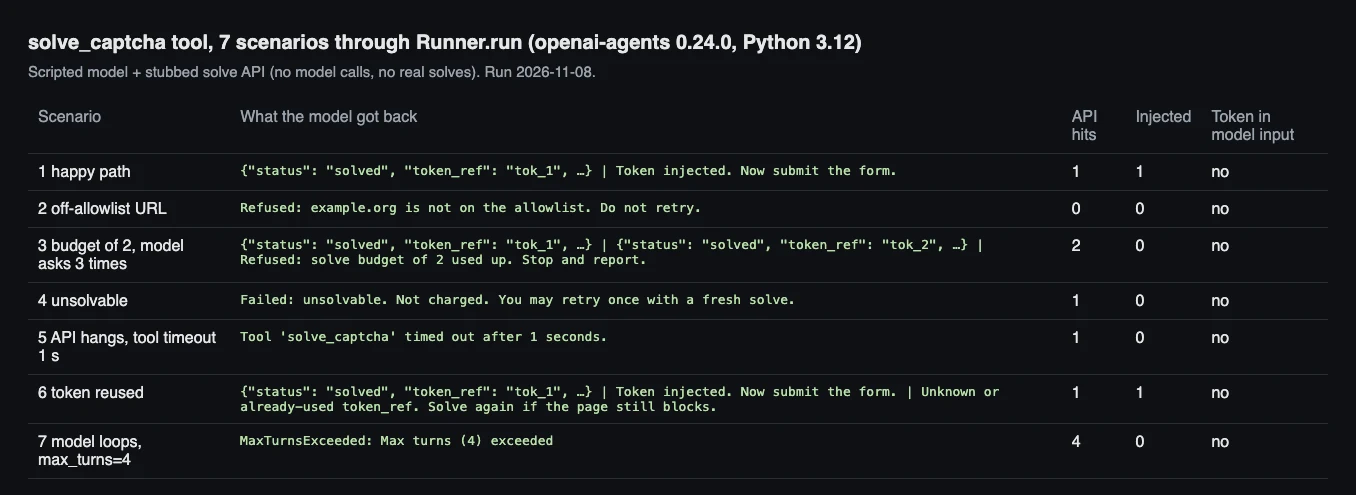
The seven scenarios, the text the model received for each, and how many times the stub API was called.
One setup note from the run: the SDK needs Python 3.10 or newer. On the Python 3.9 that ships with Xcode, pip installed an older release that crashed on import with a Pydantic error about evaluating float | None. Create the virtual environment with 3.10+ before you debug anything else.
Five rules for a captcha tool an agent can't misuse
A captcha tool differs from most tools in three ways: every call costs money, its output is a secret that works once, and the solve keeps running on the server after your client gives up. These five rules follow from that:
- Keep the token out of the conversation. Store it in the run context and give the model a short reference such as
tok_1. - Cap solves per run in code, not in the prompt.
- Set the tool timeout above your own solve deadline, so the SDK never abandons a solve that's still running.
- Replace the default error message. It tells the model to try again.
- Allowlist the hosts the agent may solve on, with a tool input guardrail.
Step 1: Install the SDK and set your keys
Install three packages, then put both keys in environment variables, never in the agent's instructions:
python3.12 -m venv .venv && . .venv/bin/activate
pip install openai-agents playwright httpx
playwright install chromium
export OPENAI_API_KEY=sk-...        # your model provider key
export CAPTCHANO_API_KEY=cn-...     # from the CaptchaNo dashboard
Playwright drives the page and httpx calls the solve API. The scripts read CAPTCHANO_API_KEY when they start, so a key never ends up in a prompt, a trace or a committed file.
Step 2: Keep the budget and the tokens in the run context
The run context is where per-run state lives. The SDK passes your context object to every tool as RunContextWrapper[T] and never sends it to the model. That makes it the right place for the solve counter and the tokens:
# captcha_tools.py
import asyncio
import json
import os
from dataclasses import dataclass, field
from typing import Any, Literal
from urllib.parse import urlparse

import httpx
from agents import (
    RunContextWrapper,
    ToolGuardrailFunctionOutput,
    function_tool,
    tool_input_guardrail,
)

API = "https://api.captchano.com/v1"
ALLOWED_HOSTS = {"www.google.com"}  # sites you are allowed to automate

_client = httpx.AsyncClient(
    base_url=API,
    headers={"Authorization": f"Bearer {os.environ.get('CAPTCHANO_API_KEY', '')}"},
    timeout=httpx.Timeout(75.0),
)


@dataclass
class BrowserRun:
    page: Any                      # the Playwright page the agent is driving
    max_solves: int = 3            # hard cap per run
    solves: int = 0
    spent_usd: float = 0.0
    tokens: dict[str, str] = field(default_factory=dict)  # never shown to the model
Why not rely on max_turns? In scenario 7 the scripted model called the solver on every turn. With max_turns=4 the run raised MaxTurnsExceeded, but only after 4 paid API calls. A turn limit caps how long the loop runs, not how much it spends. The SDK default is 10 turns (DEFAULT_MAX_TURNS in 0.24.0), which would allow up to 10 solves. With max_solves=2 (scenario 3), the third call was refused before it reached the API.
Step 3: Write the solve_captcha function tool
The tool is an async function decorated with @function_tool, with typed arguments so the generated schema limits what the model can send:
def explain_failure(ctx: RunContextWrapper[Any], error: Exception) -> str:
    # The SDK default tells the model to "try again", which turns one bad
    # request into a paid retry loop. Say what to do instead.
    return f"solve_captcha crashed ({type(error).__name__}). Do not retry; report it."


@function_tool(
    timeout=150,  # above our own 140 s deadline, so the SDK never cuts a live solve
    failure_error_function=explain_failure,
    tool_input_guardrails=[only_allowed_hosts],
)
async def solve_captcha(
    ctx: RunContextWrapper[BrowserRun],
    kind: Literal["recaptcha_v2", "recaptcha_v3", "turnstile"],
    sitekey: str,
    page_url: str,
    action: str | None = None,
) -> str:
    """Solve the captcha blocking the current page and store the token.

    Args:
        kind: Widget type found on the page.
        sitekey: The data-sitekey value (or the sitekey in the widget iframe URL).
        page_url: The full URL of the page that shows the captcha.
        action: reCAPTCHA v3 only: the action name the page passes to execute().
    """
    run = ctx.context
    if run.solves >= run.max_solves:
        return f"Refused: solve budget of {run.max_solves} used up. Stop and report."
    run.solves += 1

    body = {"type": kind, "sitekey": sitekey, "url": page_url}
    if action:
        body["action"] = action
    deadline = asyncio.get_running_loop().time() + 140  # stays under timeout=150
    task = (await _client.post("/solve", params={"wait": 60}, json=body)).json()
    while task.get("status") in ("queued", "solving"):
        if asyncio.get_running_loop().time() > deadline:
            return "Failed: no result within 140 s. Do not retry this page."
        await asyncio.sleep(5)
        task = (await _client.get(f"/task/{task['id']}")).json()

    if task.get("status") != "ready":
        code = (task.get("error") or {}).get("code", "unknown")
        hint = {
            "unsolvable": "Not charged. You may retry once with a fresh solve.",
            "invalid_sitekey": "Re-read the sitekey from the page before retrying.",
            "insufficient_balance": "Stop: the account needs credit.",
            "invalid_api_key": "Stop: the API key is not valid.",
        }.get(code, "Do not retry; report it.")
        return f"Failed: {code}. {hint}"

    run.spent_usd += float(task.get("cost") or 0)
    ref = f"tok_{run.solves}"
    run.tokens[ref] = task["solution"]["token"]
    return json.dumps({"status": "solved", "token_ref": ref,
                       "userAgent": task["solution"].get("userAgent")})
Three details in that code come from how the SDK behaves:
kindis aLiteral, so the schema has anenumof three values and the model can't request a challenge type the tool doesn't handle.- Strict mode makes every argument required. In the generated schema,
action(which defaults toNonein Python) is listed underrequiredwith typestring | null. The model must sendnullexplicitly. That's expected, not a bug in your tool. - Each failure tells the model what to do next.
unsolvableallows one retry and says no charge was made. A balance or key error says stop.
Set the timeout above your own deadline
The SDK's timeout works only on async tools. When it fires, the default timeout_behavior="error_as_result" returns a message to the model instead of failing the run. In scenario 5 the stub hung and the model received Tool 'solve_captcha' timed out after 1 seconds.
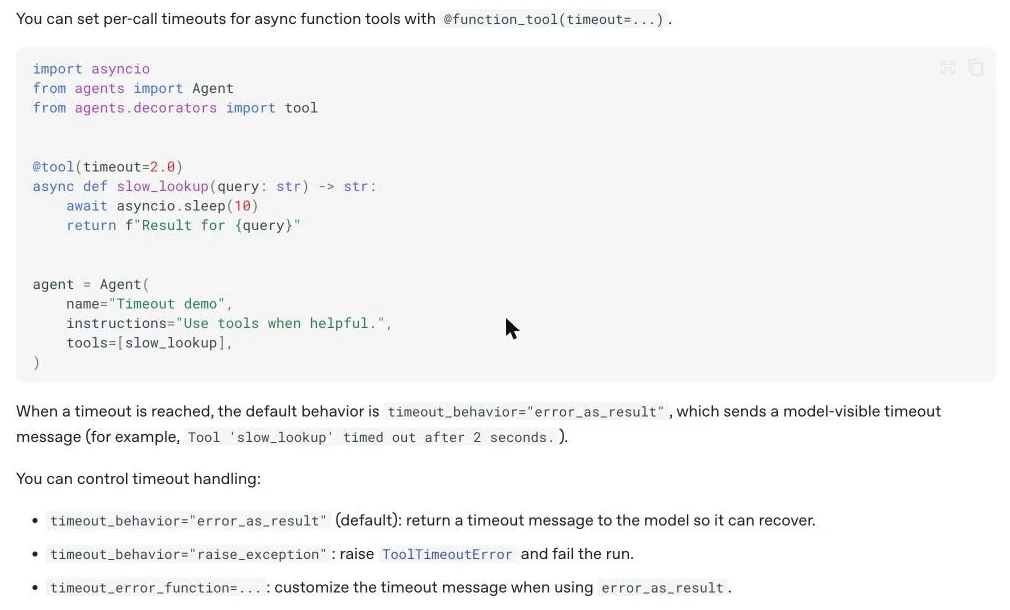
The Function tool timeouts section of the OpenAI Agents SDK tools documentation, captured 8 November 2026 (v0.24.0).
The catch: a client timeout doesn't cancel the solve on the server. The API had already been called in scenario 5, so a real solve would have finished, possibly been billed, and its token would have gone unused. That's why the tool enforces its own 140-second deadline and the SDK timeout is 150 seconds. The tool always gives up first and returns a clear message.
Replace the default error message
If the tool raises an exception (a network error or malformed JSON), the SDK sends the model a fixed string. In 0.24.0, default_tool_error_function returns "An error occurred while running the tool. Please try again." That's reasonable for a free lookup. For a paid solver, "please try again" can start a retry loop. Our explain_failure says what failed and tells the model not to retry. If you pass failure_error_function=None, the exception is raised to your code instead.
Allowlist hosts with a tool input guardrail
A tool input guardrail runs before the tool and can reject the call. Ours parses page_url and rejects any host that's not on ALLOWED_HOSTS. In scenario 2, a call for example.org came back as "Refused: example.org is not on the allowlist. Do not retry." and the API was hit 0 times. Put it above solve_captcha in captcha_tools.py, because the decorator refers to it. The SDK docs make the same distinction: is_enabled only hides a tool, while checks that depend on the arguments belong in the tool or in a guardrail.
@tool_input_guardrail
def only_allowed_hosts(data) -> ToolGuardrailFunctionOutput:
    args = json.loads(data.context.tool_arguments or "{}")
    host = urlparse(args.get("page_url", "")).hostname or ""
    if host not in ALLOWED_HOSTS:
        return ToolGuardrailFunctionOutput.reject_content(
            f"Refused: {host or 'that URL'} is not on the allowlist. Do not retry."
        )
    return ToolGuardrailFunctionOutput.allow()
Step 4: Inject the token without showing it to the model
The model never needs to read the token, so don't send it. Tool outputs become model input, and by default they also go into traces: trace_include_sensitive_data defaults to true unless you set OPENAI_AGENTS_TRACE_INCLUDE_SENSITIVE_DATA=false. A token is also a long opaque string that a model could copy wrongly. The solve tool returns token_ref, and a second tool resolves the reference in code:
INJECT_JS = """token => {
  for (const el of document.querySelectorAll(
      'textarea[name="g-recaptcha-response"], input[name="cf-turnstile-response"]')) {
    el.value = token;
  }
}"""


@function_tool
async def inject_captcha_token(ctx: RunContextWrapper[BrowserRun], token_ref: str) -> str:
    """Put a solved token into the page's hidden response field. Use once per token.

    Args:
        token_ref: The token_ref returned by solve_captcha.
    """
    token = ctx.context.tokens.pop(token_ref, None)  # pop: tokens are single-use
    if token is None:
        return "Unknown or already-used token_ref. Solve again if the page still blocks."
    await ctx.context.page.evaluate(INJECT_JS, token)
    return "Token injected. Now submit the form."
In all seven scenarios we searched every model input for the token string and found it 0 times. The pop enforces single use. In scenario 6 the model tried to inject tok_1 a second time and was told to solve again. A reused reCAPTCHA or Turnstile token fails server-side anyway, so it's better to catch that before the form is submitted.
Step 5: Wire up the agent and run it
Give the agent tools that read the page, so it never has to guess the sitekey. read_captcha reads data-sitekey from the page, and the instructions tell the model to pass those exact values to the solver:
# agent.py
import asyncio

from playwright.async_api import async_playwright
from agents import Agent, RunContextWrapper, Runner, function_tool

from captcha_tools import BrowserRun, inject_captcha_token, solve_captcha

FIND_WIDGET_JS = """() => {
  const el = document.querySelector('[data-sitekey]');
  if (!el) return null;
  const kind = el.classList.contains('cf-turnstile') ? 'turnstile' : 'recaptcha_v2';
  return { kind, sitekey: el.dataset.sitekey, page_url: location.href };
}"""


@function_tool
async def read_captcha(ctx: RunContextWrapper[BrowserRun]) -> str:
    """Read the captcha widget on the current page: kind, sitekey and page_url."""
    found = await ctx.context.page.evaluate(FIND_WIDGET_JS)
    return str(found) if found else "No checkbox or Turnstile widget on this page."


@function_tool
async def submit_form(ctx: RunContextWrapper[BrowserRun]) -> str:
    """Click the form's submit button and return the start of the next page's text."""
    page = ctx.context.page
    await page.click("input[type=submit], button[type=submit]")
    await page.wait_for_load_state()
    return (await page.inner_text("body"))[:300]


agent = Agent(
    name="Form filler",
    instructions=(
        "Submit the form on the current page. If a captcha blocks it: call read_captcha, "
        "call solve_captcha with exactly the values it returned, call inject_captcha_token "
        "with the token_ref, then submit_form. Never invent a sitekey. If a tool answer "
        "starts with Refused or says Stop, stop and report what happened."
    ),
    tools=[read_captcha, solve_captcha, inject_captcha_token, submit_form],
)


async def main() -> None:
    async with async_playwright() as p:
        browser = await p.chromium.launch()
        page = await browser.new_page()
        await page.goto("https://www.google.com/recaptcha/api2/demo")
        run = BrowserRun(page=page, max_solves=2)
        result = await Runner.run(agent, "Submit the demo form.", context=run, max_turns=8)
        print(result.final_output)
        print(f"solves={run.solves} spent=${run.spent_usd:.5f}")
        await browser.close()


asyncio.run(main())
This reads the checkbox widget on Google's public reCAPTCHA demo page. reCAPTCHA v3 has no visible widget and needs the page's action name, which the reCAPTCHA v3 Python walkthrough shows how to find. For plain browser automation without an agent, the Playwright reCAPTCHA v2 script is shorter.
What the seven scenarios showed
Every guard did its job in the real SDK loop. This is what each scenario returned to the model:
| Scenario | What the model got back | Stub API calls |
|---|---|---|
| 1. Happy path | solved, tok_1; then "Token injected" | 1 |
| 2. Host not on the allowlist | Refused by the guardrail | 0 |
| 3. Budget 2, model asks 3 times | Two solves, then "budget of 2 used up" | 2 |
4. API returns unsolvable | "Not charged. You may retry once" | 1 |
| 5. API hangs, timeout 1 s | SDK timeout message | 1 |
| 6. Same token injected twice | Second inject refused | 1 |
7. Model loops, max_turns=4 | MaxTurnsExceeded raised | 4 |
Scenarios 5 and 7 are the ones to remember: a timeout doesn't undo a call, and a turn limit doesn't limit spend.
Why the token can still be rejected
A correct tool can still produce a token the site rejects. The cause is usually the session, not the solve:
- Expiry. Tokens are valid for minutes, so inject and submit straight after solving rather than solving ahead of time.
- User agent and IP. If the result includes a
userAgent, sites that check it expect the browser to use the same one. Compare it withnavigator.userAgentwhen tokens are rejected. - Callbacks. Some pages ignore the hidden field and wait for the widget's JavaScript callback. Filling the textarea is not enough there.
- Wrong action or type. A v3 token solved for the wrong action, or a checkbox token sent where the site expects v3, fails verification.
The full checklist, with how to tell the causes apart, is in why valid captcha tokens get rejected.
Supported challenge types
The tool's Literal covers reCAPTCHA v2, reCAPTCHA v3 and Cloudflare Turnstile. Our API also handles reCAPTCHA Enterprise checkbox widgets, DataDome and image captchas; add them to the Literal and request body if you need them (see the solve API reference). We do not support score-based reCAPTCHA Enterprise keys or hCaptcha. Leave them out of the enum so the model can't request them.
How CaptchaNo fits an Agents SDK agent
CaptchaNo returns tokens from our own solving infrastructure through one endpoint. A single POST /v1/solve?wait=60 call usually returns the result, and GET /v1/task/{id} covers longer solves. Billing suits agents, whose mistakes repeat:
- Only successful solves are billed.
unsolvableand other failed solves cost nothing, which is why the tool can safely allow one retry. - Every result includes its
cost, which the tool adds tospent_usd. - Usage is tracked per API key, so you can give each agent its own key and see its spend separately.
- Credit never expires.
Questions about an integration go to support@captchano.com and are answered by the engineers who run the service. If you'd rather not write a tool, the same calls come as an MCP server. For agents built on LangChain, the LangChain captcha solver tool uses the same design, and the overview of captcha solving for AI agents compares the framework options. CrewAI users can start from our CrewAI solve tool with a usage cap.
Frequently Asked Questions
Can the OpenAI Agents SDK solve captchas on its own?
No. None of its hosted tools (web search, file search, code interpreter, hosted MCP, image generation) solves captchas, and the computer-use tool only clicks and types, with no step that turns a challenge into a verifiable token. You add solving as a function tool or an MCP server that calls a solving API, then inject the returned token into the page.
Should the captcha tool be sync or async?
Make it async. The SDK only applies the timeout parameter to async function tools, and a solve can take tens of seconds, which would block the event loop in a sync tool. An async tool with httpx lets the SDK enforce the timeout, while other tools such as page reads keep running in the same process.
Does max_turns stop an agent from overspending on captchas?
Not by itself. In our run, a model that called the solver on every turn made four paid API calls before max_turns=4 stopped it, and the SDK default is ten turns. Keep a solve counter in the run context and refuse calls past the limit inside the tool, then use max_turns as a second limit on how long the run can go.
Will the token show up in OpenAI traces?
It will if the tool returns it. Tool outputs are sent back to the model, and the SDK includes sensitive data in traces unless you turn that off with OPENAI_AGENTS_TRACE_INCLUDE_SENSITIVE_DATA set to false. Returning a short reference instead of the token keeps it out of both, and the token still reaches the page through a separate inject tool.
Does this work with models other than OpenAI's?
Yes. The tool is plain Python and HTTP, and the Agents SDK can run other providers through its model interface. The model must support function calling. Smaller models are more likely to invent sitekeys, so keep the step that reads the sitekey from the page in code and tell the model to pass that value through exactly.
Give your agent a solver it can't misuse
Copy the two files, set CAPTCHANO_API_KEY, and run the agent on a form you're allowed to automate. Keep the solve budget and the token references from day one. Rates are on the CaptchaNo pricing page, and the Hobby plan has a 7-day free trial.