CrewAI Captcha Solver: Build a Capped Solve Tool
Build a CrewAI captcha solver as a BaseTool: one Playwright thread, the token kept out of the model, and a solve cap that holds. Checked on CrewAI 1.15.41.
CrewAI has no captcha solver built in. A working CrewAI captcha solver is a custom BaseTool that reads the widget from the browser page your crew already has open, gets a token from a solving API, writes the token into the form and returns one short status line. The model never sees the token. This guide builds that tool for CrewAI 1.15.41 with Playwright, and shows three CrewAI behaviours we hit while building it that no other guide mentions. A shorter version lives on our CrewAI integration page.
We run CaptchaNo, so the example calls our API. The tool design works with any token API: swap the URL and the request body if you use another one.
Does CrewAI have a captcha solver tool?
No. CrewAI's tool list includes browser and scraping tools such as BrowserbaseLoadTool, ScrapeWebsiteTool and FirecrawlScrapeWebsiteTool, but nothing that solves a captcha (checked on the CrewAI tools page on 16 November 2026). You write a small tool yourself, or you load a solver's tools through an MCP adapter.
We read the eight pages that rank for this topic before writing. Most are solver or browser vendors. They share the same gaps:
- The token is handled outside the agent. One guide's token-injection snippet isn't connected to the tool at all. Another lists a "create task" tool but no tool to fetch the result.
- No hard limit. Retries and spend caps are "recommended" in prose, but no code stops an agent from calling the solver again and again.
- Nobody mentions threads. CrewAI runs tools on a worker thread, and Playwright's sync API cares which thread it's on. That's where our first version broke.
Our overview of captcha handling for AI agents covers the general loop. This post is the CrewAI build.
What we ran, and what we didn't
We ran every part of the script below on 15 November 2026 (UTC) with Python 3.12, crewai 1.15.41 (released on PyPI on 12 November 2026), Playwright 1.65.2 and httpx 0.28.1, against Google's public reCAPTCHA demo page. To exercise the crew without paying for model calls, we drove it with a scripted model: a small BaseLLM subclass that returns pre-written tool calls, in both native function-calling format and CrewAI's text ("ReAct") format.
We had no test key for this run, so the solve calls reached our real API with an invalid key on purpose and came back with a real invalid_api_key error. To check the success path (token written into the page, never shown to the model) we replaced the API response with a stub. So this post shows threading, detection, error handling, caps and token flow. It does not show a real solve, and we don't claim any solve time or success rate here.
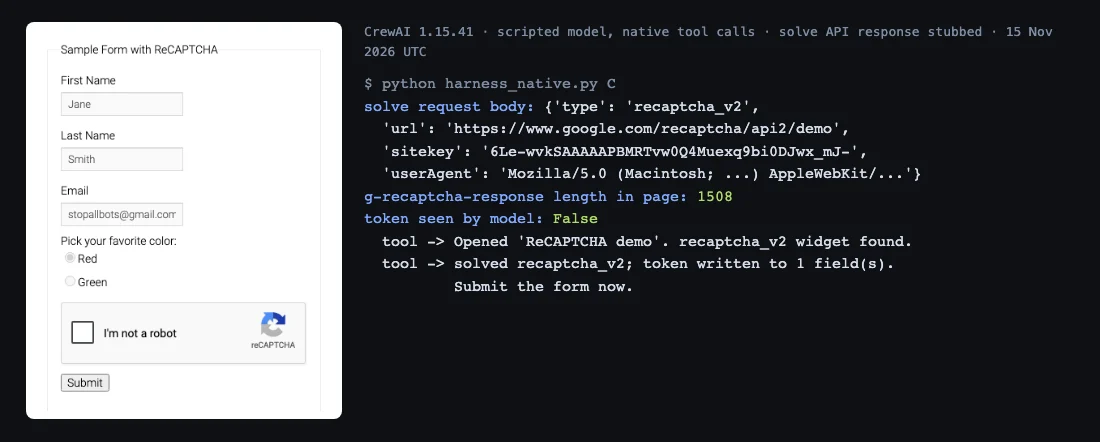
How to design a captcha tool for a CrewAI agent
Give the model as little to get wrong as possible. Four rules matter more than the code:
- No arguments. The tool reads the sitekey, widget type and callback from the live page. A model that passes a sitekey may invent one or reuse one from an earlier page.
- The token stays in the browser. The tool writes the token into the form and returns a status line. A reCAPTCHA token is well over a thousand characters, and a model that copies it into a later call can change one character and break it.
- Errors come back as text. Return
error: code: messageso the agent can stop and report instead of crashing the crew. - The limit lives in code. A line in the task asking the agent not to retry helps.
max_usage_countenforces it, with a quirk we cover in Step 4.
These are the same rules we used for the LangChain solve tool. What changes in CrewAI is how tools share the browser.
Step 1: Install CrewAI, Playwright and httpx
CrewAI needs Python 3.10 to 3.13. Install it with Playwright and an HTTP client:
pip install "crewai==1.15.41" playwright httpx
playwright install chromium
Set CAPTCHANO_API_KEY in the environment, plus PROXY_URL if your browser goes through a proxy, and whatever key your model provider needs. Keep the solver key out of tool arguments and out of the task text.
Step 2: Give Playwright its own thread
Start Playwright on a dedicated thread and send every page action to it. Two things break if you don't, and we hit both.
Why sync Playwright breaks crew.kickoff()
Our first version started Playwright with sync_playwright().start() on the main thread, then called crew.kickoff(). CrewAI refused to run: sync Playwright runs an asyncio event loop on the thread that starts it, and CrewAI 1.15.41 raises a RuntimeError when sync agent execution starts inside a running event loop. The message points you to kickoff_async().
Moving Playwright off the main thread exposes the second problem. A probe tool showed that CrewAI ran every tool call on a worker thread, not on the main thread. Playwright's sync API only works on the thread that started it, so any call from another thread fails with greenlet.error: Cannot switch to a different thread. We got exactly that when our test harness read the page from the main thread.
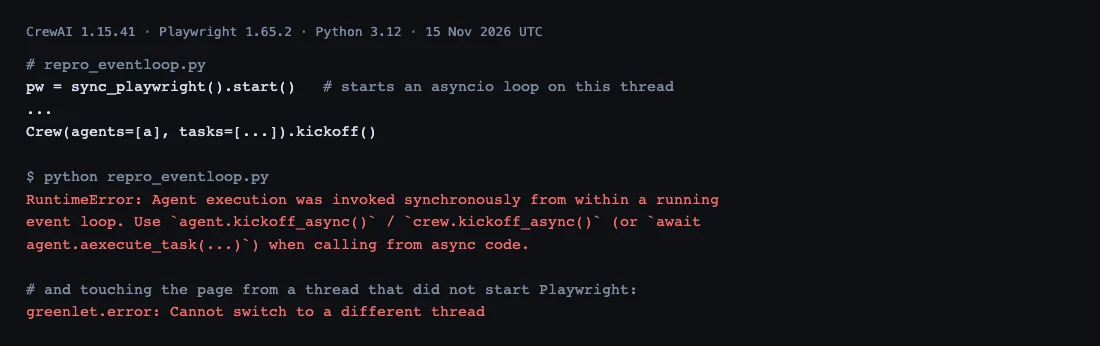
The browser-thread pattern
A single-worker ThreadPoolExecutor owns Playwright. Tools never touch the page directly: they pass a function to browser.do(), which runs it on that one thread and waits for the result. It doesn't matter which thread CrewAI picks for the tool, and the main thread has no event loop, so kickoff() works.
class Browser:
    """One Playwright page, owned by one dedicated thread. Tools never touch the page
    directly: they send a function to that thread with browser.do(...)."""
    def __init__(self):
        self._pool = ThreadPoolExecutor(max_workers=1, thread_name_prefix="browser")
        self.do(self._start)

    def _start(self):
        self._pw = sync_playwright().start()
        self._browser = self._pw.chromium.launch(proxy=playwright_proxy(PROXY_URL))
        self.page = self._browser.new_context().new_page()
        self.user_agent = self.page.evaluate("navigator.userAgent")
        self.thread = threading.get_ident()

    def do(self, fn, *args, **kwargs):
        return self._pool.submit(fn, *args, **kwargs).result()

    def close(self):
        self.do(lambda: (self._browser.close(), self._pw.stop()))
        self._pool.shutdown()
The async route also works (async tools plus kickoff_async()). The browser thread keeps the tools plain synchronous Python, which is what most CrewAI examples use.
Step 3: Write the solve tool as a BaseTool
The tool detects the widget, sends one solve request, waits for the response field, writes the token and fires the page's callback. CrewAI shows the tool's name and description to the model, as its custom tools guide explains, so the description says when to call it and what to do on an error.
class SolveCaptchaTool(BaseTool):
    name: str = "solve_captcha"
    description: str = ("Solve the captcha on the page that is open now and write the token "
                        "into the form. Takes no arguments. Call it once, right before "
                        "submitting. If it returns an error, stop and report it.")
    browser: Browser = Field(exclude=True)
    api_key: str = Field(default_factory=lambda: os.environ.get("CAPTCHANO_API_KEY", ""),
                         exclude=True, repr=False)
    http: httpx.Client | None = Field(default=None, exclude=True)  # injectable for tests
    model_config = {"arbitrary_types_allowed": True}

    def _run(self) -> str:
        b, page = self.browser, self.browser.page
        w = b.do(page.evaluate, DETECT_JS)
        if not w:
            return "error: no captcha widget on the current page"
        task = {"type": w["type"], "url": b.do(lambda: page.url), "sitekey": w["sitekey"],
                "userAgent": b.user_agent}
        if w.get("invisible"):
            task["invisible"] = True
        if PROXY_URL:
            task["proxy"] = PROXY_URL
        client = self.http or httpx.Client(timeout=75)
        try:
            r = client.post(API_URL, params={"wait": 60}, json=task,
                            headers={"Authorization": f"Bearer {self.api_key}"})
            data = r.json()
        except (httpx.HTTPError, ValueError) as e:
            return f"error: solver unreachable ({type(e).__name__})"
        if data.get("status") != "ready":
            err = data.get("error") or {}
            return f"error: {err.get('code', data.get('status'))}: {err.get('message', '')}"
        field = "cf-turnstile-response" if w["type"] == "turnstile" else "g-recaptcha-response"
        try:  # the widget script adds this field after page load; wait for it
            b.do(page.wait_for_selector, f'[name="{field}"]', state="attached", timeout=15000)
        except PlaywrightTimeout:
            return f"error: {field} field never appeared; token not used"
        filled = b.do(page.evaluate, INJECT_JS,
                      [w["type"], data["solution"]["token"], w.get("callback")])
        if not filled:
            return f"error: no {field} field to write the token into"
        return (f"solved {w['type']}; token written to {filled} field(s). "
                f"Submit the form now.")
Three fields keep the token tied to the browser session. url is the page's current URL, read from the browser, which matters after redirects. userAgent comes from the browser itself. proxy is the same proxy the browser uses. If any of them differ between solving and submitting, you get the session mismatch described in why valid captcha tokens get rejected.
Wait for the response field before writing the token
Our first run "succeeded" and wrote the token into zero fields. On Google's demo the hidden g-recaptcha-response textarea didn't exist at DOMContentLoaded: the widget script added it about three seconds later. With a fast solve, the token arrived before the field did. The tool now waits up to 15 seconds for the field and returns an error if there is nothing to write into, instead of telling the agent to submit an empty form. The callback step is explained in our Playwright reCAPTCHA v2 walkthrough.
Step 4: Cap solves with max_usage_count
Pass max_usage_count=2 when you create the tool. Once it's spent, CrewAI refuses further calls and tells the agent the tool "has reached its usage limit". One solve plus one retry for an expired token is enough for a single form. If a page asks for a third token, the problem is usually the session, and another solve won't fix it.
In our runs the cap behaved differently depending on how the model calls tools:
| Behaviour in CrewAI 1.15.41 | Native tool calls | ReAct text mode |
|---|---|---|
Executions allowed with max_usage_count=2 | 2, third call refused | 1, second call refused |
| Same call with the same input, straight after | Runs again | Refused: "I tried reusing the same input" |
| Same call, same input and same result, repeated | Warning on the 4th, tool use stopped on the 5th | Blocked from the 2nd |
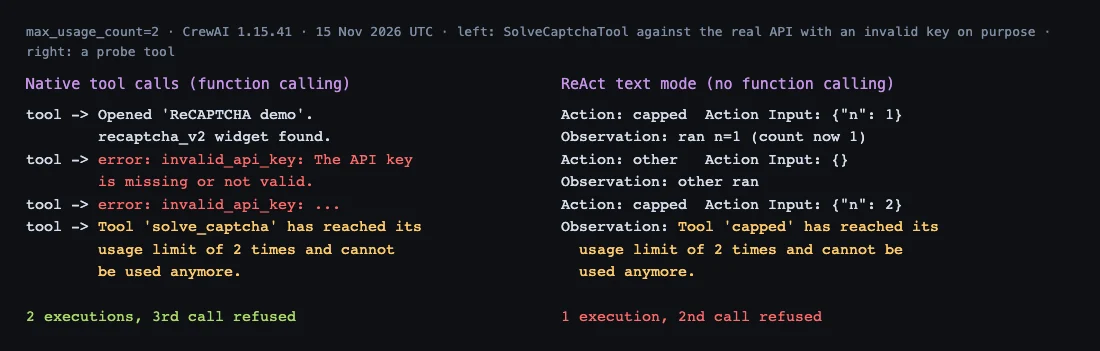
In text mode, CrewAI's tool-usage code counts a call once when the tool claims a use and again after it runs, so a limit of 2 allows a single execution. Models with function calling (the usual case with hosted models) use the native path, where the limit matches the docs. If you run a model in text mode, set the cap one higher, or keep your own counter inside _run.
Don't rely on CrewAI's repeated-call guard as your cap. The agents documentation says CrewAI stops a tool that is called with the same arguments and returns the same result five times in a row. A solve tool's results usually differ from call to call, so that guard may never trigger on a solve loop. max_iter (default 20) bounds the whole agent, not one tool.
Step 5: Wire the crew and run it
One agent gets the three tools, one task describes the flow, and the browser is closed in finally. The task text repeats the no-retry rule, and the cap enforces it.
def build_crew(browser, llm):
    agent = Agent(
        role="Form runner",
        goal="Submit web forms the user is authorised to automate",
        backstory="You operate one browser through tools. You never retry a failed solve.",
        llm=llm,
        tools=[OpenPageTool(browser=browser),
               SolveCaptchaTool(browser=browser, max_usage_count=2),
               SubmitFormTool(browser=browser)],
        max_iter=8,
    )
    task = Task(
        description=("Open {url} and submit the form. If open_page reports a captcha, "
                     "call solve_captcha once, then submit_form. If solve_captcha returns "
                     "an error, stop and report it."),
        expected_output="The first lines of the page shown after submitting, or the error.",
        agent=agent,
    )
    return Crew(agents=[agent], tasks=[task], process=Process.sequential)


if __name__ == "__main__":
    browser = Browser()
    try:
        crew = build_crew(browser, LLM(model=os.environ["CREW_MODEL"]))  # e.g. "openai/<model>"
        print(crew.kickoff(inputs={"url": "https://www.google.com/recaptcha/api2/demo"}))
    finally:
        browser.close()
With our scripted model, this exact build_crew produced: page opened and widget found, two invalid_api_key errors from the real API, then the third call refused by the cap. With a valid key the second call doesn't happen: the tool writes the token and the agent moves on to submit_form. The full file is below.
Full crew_captcha.py (173 lines)
import os
import threading
from concurrent.futures import ThreadPoolExecutor
from urllib.parse import urlsplit

import httpx
from crewai import LLM, Agent, Crew, Process, Task
from crewai.tools import BaseTool
from playwright.sync_api import TimeoutError as PlaywrightTimeout, sync_playwright
from pydantic import BaseModel, Field

API_URL = "https://api.captchano.com/v1/solve"
PROXY_URL = os.environ.get("PROXY_URL")  # http://user:pass@host:port, optional

DETECT_JS = """() => {
  const ts = document.querySelector('.cf-turnstile[data-sitekey]');
  if (ts) return {type: 'turnstile', sitekey: ts.dataset.sitekey,
                  callback: ts.dataset.callback || null};
  const rc = document.querySelector('.g-recaptcha[data-sitekey], [data-sitekey]');
  if (!rc) return null;
  const enterprise = !!document.querySelector('script[src*="recaptcha/enterprise.js"]');
  return {type: enterprise ? 'recaptcha_enterprise' : 'recaptcha_v2',
          sitekey: rc.dataset.sitekey, invisible: rc.dataset.size === 'invisible',
          callback: rc.dataset.callback || null};
}"""

INJECT_JS = """([kind, token, callback]) => {
  const name = kind === 'turnstile' ? 'cf-turnstile-response' : 'g-recaptcha-response';
  const fields = document.querySelectorAll(`[name="${name}"]`);
  fields.forEach(f => { f.value = token; f.innerHTML = token; });
  if (callback && typeof window[callback] === 'function') window[callback](token);
  return fields.length;
}"""


def playwright_proxy(url):
    if not url:
        return None
    u = urlsplit(url)
    return {"server": f"{u.scheme}://{u.hostname}:{u.port}",
            "username": u.username or "", "password": u.password or ""}


class Browser:
    """One Playwright page, owned by one dedicated thread. Tools never touch the page
    directly: they send a function to that thread with browser.do(...)."""
    def __init__(self):
        self._pool = ThreadPoolExecutor(max_workers=1, thread_name_prefix="browser")
        self.do(self._start)

    def _start(self):
        self._pw = sync_playwright().start()
        self._browser = self._pw.chromium.launch(proxy=playwright_proxy(PROXY_URL))
        self.page = self._browser.new_context().new_page()
        self.user_agent = self.page.evaluate("navigator.userAgent")
        self.thread = threading.get_ident()

    def do(self, fn, *args, **kwargs):
        return self._pool.submit(fn, *args, **kwargs).result()

    def close(self):
        self.do(lambda: (self._browser.close(), self._pw.stop()))
        self._pool.shutdown()


class OpenPageInput(BaseModel):
    url: str = Field(..., description="Full URL to open")


class OpenPageTool(BaseTool):
    name: str = "open_page"
    description: str = ("Open a URL in the shared browser. Reports the page title and "
                        "whether a captcha widget is on the page.")
    args_schema: type[BaseModel] = OpenPageInput
    browser: Browser = Field(exclude=True)
    model_config = {"arbitrary_types_allowed": True}

    def _run(self, url: str) -> str:
        def go(page):
            page.goto(url, wait_until="domcontentloaded")
            return page.title(), page.evaluate(DETECT_JS)
        title, w = self.browser.do(go, self.browser.page)
        found = f"{w['type']} widget found" if w else "no captcha widget found"
        return f"Opened '{title}'. {found}."


class SolveCaptchaTool(BaseTool):
    name: str = "solve_captcha"
    description: str = ("Solve the captcha on the page that is open now and write the token "
                        "into the form. Takes no arguments. Call it once, right before "
                        "submitting. If it returns an error, stop and report it.")
    browser: Browser = Field(exclude=True)
    api_key: str = Field(default_factory=lambda: os.environ.get("CAPTCHANO_API_KEY", ""),
                         exclude=True, repr=False)
    http: httpx.Client | None = Field(default=None, exclude=True)  # injectable for tests
    model_config = {"arbitrary_types_allowed": True}

    def _run(self) -> str:
        b, page = self.browser, self.browser.page
        w = b.do(page.evaluate, DETECT_JS)
        if not w:
            return "error: no captcha widget on the current page"
        task = {"type": w["type"], "url": b.do(lambda: page.url), "sitekey": w["sitekey"],
                "userAgent": b.user_agent}
        if w.get("invisible"):
            task["invisible"] = True
        if PROXY_URL:
            task["proxy"] = PROXY_URL
        client = self.http or httpx.Client(timeout=75)
        try:
            r = client.post(API_URL, params={"wait": 60}, json=task,
                            headers={"Authorization": f"Bearer {self.api_key}"})
            data = r.json()
        except (httpx.HTTPError, ValueError) as e:
            return f"error: solver unreachable ({type(e).__name__})"
        if data.get("status") != "ready":
            err = data.get("error") or {}
            return f"error: {err.get('code', data.get('status'))}: {err.get('message', '')}"
        field = "cf-turnstile-response" if w["type"] == "turnstile" else "g-recaptcha-response"
        try:  # the widget script adds this field after page load; wait for it
            b.do(page.wait_for_selector, f'[name="{field}"]', state="attached", timeout=15000)
        except PlaywrightTimeout:
            return f"error: {field} field never appeared; token not used"
        filled = b.do(page.evaluate, INJECT_JS,
                      [w["type"], data["solution"]["token"], w.get("callback")])
        if not filled:
            return f"error: no {field} field to write the token into"
        return (f"solved {w['type']}; token written to {filled} field(s). "
                f"Submit the form now.")


class SubmitFormTool(BaseTool):
    name: str = "submit_form"
    description: str = "Click the form's submit button and return the start of the next page."
    browser: Browser = Field(exclude=True)
    model_config = {"arbitrary_types_allowed": True}

    def _run(self) -> str:
        def submit(page):
            page.click("input[type=submit], button[type=submit]")
            page.wait_for_load_state("domcontentloaded")
            return page.inner_text("body")[:500]
        return self.browser.do(submit, self.browser.page)


def build_crew(browser, llm):
    agent = Agent(
        role="Form runner",
        goal="Submit web forms the user is authorised to automate",
        backstory="You operate one browser through tools. You never retry a failed solve.",
        llm=llm,
        tools=[OpenPageTool(browser=browser),
               SolveCaptchaTool(browser=browser, max_usage_count=2),
               SubmitFormTool(browser=browser)],
        max_iter=8,
    )
    task = Task(
        description=("Open {url} and submit the form. If open_page reports a captcha, "
                     "call solve_captcha once, then submit_form. If solve_captcha returns "
                     "an error, stop and report it."),
        expected_output="The first lines of the page shown after submitting, or the error.",
        agent=agent,
    )
    return Crew(agents=[agent], tasks=[task], process=Process.sequential)


if __name__ == "__main__":
    browser = Browser()
    try:
        crew = build_crew(browser, LLM(model=os.environ["CREW_MODEL"]))  # e.g. "openai/<model>"
        print(crew.kickoff(inputs={"url": "https://www.google.com/recaptcha/api2/demo"}))
    finally:
        browser.close()
Turnstile, invisible reCAPTCHA and v3
The same tool covers Cloudflare Turnstile and invisible reCAPTCHA v2 without changes, and reCAPTCHA v3 needs one more field. Detection picks the type from the page:
- Turnstile: a
.cf-turnstileelement givestype: "turnstile", and the token goes intocf-turnstile-response. Our Turnstile solver page lists the fields. - Invisible v2:
data-size="invisible"addsinvisible: trueto the request. These widgets nearly always use a callback, which the tool fires. - reCAPTCHA Enterprise checkbox widgets: pages that load
enterprise.jsare sent asrecaptcha_enterprise. Score-only Enterprise keys aren't supported. - reCAPTCHA v3: there's no widget in the DOM. Read the sitekey from the
render=parameter ofapi.js, find the action name in the page'sgrecaptcha.executecall, and send"type": "recaptcha_v3"with the action. Our reCAPTCHA v3 Python guide shows how to find it.
Troubleshooting a CrewAI captcha tool
Most failures map to one of these. Each is something we saw while building this tool or a known cause of rejected tokens.
| Symptom | Cause | Fix |
|---|---|---|
RuntimeError: invoked synchronously from within a running event loop | Sync Playwright started on the thread that calls kickoff() | Start Playwright on its own thread (Step 2), or go fully async |
greenlet.error: Cannot switch to a different thread | The page is used from a thread that didn't start Playwright | Route every page call through browser.do() |
| "token written to 0 field(s)" | The response field isn't in the DOM yet | Wait for the field before writing (Step 3) |
| Usage limit hit after one solve | Text-mode tool calling counts each run twice | Set the cap one higher, or count inside the tool |
| Token accepted by the API, rejected by the site | Solve and submit came from different sessions, or the token expired | Send the browser's URL, user agent and proxy; submit right after solving |
How CaptchaNo fits a CrewAI crew
CaptchaNo is one REST endpoint, so the tool needs no SDK. With ?wait=60 the call blocks until the solve finishes, which keeps the tool to one request. Failures come back with a stable error code, such as invalid_api_key, invalid_sitekey or unsolvable, which you can pass straight to the agent. You're only charged for successful solves, and credit doesn't expire.
Solving runs on our own infrastructure, and questions about an integration go to the engineers who run it at support@captchano.com. The API reference lists every request field, and the reCAPTCHA v2 solver page covers the checkbox, invisible and callback variants.
Frequently Asked Questions
Does CrewAI have a built-in captcha solver?
No. CrewAI 1.15.41 ships browser and scraping tools but nothing that solves captchas. You subclass BaseTool or use the @tool decorator to call a solving API, or you load a solver's MCP server through CrewAI's MCP adapter. Either way, have the tool read the widget from the page and write the token back into the page itself.
Why does crew.kickoff() fail after I start Playwright?
Playwright's sync API runs an asyncio event loop on the thread that starts it. CrewAI 1.15.41 refuses to run a crew synchronously inside a running event loop and raises a RuntimeError that suggests kickoff_async. Start Playwright on a separate thread that owns the browser, or switch to async Playwright with async tools and kickoff_async.
Does max_usage_count stop a captcha loop in CrewAI?
Yes, with one quirk. With native function calling, a limit of two allowed exactly two runs in our test, and CrewAI refused the third call. In ReAct text mode, each run was counted twice, so the same limit allowed one run. Set the limit one higher for text-mode models, or count calls inside the tool.
Should a CrewAI tool return the captcha token to the agent?
Not when a browser is involved. A token runs to well over a thousand characters, and an agent that copies it into another tool call can corrupt it and wastes context doing so. Write the token into the form inside the tool and return a short status line. Return the raw token only when your own code, not the model, sends the next request.
Why does my CrewAI agent keep calling the captcha tool?
Usually because the tool's result doesn't tell the agent what to do next, or the page asks for a new token after each submit. Return a clear status that says to submit now, and on errors say to stop. Then enforce it with max_usage_count, since CrewAI's built-in repeat guard only stops calls that return the same result five times in a row.
Add the tool to your crew
Copy crew_captcha.py, set your key and proxy, and run it against a form you're allowed to automate. Keep max_usage_count in place from the first run. Rates and the free trial are on the pricing page.