LangChain Captcha Solver: A Tool Agents Cannot Loop
Build a LangChain captcha solver tool with async Playwright that reads the widget, injects the token and uses ToolCallLimitMiddleware to stop loops.
LangChain has no captcha solver of its own. A dependable LangChain captcha solver is a tool you write: it reads the widget from the browser page your agent already has open, asks a solving API for a token, writes the token into the form and fires the widget's callback. The token never goes through the model. This guide builds that tool for LangChain 1.x with async Playwright, and caps how often the agent can call it. A shorter version lives on our LangChain integration page.
We run CaptchaNo, so the example calls our API. The tool design works with any token API. Swap the URL and request body if you use another one.
Does LangChain have a captcha solver tool?
No. LangChain ships no captcha tool, so you write a small custom one. Most of the pages that rank for this query are written by solver vendors. They install the vendor's own package from GitHub and wrap it with create_react_agent from langgraph.prebuilt, or skip LangChain and hand-write an OpenAI tool-calling loop.
We read eight of those pages before writing this one. They share four gaps:
- The token goes back to the model. The model then has to copy a long opaque string into a later tool call, and a single changed character breaks it.
- The browser and the solve request don't match. None of them sends the browser's user agent or proxy with the solve, so the token is produced for a different session than the one that submits it.
- There's no hard limit. Retries are "recommended", but nothing stops an agent that keeps calling the solver on a page that keeps challenging it.
- Nobody mentions threads. Sync Playwright inside a LangChain tool fails, as we show below.
Our overview of captcha handling for AI agents covers the general agent loop. This post is the LangChain-specific build.
What we ran, and what we didn't
We built and ran every part of this script on 2026-10-24 except a real solve. We used Python 3.12, langchain 1.4.7, langchain-core 1.7.0, langgraph 1.2.17 and Playwright 1.64.1. To exercise the agent loop without paying for model calls, we drove it with LangChain's GenericFakeChatModel, scripted to open Google's public reCAPTCHA demo and then call the solve tool three times in a row.
We had no valid API key for this run, so every solve call got a real invalid_api_key error back from the API. That means we checked detection, error handling, the call cap and the sync-versus-async behaviour. We didn't check token acceptance, and we're not claiming any solve time or success rate here.
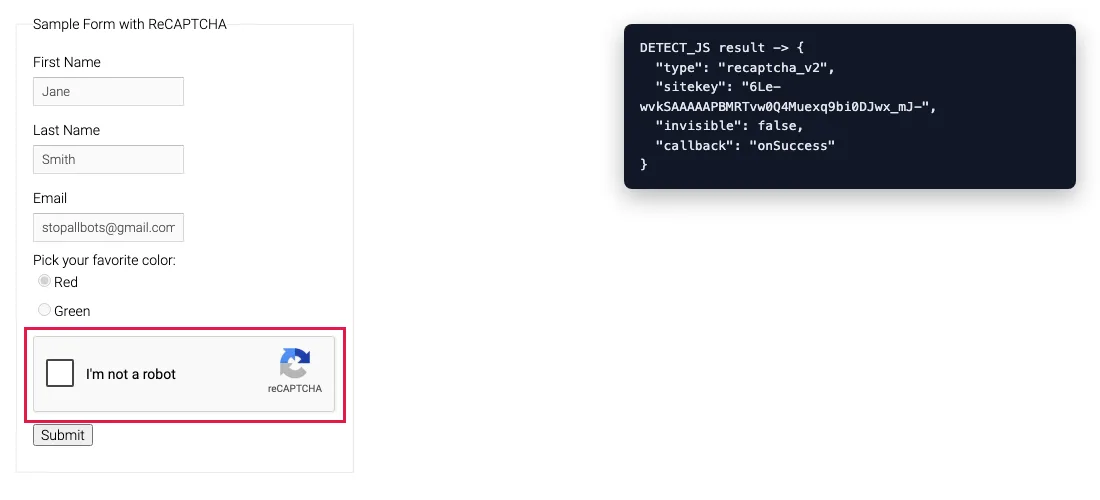
onSuccess callback.Design the solve tool so the model can't break it
Give the model as little to get wrong as possible. Four rules matter more than the code itself:
- No arguments. The tool reads the sitekey, variant and callback from the live page. If the model passes a sitekey, it may hallucinate one or reuse one from an earlier page.
- The token stays in the browser. The tool writes the token into the form and returns a short status line. The model only learns that it can submit now.
- Errors come back as text. Return
error: code: messageinstead of raising, so the agent can stop and report rather than crash the run. - The limit lives in code. A line in the system prompt asking the model not to retry helps. A middleware cap enforces it.
The same rules apply to the Browser Use solve action we built earlier. The difference in LangChain is how tools share the browser, and that's where threads come in.
Step 1: Install LangChain, Playwright and a model provider
You need LangChain 1.x, async Playwright, an async HTTP client and the provider package for your model. httpx is already installed as a LangChain dependency, but list it so the requirement is explicit.
pip install "langchain>=1.4" langchain-openai playwright httpx
playwright install chromium
Set CAPTCHANO_API_KEY in the environment, and PROXY_URL if your browser goes through a proxy. Keep the key out of the tool's arguments and out of the prompt.
Step 2: Share one async Playwright page across tools
All the tools must act on the same page, and in a LangChain agent that page has to be async. Our first version used sync Playwright, and it failed on the first tool call.
Why sync Playwright fails inside a LangChain agent
LangGraph's tool node ran the sync tool on a worker thread, not on the thread that started Playwright. Playwright's sync API is bound to the thread that created it, so the call died with greenlet.error: Cannot switch to a different thread. The traceback shows the call going through _execute_tool_sync in langgraph/prebuilt/tool_node.py, and the two greenlets report different thread ids.
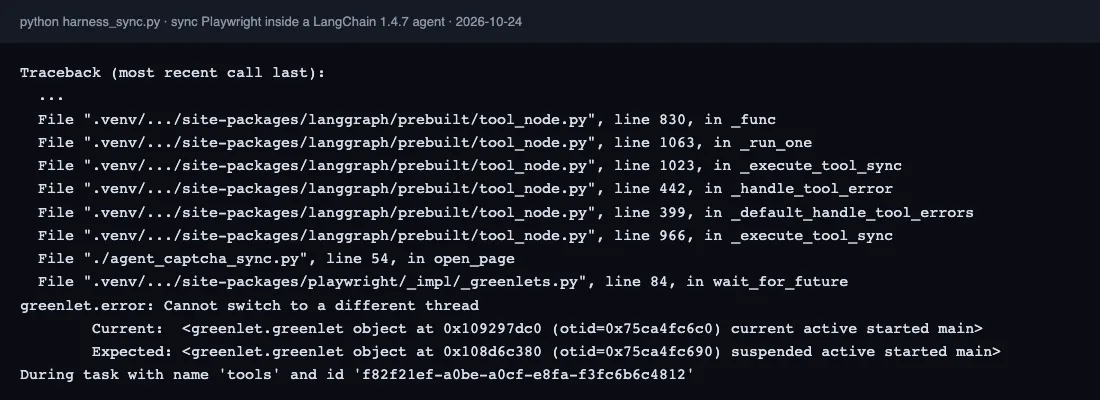
The fix is to make every tool async def, use playwright.async_api, and call agent.ainvoke. Async tools run on the event loop that owns the browser, and the same script then worked end to end. Open the page once, read its user agent, and keep both at module level so each tool can reach them:
async def main():
    global page, USER_AGENT
    async with async_playwright() as pw:
        browser = await pw.chromium.launch(proxy=playwright_proxy(PROXY_URL))
        page = await (await browser.new_context()).new_page()
        USER_AGENT = await page.evaluate("navigator.userAgent")
Step 3: Write the solve tool
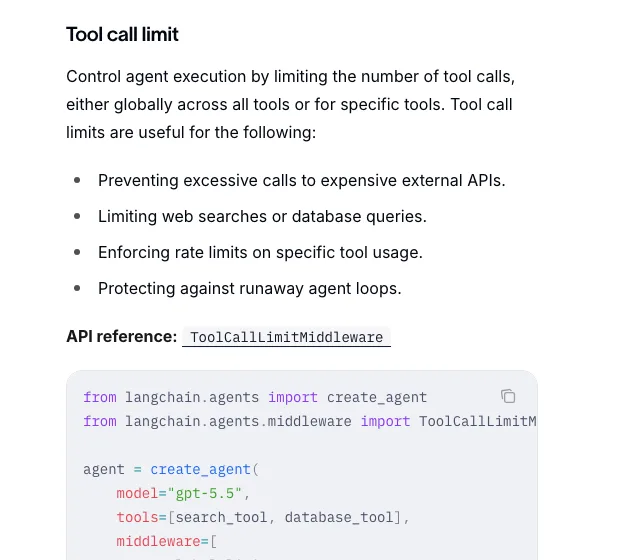
The tool detects the widget, sends one solve request, writes the token into the response field and calls the page's callback. LangChain turns the docstring into the tool description the model reads, as its tools documentation explains. So the docstring states when to call the tool and says not to call it twice.
@tool
async def solve_captcha() -> str:
    """Solve the captcha on the page that is currently open and put the token
    into the form. Takes no arguments: it reads the widget from the page.
    Call it once, right before submitting. Never call it twice in a row."""
    widget = await page.evaluate(DETECT_JS)
    if not widget:
        return "error: no captcha widget on the current page"
    task = {"type": widget["type"], "url": page.url, "sitekey": widget["sitekey"],
            "userAgent": USER_AGENT}
    if widget.get("invisible"):
        task["invisible"] = True
    if PROXY_URL:
        task["proxy"] = PROXY_URL
    try:
        async with httpx.AsyncClient(timeout=75) as client:
            r = await client.post(API_URL, params={"wait": 60}, json=task,
                                  headers={"Authorization": f"Bearer {CAPTCHANO_KEY}"})
        data = r.json()
    except (httpx.HTTPError, ValueError) as e:
        return f"error: solver unreachable ({type(e).__name__})"
    if data.get("status") != "ready":
        err = data.get("error") or {}
        return f"error: {err.get('code', data.get('status'))}: {err.get('message', '')}"
    filled = await page.evaluate(INJECT_JS, [widget["type"], data["solution"]["token"],
                                       widget.get("callback")])
    return (f"solved {widget['type']} in {data.get('solveTime')}s; token written to "
            f"{filled} field(s). Submit the form now.")
Three fields keep the token tied to the browser session. url is the page's current URL, not the one the agent first opened, which matters after redirects. userAgent comes from the browser itself. proxy is the same proxy the browser uses. If any of these differ between the solve and the submit, you get the session mismatch we describe in why valid captcha tokens get rejected.
The injection step sets every g-recaptcha-response (or cf-turnstile-response) field, then calls the function named in data-callback. On Google's demo that function is onSuccess. Pages that use a callback often keep the submit button disabled until it fires. The callback trick is explained in more depth in our Playwright reCAPTCHA v2 walkthrough.
Step 4: Cap solves with ToolCallLimitMiddleware
LangChain 1.x has a built-in middleware that limits how often a tool can be called, and it's the right place to enforce a solve budget. ToolCallLimitMiddleware takes a tool_name, a run_limit (calls per invocation) and/or a thread_limit (calls across a conversation), plus an exit_behavior.
agent = create_agent(
    model=os.environ.get("AGENT_MODEL", "openai:gpt-5.5"),
    tools=[open_page, solve_captcha, submit_form],
    system_prompt=("You automate a web form the user is authorised to use. "
                   "If open_page reports a captcha, call solve_captcha once, "
                   "then submit_form. If solve_captcha returns an error, stop and "
                   "report it; do not retry."),
    middleware=[ToolCallLimitMiddleware(tool_name="solve_captcha", run_limit=2,
                                        exit_behavior="end")],
)
According to the built-in middleware reference, exit_behavior accepts three values:
"continue"(the default): blocks the extra call with an error message and lets the model keep going."end": stops the run. It only works when the limit targets a single tool."error": raisesToolCallLimitExceededError.
A run_limit works without a checkpointer. A thread_limit needs one.
In our scripted run, the model ignored the prompt and called solve_captcha three times. The first two calls reached the API and came back as invalid_api_key errors. The middleware blocked the third and ended the run with "run limit exceeded (3/2 calls)". The prompt asked the model not to retry, and the cap stopped it when the model retried anyway.
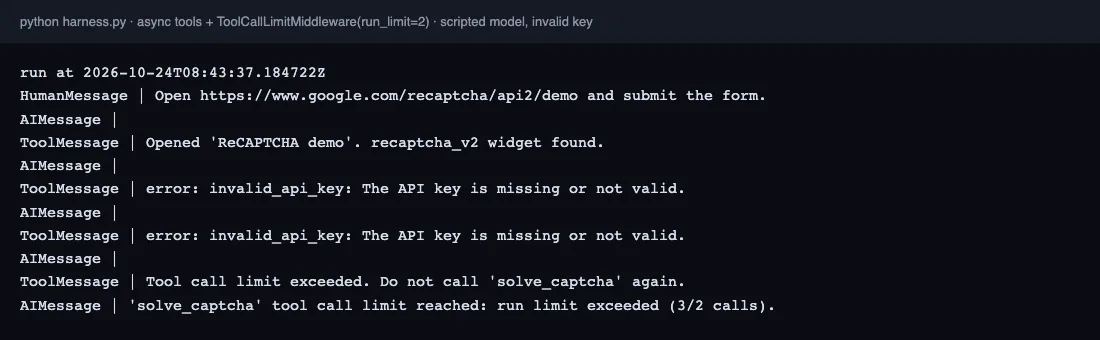
Two is a sensible run_limit for a single form: one solve, plus one retry if the token expired before submission. If a page asks for a third token in the same run, the problem is usually the session, and another solve won't fix it.
Step 5: The full LangChain captcha solver script
Here is the whole file we ran. It has three tools, one shared async page and one cap. Replace the demo URL with a page you're allowed to automate, and set AGENT_MODEL to any tool-calling model string LangChain accepts.
import asyncio
import os
from urllib.parse import urlsplit

import httpx
from playwright.async_api import async_playwright
from langchain.agents import create_agent
from langchain.agents.middleware import ToolCallLimitMiddleware
from langchain.tools import tool

API_URL = "https://api.captchano.com/v1/solve"
CAPTCHANO_KEY = os.environ["CAPTCHANO_API_KEY"]
PROXY_URL = os.environ.get("PROXY_URL")  # http://user:pass@host:port, optional


def playwright_proxy(url):
    if not url:
        return None
    u = urlsplit(url)
    return {"server": f"{u.scheme}://{u.hostname}:{u.port}",
            "username": u.username or "", "password": u.password or ""}


page = None        # one Playwright page shared by every tool
USER_AGENT = None  # read from that page, sent with each solve

DETECT_JS = """() => {
  const ts = document.querySelector('.cf-turnstile[data-sitekey]');
  if (ts) return {type: 'turnstile', sitekey: ts.dataset.sitekey,
                  callback: ts.dataset.callback || null};
  const rc = document.querySelector('.g-recaptcha[data-sitekey], [data-sitekey]');
  if (!rc) return null;
  const enterprise = !!document.querySelector('script[src*="recaptcha/enterprise.js"]');
  return {type: enterprise ? 'recaptcha_enterprise' : 'recaptcha_v2',
          sitekey: rc.dataset.sitekey,
          invisible: rc.dataset.size === 'invisible',
          callback: rc.dataset.callback || null};
}"""

INJECT_JS = """([kind, token, callback]) => {
  const name = kind === 'turnstile' ? 'cf-turnstile-response' : 'g-recaptcha-response';
  const fields = document.querySelectorAll(`[name="${name}"]`);
  fields.forEach(f => { f.value = token; f.innerHTML = token; });
  if (callback && typeof window[callback] === 'function') window[callback](token);
  return fields.length;
}"""


@tool
async def open_page(url: str) -> str:
    """Open a URL in the shared browser. Reports the page title and whether
    a captcha widget was found on the page."""
    await page.goto(url, wait_until="domcontentloaded")
    widget = await page.evaluate(DETECT_JS)
    found = f"{widget['type']} widget found" if widget else "no captcha widget found"
    return f"Opened '{await page.title()}'. {found}."


@tool
async def solve_captcha() -> str:
    """Solve the captcha on the page that is currently open and put the token
    into the form. Takes no arguments: it reads the widget from the page.
    Call it once, right before submitting. Never call it twice in a row."""
    widget = await page.evaluate(DETECT_JS)
    if not widget:
        return "error: no captcha widget on the current page"
    task = {"type": widget["type"], "url": page.url, "sitekey": widget["sitekey"],
            "userAgent": USER_AGENT}
    if widget.get("invisible"):
        task["invisible"] = True
    if PROXY_URL:
        task["proxy"] = PROXY_URL
    try:
        async with httpx.AsyncClient(timeout=75) as client:
            r = await client.post(API_URL, params={"wait": 60}, json=task,
                                  headers={"Authorization": f"Bearer {CAPTCHANO_KEY}"})
        data = r.json()
    except (httpx.HTTPError, ValueError) as e:
        return f"error: solver unreachable ({type(e).__name__})"
    if data.get("status") != "ready":
        err = data.get("error") or {}
        return f"error: {err.get('code', data.get('status'))}: {err.get('message', '')}"
    filled = await page.evaluate(INJECT_JS, [widget["type"], data["solution"]["token"],
                                       widget.get("callback")])
    return (f"solved {widget['type']} in {data.get('solveTime')}s; token written to "
            f"{filled} field(s). Submit the form now.")


@tool
async def submit_form() -> str:
    """Click the form's submit button and return the start of the next page's text."""
    await page.click("input[type=submit], button[type=submit]")
    await page.wait_for_load_state("domcontentloaded")
    return (await page.inner_text("body"))[:500]


agent = create_agent(
    model=os.environ.get("AGENT_MODEL", "openai:gpt-5.5"),
    tools=[open_page, solve_captcha, submit_form],
    system_prompt=("You automate a web form the user is authorised to use. "
                   "If open_page reports a captcha, call solve_captcha once, "
                   "then submit_form. If solve_captcha returns an error, stop and "
                   "report it; do not retry."),
    middleware=[ToolCallLimitMiddleware(tool_name="solve_captcha", run_limit=2,
                                        exit_behavior="end")],
)


async def main():
    global page, USER_AGENT
    async with async_playwright() as pw:
        browser = await pw.chromium.launch(proxy=playwright_proxy(PROXY_URL))
        page = await (await browser.new_context()).new_page()
        USER_AGENT = await page.evaluate("navigator.userAgent")
        result = await agent.ainvoke({"messages": [{"role": "user", "content":
            "Open https://www.google.com/recaptcha/api2/demo and submit the form."}]})
        for m in result["messages"]:
            print(type(m).__name__, "|", str(m.content)[:200])
        await browser.close()


if __name__ == "__main__":
    asyncio.run(main())
Why the token can still be rejected
A token the solver returns is only useful if the site accepts it, and three things break that. First is time. Google's reCAPTCHA verification docs say each token is valid for two minutes and can be verified only once, so solve right before submitting and never reuse a token. That's why the tool tells the model to submit right away.
Second is the session. If the proxy, user agent or page URL differ between the solve and the submit, the site sees two different visitors. Third is the widget type. Classic checkbox and invisible v2 work with this tool, and so does reCAPTCHA Enterprise in checkbox form. Score-based Enterprise keys aren't supported by our API, so the tool will fail on them. Our reCAPTCHA Enterprise explainer shows how to tell the two apart.
Does the same tool work for Turnstile and reCAPTCHA v3?
Turnstile, yes. The detection script checks for a .cf-turnstile widget first, and the injection step writes the cf-turnstile-response field. Full-page Cloudflare challenges also need cData and pageData, which this version doesn't read. See how Turnstile decides for the difference.
reCAPTCHA v3 needs one change. There's no widget in the DOM, and the request needs the page's action name. Read the sitekey from the render= parameter of the api.js script, find the action in the page's grecaptcha.execute call, and add "type": "recaptcha_v3", "action": ... to the request.
How CaptchaNo fits a LangChain agent
CaptchaNo is one REST endpoint, so the tool needs no SDK. With ?wait=60 the call blocks until the solve finishes, which keeps the tool to a single request. Failures come back with a stable error code, such as invalid_sitekey, proxy_unreachable or unsolvable, so you can hand the code straight to the model. Solves that fail aren't charged.
The API reference lists every field. The reCAPTCHA v2 solver page covers the checkbox, invisible and callback variants.
Frequently Asked Questions
Does LangChain have a built-in captcha solver?
No. LangChain ships no captcha tool. You write a small tool with the @tool decorator that calls a solving API, or you load an MCP server's tools into the agent. The tool should read the widget from the page itself and write the token back into the page, so the model never handles the token string.
Why does my Playwright tool crash with "Cannot switch to a different thread"?
You are using Playwright's sync API inside a LangChain agent. LangGraph ran the sync tool on a worker thread, while the browser belongs to the thread that started it, so Playwright raised a greenlet error. Define the tools with async def, use playwright.async_api and call agent.ainvoke, and every tool then runs on the event loop that owns the browser.
Should the captcha tool return the token to the model?
Not if a browser is involved. A token is a long opaque string, so asking the model to copy it into a later tool call wastes context and risks a corrupted value. Write the token into the form inside the tool and return a short status line. Only return the token when the next step is a plain HTTP request that your code makes, not the model.
How do I stop a LangChain agent from looping on captchas?
Add ToolCallLimitMiddleware with tool_name set to your solve tool and a run_limit of two, and choose an exit behaviour. With "end", the run stops once the limit is reached. With "continue", the extra call is blocked and the model is told why. A thread_limit also works across turns, but it needs a checkpointer. Keep a no-retry instruction in the prompt as well.
Does the same tool work in LangGraph?
Yes. create_agent in LangChain 1.x builds a LangGraph graph, and tools defined with @tool run in LangGraph's tool node either way. The threading rule applies in both: if your tools drive a browser, make them async and run the graph with ainvoke. A custom graph can reuse the same three tools without changes.
Add the tool to your agent
Copy the script, set your key and proxy, and run it against a form you're allowed to automate. Keep the solve cap from the first run. You can start on the pricing page, which includes a free trial.