Cloudflare Turnstile Solver in Python (Playwright)
Build a Cloudflare Turnstile solver in Python with Playwright: read action, cData and renamed fields, match the user agent and fire the page callback.
A working Cloudflare Turnstile solver in Python does four things: it reads every parameter the widget was rendered with (sitekey, action, cData and the name of the hidden field), gets a token for those parameters, makes the browser use the same user agent the token was produced with, and hands the token to the page's own callback. Most short tutorials do only the second step and post the token to cf-turnstile-response, which breaks on JavaScript-rendered widgets and renamed fields. This guide uses Playwright for Python and shows each step, with results from a local test run. If you want the background first, read how Turnstile decides who gets a token.
What we ran, and what we didn't
We tested the page-side code from this guide on 29 October 2026 (UTC) against local test pages that use Cloudflare's public always-pass test sitekey, with Playwright for Python 1.60.0 and Chromium 148 headless. We did not call any solving API in this run, so nothing below is a claim about solve speed or success rates. The token we injected was a marker string, INJECTED-MARKER-TOKEN, which made it easy to see where it ended up.
That run turned up three facts that shaped the code below:
- Replacing
window.turnstilewith a property getter before Cloudflare's script loads breaks the widget. The script logged "Turnstile already has been loaded" and the page then failed callingrender. Wrappingrenderafter the script has loaded worked. - When a page renames the hidden input with
response-field-name, the usual selectorinput[name="cf-turnstile-response"]matched 0 elements. - In Playwright, overriding the
User-Agentheader does not changenavigator.userAgent. The page still reportedHeadlessChrome/148.
Step 1: Read every widget parameter, including JavaScript-rendered widgets
Read the sitekey, action, cData, callback and field name before you request a token, because a token produced without the page's action or cData can fail the site's own checks. Cloudflare limits action to 32 characters and cData to 255, both letters, digits, _ and - (widget configuration reference), and siteverify returns both values to the site's server, so the site can check them.
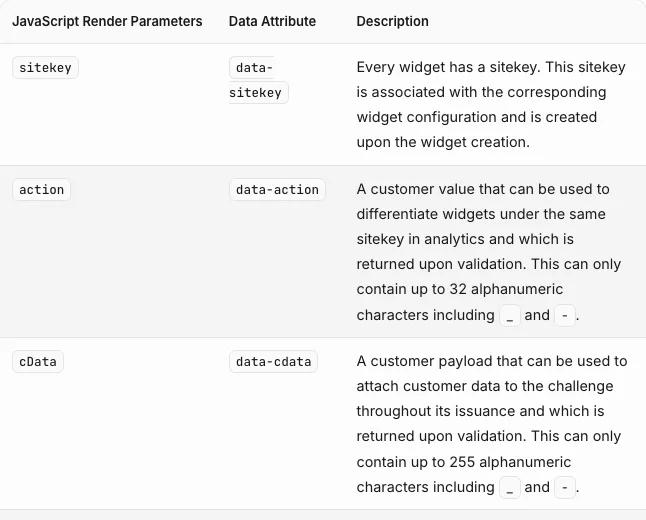
Implicit widgets: read the data attributes
A widget rendered from HTML is a .cf-turnstile element, and everything you need is on its data- attributes:
READ_IMPLICIT = """() => [...document.querySelectorAll('.cf-turnstile[data-sitekey]')].map(el => ({
  sitekey: el.dataset.sitekey,
  action: el.dataset.action || null,
  cData: el.dataset.cdata || null,
  callback: el.dataset.callback || null,
  field: el.dataset.responseFieldName || 'cf-turnstile-response',
}))"""

widgets = page.evaluate(READ_IMPLICIT)
Explicit widgets: wrap turnstile.render before the page calls it
Single-page apps and most React or Vue forms call turnstile.render() from JavaScript, so there is no .cf-turnstile element to read and the callback is often an anonymous function with no global name. In our run the attribute reader returned an empty list on such a page. The fix is a small init script that wraps render as soon as Cloudflare's script has loaded, records the options, keeps a reference to the callback and then calls the real render, so the widget still works:
HOOK = """
(() => {
  window.__ts = [];
  window.__tsCallbacks = [];
  const wrap = () => {
    const t = window.turnstile;
    if (!t || t.__wrapped) return;
    const render = t.render.bind(t);
    t.render = (el, opts = {}) => {
      window.__ts.push({
        sitekey: opts.sitekey, action: opts.action || null,
        cData: opts.cData || null,
        field: opts['response-field-name'] || 'cf-turnstile-response',
        hasCallback: typeof opts.callback === 'function',
      });
      if (typeof opts.callback === 'function') window.__tsCallbacks.push(opts.callback);
      return render(el, opts);
    };
    t.__wrapped = true;
  };
  // api.js fires its load event after it runs and before the page's own load handlers
  document.addEventListener('load', (e) => {
    if (e.target.src && e.target.src.includes('challenges.cloudflare.com/turnstile')) wrap();
  }, true);
})();
"""

context.add_init_script(HOOK)  # before page.goto
Two things not to do, both learned the hard way in this run. Don't define window.turnstile yourself with Object.defineProperty: Cloudflare's script sees the property, decides it has already loaded, and the page's own render call then fails. And don't replace render without calling the original, which some older write-ups do. The widget then never renders, which is easy for the site to notice.
Timing note: the hook relies on the page calling render after the script's load event, which is the usual pattern (?render=explicit plus a load handler, or the onload= callback). If a page renders inside a script that runs before that, poll for window.turnstile instead and wrap it the moment it appears.
Step 2: Request the Turnstile token from Python
Send the page URL, sitekey and any action or cData to the solving API, along with the proxy your browser uses and the user agent your browser context will present. With CaptchaNo, POST /v1/solve?wait=60 blocks until the token is ready and returns it with the user agent it is bound to:
import time
import requests

CAPTCHANO_KEY = "cn-YOUR_API_KEY"
HEADERS = {"Authorization": f"Bearer {CAPTCHANO_KEY}"}

def solve_turnstile(url, widget, proxy=None, user_agent=None):
    task = {"type": "turnstile", "url": url, "sitekey": widget["sitekey"]}
    if widget.get("action"):
        task["action"] = widget["action"]
    if widget.get("cData"):
        task["cData"] = widget["cData"]
    if proxy:
        task["proxy"] = proxy            # "http://user:pass@host:port"
    if user_agent:
        task["userAgent"] = user_agent
    r = requests.post("https://api.captchano.com/v1/solve", params={"wait": 60},
                      json=task, headers=HEADERS, timeout=75)
    data = r.json()
    while data.get("status") in ("queued", "solving"):
        time.sleep(5)
        data = requests.get(f"https://api.captchano.com/v1/task/{data['id']}",
                            headers=HEADERS, timeout=30).json()
    if data.get("status") != "ready":
        raise RuntimeError(data.get("error") or data)
    return data["solution"]  # {"token": "...", "userAgent": "..."}
Turnstile on a full-page challenge (the "Verifying you are human" interstitial) can also need a pageData value; the field list for every type and the error codes are in the solving API reference. Request the token last, right before you submit: Cloudflare says a token is valid for 300 seconds and verifies once (server-side validation docs).
Step 3: Match the user agent the Playwright way
Turnstile tokens are bound to the user agent they were produced with, and in Playwright the user agent belongs to the browser context, not the page. That is the main difference from Puppeteer, where page.setUserAgent() changes it on the fly, as in our Node.js Turnstile walkthrough.
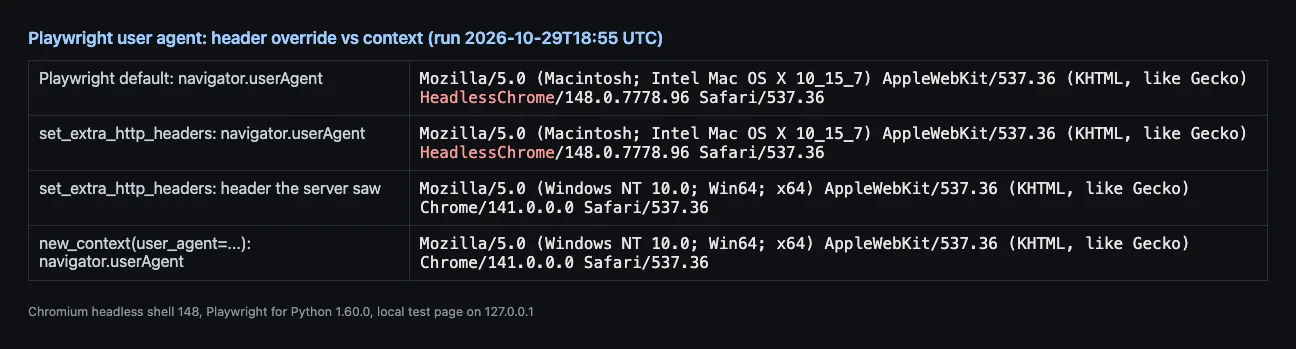
The test above is why page.set_extra_http_headers({"User-Agent": ...}) is the wrong tool. The server sees one browser and the page's JavaScript sees another, and the default headless string says HeadlessChrome outright. Use this order instead:
- Pick a normal desktop user agent and create the context with it:
browser.new_context(user_agent=UA). - Send the same string as
userAgentin the solve request. - Compare it with
solution["userAgent"]. If they differ, open a new context with the returned value and load the page again before you inject, staying inside the token's 300-second window.
Step 4: Inject into the right field and fire the callback
Put the token into the hidden field the widget actually created, then call the page's callback. The field fill is what the form submits, and the callback is what enables the button or sends the request in most apps. Skip either and the form looks filled but nothing happens.
INJECT = """({ token, field, callback }) => {
  document.querySelectorAll(`input[name="${field}"]`).forEach(i => { i.value = token; });
  if (callback && typeof window[callback] === 'function') window[callback](token);
  (window.__tsCallbacks || []).forEach(cb => cb(token));
}"""
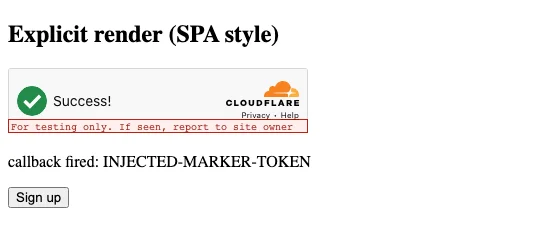
In our run, calling the captured anonymous callback with the marker token updated the page and enabled the submit button, exactly as the real widget's own token had a moment earlier:
The full Python script
Here is everything put together, assuming solve_turnstile, HOOK, READ_IMPLICIT and INJECT from the steps above are in the same file. Replace the target URL, proxy and form steps with your own, and only run it where you are allowed to automate. The full script needs a real solve, so unlike the hook and injection code it was not part of our test run.
from playwright.sync_api import sync_playwright

TARGET = "https://example.com/signup"
PROXY = {"server": "http://host:port", "username": "user", "password": "pass"}
PROXY_URL = "http://user:pass@host:port"
UA = ("Mozilla/5.0 (Windows NT 10.0; Win64; x64) AppleWebKit/537.36 "
      "(KHTML, like Gecko) Chrome/141.0.0.0 Safari/537.36")

def open_page(browser, ua):
    context = browser.new_context(user_agent=ua, proxy=PROXY)
    context.add_init_script(HOOK)
    page = context.new_page()
    page.goto(TARGET, wait_until="networkidle")
    return context, page

def read_widget(page):
    found = page.evaluate("window.__ts") or page.evaluate(READ_IMPLICIT)
    if not found:
        raise RuntimeError("no Turnstile widget found")
    return found[0]

with sync_playwright() as p:
    browser = p.chromium.launch()
    context, page = open_page(browser, UA)
    widget = read_widget(page)

    # ... fill the rest of the form here ...

    solution = solve_turnstile(page.url, widget, proxy=PROXY_URL, user_agent=UA)
    if solution.get("userAgent") and solution["userAgent"] != UA:
        context.close()
        context, page = open_page(browser, solution["userAgent"])
        widget = read_widget(page)
        # ... fill the form again ...

    page.evaluate(INJECT, {"token": solution["token"], "field": widget["field"],
                           "callback": widget.get("callback")})
    with page.expect_navigation():
        page.click("button[type=submit]")
    print(page.url)  # check where you actually landed
    browser.close()
Check the result the site shows (a redirect, a success message, a new session cookie) rather than printing "solved" after the click. A Turnstile token can be perfect and the submission can still fail on the site's other checks. If the same form uses Google's widget instead, the Playwright flow for that is in solving reCAPTCHA v2 with Playwright and Python, and the short reference version of both lives on our Playwright integration page.
Without a browser: Turnstile with requests only
If the form is a plain HTML post, you can skip the browser: fetch the page with requests.Session, read the sitekey, solve, and post the token in the widget's field together with every other form field. Three rules decide whether that works:
- Send the solution's user agent as your
User-Agentheader on every request in the session, not only the final post. - Use the same proxy for the solve and for the session, so the token and the post come from the same exit IP.
- Keep the cookies and hidden fields from the GET (CSRF tokens especially). A post that only contains
cf-turnstile-responsefails for reasons unrelated to Turnstile.
Plain requests has its own TLS fingerprint, and sites behind Cloudflare's bot management can challenge it no matter what token you send. If the page you fetch is the interstitial rather than the form, you have a different problem, covered in why Cloudflare keeps saying "Verifying you are human".
Why a Turnstile token is still rejected, and how to check
Only the site's server learns whether a token passed, because it is the one calling siteverify. Here is what Cloudflare's test secrets returned in our run, and a warning about what they can't tell you:
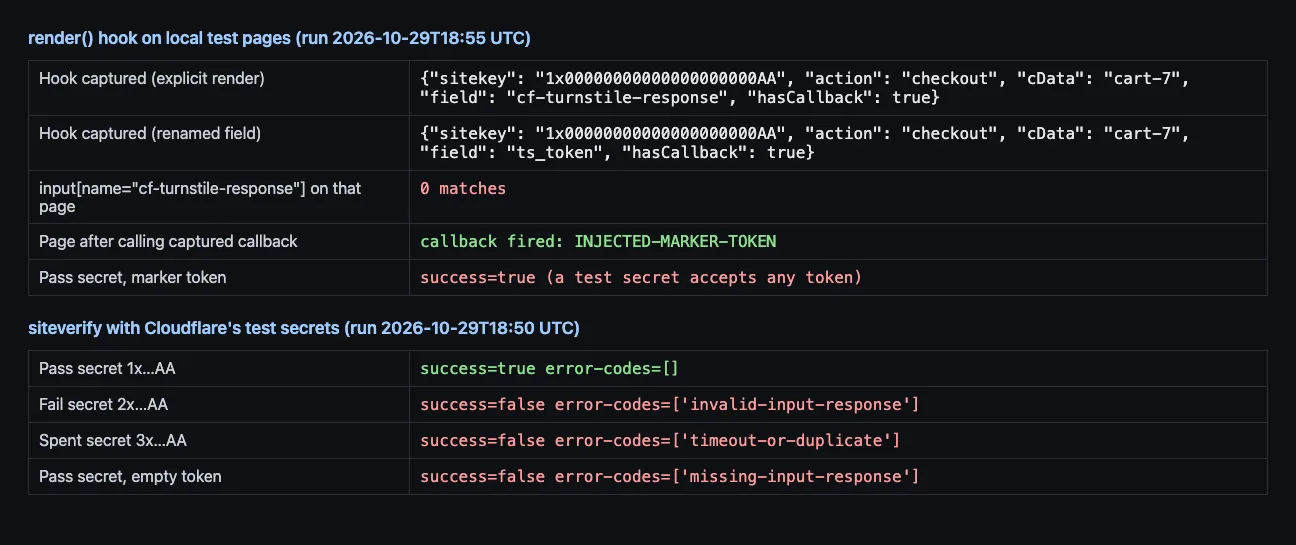
The always-pass test secret returned success: true for our marker string, which is not a real token. So a passing test with Cloudflare's test keys proves your page wiring, not your solver. To test the wiring properly on your own site, use the approach in our test-keys guide for reCAPTCHA and Turnstile. On a live site, map what you see to these causes:
| Symptom | Likely cause | Fix |
|---|---|---|
| Token set, button stays disabled | Callback never called | Call the captured or data-callback function (Step 4) |
| Form posts without a token | Field renamed with response-field-name | Use the field name the hook or attributes reported |
invalid-input-response | Token expired, malformed, or minted for another sitekey | Re-read the sitekey; solve right before submitting |
timeout-or-duplicate | Token reused, for example on a retry | Request a new token for every attempt |
| Passes locally, fails from servers | Token and post from different IPs or user agents | Pass the browser's proxy; match the user agent (Step 3) |
| Accepted by Cloudflare, rejected by the site | Action or cData mismatch, or the site's own checks | Send the page's action and cData; check cookies and CSRF |
The same checklist for every widget type, not only Turnstile, is in why valid captcha tokens get rejected.
When a Turnstile solver is the wrong tool
Don't use a solver on your own site's tests. Cloudflare publishes test sitekeys and secrets that always pass, always fail or return "token already spent", and they work on localhost (Cloudflare's testing page). Don't use one where a site's terms forbid automation, or to create accounts at scale. And if the site blocks you on IP reputation or rate limits, a token does not change that. Fix the traffic, not the widget.
Frequently Asked Questions
Can Python solve Cloudflare Turnstile without a solving service?
On your own pages, yes: Cloudflare's test sitekeys return a dummy token without any solving. On other sites it depends on the browser and connection, because Turnstile mostly scores the session rather than showing a puzzle. Open-source click-automation libraries exist, but they depend on how the widget behaves today and need updating when Cloudflare changes it, which is why teams that need steady volume use a token API.
How long is a Cloudflare Turnstile token valid?
Cloudflare documents 300 seconds, so five minutes from when the token is produced, and each token can be verified only once. A second check of the same token returns timeout-or-duplicate. In practice, request the token at the last moment, right before the submit, and ask for a fresh one on every retry instead of reusing the one that failed.
Do I need a proxy to solve Turnstile?
Not always, but it helps on sites that compare where the token was produced with where the form was posted from. Passing the same proxy your browser or requests session uses keeps both on one exit IP. Without a proxy the token comes from a different network, which some sites accept and others treat as a mismatch, so test both on the site you automate.
Why does my Turnstile token work in Puppeteer but not in Playwright?
Usually because of the user agent. Puppeteer can change the user agent on an open page, while Playwright sets it per browser context. If you only override the User-Agent header in Playwright, the page's JavaScript still sees the headless browser string, so the token and the browser disagree. Create the context with the user agent from the start.
What is the difference between Turnstile and the Cloudflare challenge page?
Turnstile is a widget a site embeds in its own form, and it produces a token that the site checks. The challenge page is a full-page interstitial that Cloudflare shows before the site loads at all, and passing it sets a clearance cookie for that visitor. Both can show the same Turnstile checkbox, but they need different inputs and different handling in automation.
Add Turnstile solving to your Python stack
Use the hook and injection code above with any token source. If you want ours, CaptchaNo returns a Turnstile token with the user agent it is bound to from one blocking request, solved on our own infrastructure and billed only on success. Create an account, read the request fields on the Cloudflare Turnstile solver page, and try it against a form you are allowed to automate.