Solve reCAPTCHA v3 in Python: Find the Action First
Solve reCAPTCHA v3 in Python: find the sitekey and action with a Playwright hook, request a scored token, and send it the way the page does. Code included.
To solve reCAPTCHA v3 in Python you need three values from the page (the sitekey, the action name and the request that carries the token), one call to a solving API for a token scored against that action, and a replay of the page's own request with the new token. There is no checkbox and no form field to fill, which is why most v2 scripts fail on v3. If you are not sure the page is really v3, our reCAPTCHA v2 vs v3 comparison shows how to tell them apart.
How we made this guide: in November 2026 we ran the detection code below against Google's public v3 demo with Playwright for Python and recorded the output, which is quoted in each step. The solve call in Step 3 is the documented CaptchaNo request; we did not run paid solves for this article, so there are no solve times or success rates here.
What a reCAPTCHA v3 solver actually gives you
A reCAPTCHA v3 solver returns a token, and Google attaches a score and an action name to it that only the site can read when it verifies the token. You never see the score yourself. The site sends the token to Google, gets back the score, compares the action with the one it expects, and decides on its own threshold.
That has two practical consequences. First, the action you request must be the exact string the page passes to grecaptcha.execute(), or the site sees a mismatch. Second, a token is only worth what its score is worth to that site. Google's own reCAPTCHA v3 documentation suggests a starting threshold of 0.5, says tokens expire after two minutes, and limits action names to letters, digits, slashes and underscores. What the score levels mean in practice is covered in our guide to reading reCAPTCHA v3 scores.
Step 1: Confirm the page uses classic v3
Classic v3 loads api.js?render=SITEKEY and calls grecaptcha.execute(); anything else needs a different request. Check the script tag before writing any solving code, because three variants look alike from the outside.
| What you see in the page | What it is | Request type |
|---|---|---|
api.js?render=6L... and a grecaptcha.execute(key, {action}) call | Classic reCAPTCHA v3 | recaptcha_v3 |
api.js without render=, a data-sitekey div, data-size="invisible" | Invisible reCAPTCHA v2 | recaptcha_v2 |
enterprise.js with a checkbox or invisible widget | Enterprise checkbox-style widget | recaptcha_enterprise |
enterprise.js?render=6L... and grecaptcha.enterprise.execute() | Score-based Enterprise key | Not supported by CaptchaNo |
The last row matters. CaptchaNo solves classic v3 keys and Enterprise checkbox-style widgets; score-based Enterprise keys are not supported, and we would rather you find that out here than after you build the integration. Our reCAPTCHA Enterprise explainer goes through the differences in more detail.
Step 2: Find the sitekey and action with Python
The most reliable way to get the action is to record the arguments of every grecaptcha.execute() call while the page runs. Searching the page source for execute( works on simple sites, but bundled JavaScript often builds the action string at runtime, and some pages call execute several times with different actions.
The script below injects a hook before any page script runs. It traps the moment grecaptcha (and grecaptcha.enterprise) is assigned and wraps execute, so the call is logged even when the page fires it immediately on load. It also records any non-Google request that carries a token, which tells you where the page sends it.
import json, re
from playwright.sync_api import sync_playwright

HOOK = """
(() => {
  window.__v3 = [];
  const trap = (obj, enterprise) => {
    let fn = obj.execute;
    Object.defineProperty(obj, 'execute', {
      configurable: true,
      get() {
        return fn && ((key, opts) => {
          window.__v3.push({ sitekey: key, action: (opts || {}).action || null, enterprise });
          return fn.call(obj, key, opts);
        });
      },
      set(v) { fn = v; },
    });
  };
  let g;
  Object.defineProperty(window, 'grecaptcha', {
    configurable: true,
    get() { return g; },
    set(v) {
      g = v;
      if (v && typeof v === 'object') {
        trap(v, false);
        let e;
        Object.defineProperty(v, 'enterprise', {
          configurable: true,
          get() { return e; },
          set(x) { e = x; if (x && typeof x === 'object') trap(x, true); },
        });
      }
    },
  });
})();
"""

def inspect_v3(url: str) -> dict:
    with sync_playwright() as p:
        browser = p.chromium.launch()
        page = browser.new_page()
        page.add_init_script(HOOK)
        carriers = []

        def on_request(req):
            if "google.com/recaptcha" in req.url or "gstatic.com" in req.url:
                return  # Google's own reload calls carry binary bodies
            body = (req.post_data_buffer or b"").decode("utf-8", "replace")
            if re.search(r"0[0-9a-zA-Z]A[\w-]{100,}", req.url + body):
                carriers.append({"method": req.method,
                                 "url": re.sub(r"=[\w-]{100,}", "=<token>", req.url),
                                 "body": re.sub(r"[\w-]{100,}", "<token>", body)[:200]})

        page.on("request", on_request)
        page.goto(url, wait_until="networkidle")
        page.wait_for_timeout(5000)
        scripts = page.eval_on_selector_all("script[src*='recaptcha']", "els => els.map(e => e.src)")
        calls = page.evaluate("window.__v3")
        browser.close()
    return {"scripts": scripts, "execute_calls": calls, "token_carriers": carriers}

print(json.dumps(inspect_v3("https://recaptcha-demo.appspot.com/recaptcha-v3-request-scores.php"), indent=1))
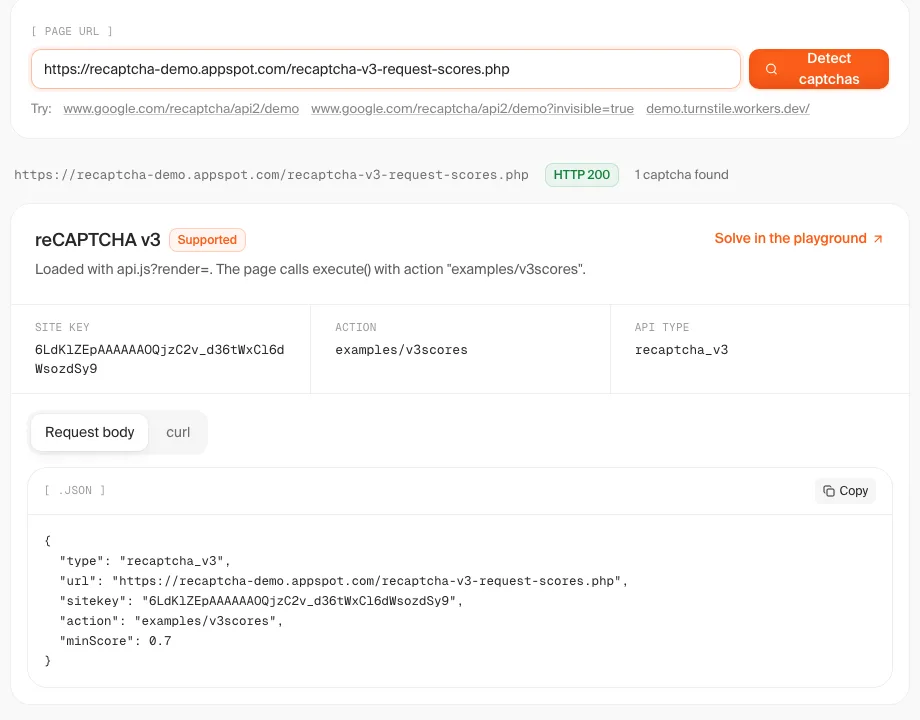
Against Google's v3 demo, the run returned one execute call with the sitekey 6LdKlZEpAAAAAAOQjzC2v_d36tWxCl6dWsozdSy9 and the action examples/v3scores, flagged as non-Enterprise. It also caught the token carrier: a GET to /recaptcha-v3-verify.php?action=examples/v3scores&token=<token>. Run against Google's v2 demo, the same script found api.js without render= and no execute calls at all, which is the quick way to rule v3 out.
One failure we hit while writing it: the first version read req.post_data on every request and crashed with a UnicodeDecodeError, because Google's own reload calls send binary bodies. Skip Google's hosts first and decode post_data_buffer with errors="replace", as above.
If you only need the values once, paste the URL into our free captcha detector. On the same demo page it reported the same sitekey and action and generated the request body for Step 3.
Step 3: Request a token scored for that action
Send the sitekey, the page URL, the action and the minimum score you need in one blocking request. With ?wait=60 the call returns when the token is ready, so it fits inside a single login or form step.
import os
import requests

API_KEY = os.environ["CAPTCHANO_API_KEY"]
PROXY = "http://user:pass@host:port"   # optional: the proxy your own requests will use
USER_AGENT = "Mozilla/5.0 (Windows NT 10.0; Win64; x64) AppleWebKit/537.36 (KHTML, like Gecko) Chrome/130.0.0.0 Safari/537.36"

def solve_recaptcha_v3(sitekey: str, url: str, action: str, min_score: float = 0.7) -> str:
    r = requests.post(
        "https://api.captchano.com/v1/solve",
        params={"wait": 60},
        json={
            "type": "recaptcha_v3",
            "sitekey": sitekey,
            "url": url,
            "action": action,
            "minScore": min_score,
            "proxy": PROXY,
            "userAgent": USER_AGENT,
        },
        headers={"Authorization": f"Bearer {API_KEY}"},
        timeout=75,
    )
    data = r.json()
    if data.get("status") != "ready":
        raise RuntimeError(data.get("error") or data)
    return data["solution"]["token"]
Choosing minScore: start at 0.7, which clears Google's suggested 0.5 default with room to spare. Move to 0.9 only when a site keeps rejecting 0.7 tokens on the same action, and use 0.3 for endpoints that only log the score. The per-solve price on CaptchaNo is the same whatever minimum you request, but asking for more than the site needs gains nothing. All request fields are listed on the reCAPTCHA v3 solver page.
Keep the key in an environment variable, never in the script, and request the token right before you use it. A token that waits more than two minutes is dead.
Step 4: Send the token where the page sends it
A v3 token goes into the page's own request, not into a form field. On Google's demo that request is a GET with the token in the query string; on a real site it is usually a JSON or form POST to a login, signup or search endpoint. Step 2's token_carriers output tells you which.
The simplest option is to replay that request yourself with the same user agent and proxy you sent to the solver:
sitekey = "6LdKlZEpAAAAAAOQjzC2v_d36tWxCl6dWsozdSy9"
page_url = "https://recaptcha-demo.appspot.com/recaptcha-v3-request-scores.php"
action = "examples/v3scores"

token = solve_recaptcha_v3(sitekey, page_url, action)

session = requests.Session()
session.headers["User-Agent"] = USER_AGENT
session.proxies = {"http": PROXY, "https": PROXY}
r = session.get(
    "https://recaptcha-demo.appspot.com/recaptcha-v3-verify.php",
    params={"action": action, "token": token},
    timeout=30,
)
print(r.json())   # the demo backend echoes success, score, action and error-codes
If the request needs cookies or CSRF values that only the browser has, keep the browser and swap the token in flight instead. Solve first, then route the carrier request and replace whatever token the page generated:
import re

def swap_token(route, request):
    url = re.sub(r"token=[\w-]+", f"token={token}", request.url)
    body = request.post_data_buffer
    if body:
        body = re.sub(rb"0[0-9a-zA-Z]A[\w-]{100,}", token.encode(), body)
    route.continue_(url=url, post_data=body)

page.route("**/recaptcha-v3-verify.php*", swap_token)   # match your site's endpoint
page.goto(page_url)
Create the browser context with the same user agent you sent to the solver (browser.new_context(user_agent=USER_AGENT)), so the request and the token do not disagree. The same session rules apply to every token type and are listed in our checklist of reasons valid tokens get rejected.
Why letting headless Chromium run v3 itself fails
Some libraries "solve" v3 by letting the automated browser run Google's script and capturing the token it produces. The token is real, but its score reflects the automated browser. We loaded Google's v3 demo three times in an unmodified headless Chromium from one connection in November 2026 and captured the demo backend's reply each time.
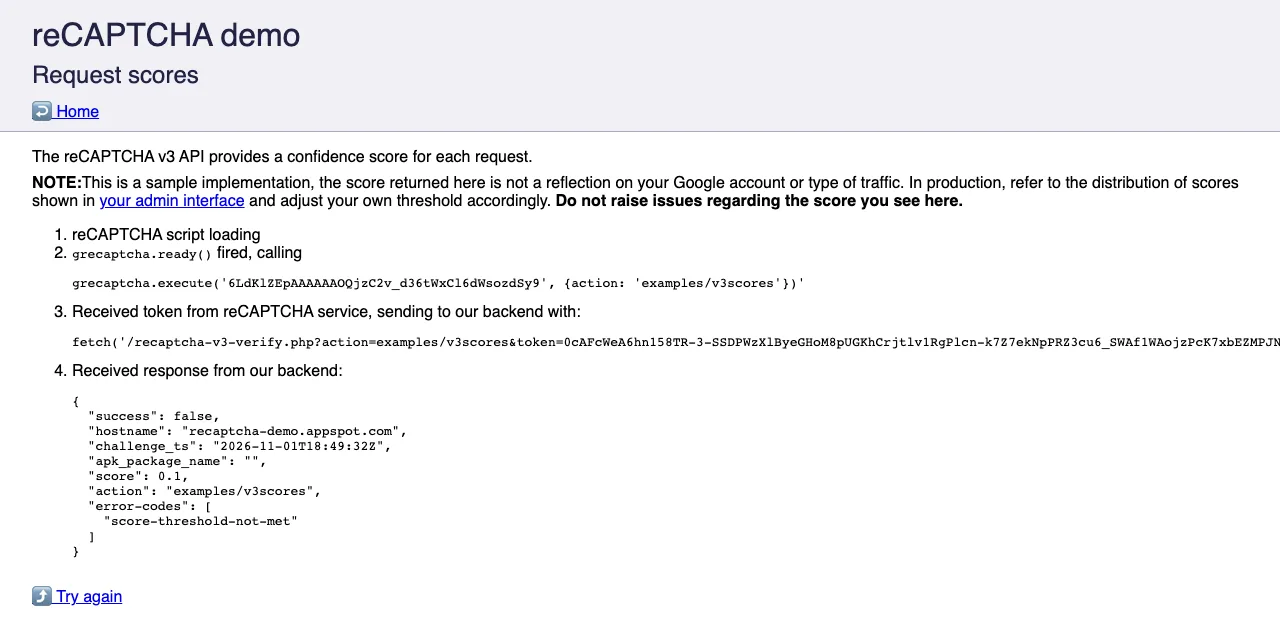
All three runs came back with "score": 0.1, the correct action examples/v3scores, "success": false and the demo's own error code score-threshold-not-met. Two caveats: three runs from one IP is a small sample, and the demo page itself warns that its scores do not reflect your account or traffic type. Even so, the result shows the failure mode: the token is valid, the action matches, and the score sinks it. Stealth plugins change some of the signals, but you still cannot see the score before the site does.
Why a v3 token still gets rejected
When a site rejects a v3 token from a successful solve, the cause is almost always the action, the age of the token, the score threshold or the key type. Work through them in this order.
| Symptom | Likely cause | Fix |
|---|---|---|
| Rejected with a valid-looking token | Action differs from the one the site checks | Re-run Step 2 on the exact page and step; copy the string as is, including slashes |
timeout-or-duplicate from Google | Token older than two minutes, or used twice | Solve right before the request; never reuse a token on retry |
| Accepted on light pages, rejected on login or checkout | The site uses a higher threshold for that action | Raise minScore to 0.9 for that action only |
| Rejected only from servers | IP or session reputation checks on top of the score | Send the same proxy and user agent to the solver and to your request |
| Solve request errors or never works | Key is score-based Enterprise, or actually v2 invisible | Re-check the script tag (Step 1) and switch the request type |
Google's token verification reference lists the error codes a site receives, including timeout-or-duplicate, and confirms each token can be verified only once.
Libraries versus a solving API
Python options fall into three groups, and only one gives you control over the score. Browser-capture libraries such as playwright-recaptcha wait for the page's own v3 call and parse the token out of Google's reload response, so the score is whatever your automated browser earns. HTTP-only libraries replay Google's anchor and reload requests without a browser, so the score still depends on the IP and request pattern you send them from. A solving API takes the sitekey, URL, action and a minimum score and returns a token minted for that request.
For testing your own forms, none of this is needed: use Google's test keys, which always pass. Our guide to testing reCAPTCHA and Turnstile with test keys covers the setup. If the page turns out to use a v2 checkbox after all, the matching flow is in our Playwright tutorial for reCAPTCHA v2.
How CaptchaNo handles reCAPTCHA v3
CaptchaNo solves classic reCAPTCHA v3 on our own solving infrastructure and returns a token scored for the action and minimum score you send. A few facts that matter when you build on it:
- Only successful solves are billed. A failed solve costs nothing, and credit never expires.
- One blocking request with
?wait=60, plain JSON, and SDKs for Python, Node.js, Go and PHP. - Proxy and user-agent pass-through, so the token is minted for the same session that spends it.
- Per-key usage in the dashboard, with the real duration of every solve.
- Questions go to support@captchano.com, and replies come from the engineers who run the service.
Working Playwright setups, including the context and proxy settings above, are on our Playwright integration page, and current rates are on the pricing page.
Frequently Asked Questions
Can you solve reCAPTCHA v3 without a browser in Python?
Yes. A solving API needs only the sitekey, the page URL and the action, so plain requests is enough to get a token and send it. You only need a browser when the request that carries the token depends on cookies, CSRF values or JavaScript state that are hard to reproduce. In that case keep the browser and swap the token into its request.
What happens if I send the wrong action?
The token is still issued, but the site sees an action that differs from the one it expects when it verifies the token. Google's documentation tells site owners to check that the action matches, so most well-built sites reject the token or treat it as suspicious. Always record the action from the exact page and step you automate, because sites often use different actions for login and signup.
Which minScore should I request for reCAPTCHA v3?
Start with 0.7. Google suggests site owners begin with a threshold of 0.5, so 0.7 clears the default with a margin. Raise it to 0.9 only for actions that keep rejecting 0.7 tokens, such as login or checkout. Use 0.3 where a site only records the score. You cannot read the score yourself, so judge by whether the site accepts the request.
How long is a reCAPTCHA v3 token valid?
Two minutes from the moment it is issued, and it can be verified only once. That is why the token should be requested immediately before the request that uses it, not at the start of a long script. If your flow retries a failed submission, request a fresh token for every attempt, because a reused token fails with timeout-or-duplicate.
Does CaptchaNo support reCAPTCHA Enterprise v3?
Not the score-based kind. CaptchaNo supports classic reCAPTCHA v3 keys loaded from api.js and Enterprise widgets that behave like a checkbox or invisible v2. A page that loads enterprise.js with a render parameter and calls grecaptcha.enterprise.execute uses a score-based Enterprise key, which is not supported. Check the script tag before you build anything around it.
Run it against your own target
Start with Step 2 on the page you need to automate: if the hook shows a classic v3 key and an action, the rest is two requests. Create a CaptchaNo account, send the sitekey, URL and action from your run, and try it on a site you are allowed to automate.