DataDome Captcha Solver in Python: Slider to Cookie
Use a DataDome captcha solver from Python: find the slider URL, check t=fe vs t=bv, solve through your own proxy and reuse the datadome cookie safely.
A DataDome captcha solver doesn't hand you a token. It hands you a datadome cookie, and that cookie only works for the IP address and browser that earned it. So the job in Python is more than calling an API: find the slider's URL, check that the IP isn't already banned, solve through the same proxy and user agent your scraper uses, then keep the cookie for the rest of the session. This guide builds that flow with Playwright and our API. If you're still working out whether DataDome is what's blocking you, start with what DataDome is and why it blocks scrapers.
We run CaptchaNo, so the code calls our API. The steps and the pre-flight checks work the same way with any provider, and a table below shows what each major provider's DataDome task asks for.
How a DataDome captcha solver works
A solver loads DataDome's challenge page through your proxy, passes the slider, and returns the cookie DataDome issues when it does. You set that cookie in your session and request the page again. If the IP and client still match, DataDome lets the request through.
The slider is not really a puzzle check. DataDome's own slider documentation lists what it collects while it runs: screen and device details, codecs and plugins, CPU and GPU information, JavaScript consistency challenges, canvas rendering, and mouse, touch, scroll and keystroke dynamics. Dragging the piece to the right spot is the least of it. That's why every serious solver insists on your proxy and your user agent: the verdict is about the whole session, not the drag.

Before you solve: read the block
Don't pay for a solve until you know what DataDome actually returned. Only one of the four common outcomes is something a solver can fix.
| What you see | What it means | What to do |
|---|---|---|
Normal page, js.datadome.co tag loaded, no iframe | DataDome is present but trusts the session | Nothing. Keep the cookie and carry on |
Iframe from geo.captcha-delivery.com with t=fe in its URL | A challenge you're allowed to attempt | Solve it through the same proxy and user agent |
Same iframe with t=bv | The IP is already banned | Change the proxy and start a fresh session. A solve won't help |
| HTTP 403 with no challenge iframe | A hard block, decided before any puzzle | Fix the client (IP reputation, TLS, headers), not the captcha |
The fe/bv rule isn't ours. 2Captcha, CapSolver and CapMonster Cloud all document it in their DataDome guides (read on 21 October 2026): t=fe means go ahead, t=bv means the IP is blocked and must change. Checking the flag yourself takes one line and avoids a request that can't produce a working cookie.
What you need
- Python 3.9+ with
requestsandplaywright(pip install requests playwright, thenplaywright install chromium). - A sticky proxy. One exit IP that stays the same for the length of the session. A proxy that rotates on every request makes the cookie arrive from a different address than the one that earned it.
- One user agent string, used by the browser, sent with the solve, and replayed on every later request.
- An API key, read from an environment variable rather than written into the script.
The request fields for every challenge type are in our captcha solver API reference. For DataDome the datadome type takes url, challengeUrl, proxy (required) and userAgent.
Solve DataDome in Python: the full script
The script opens the page in Playwright through your proxy, looks for the challenge iframe, checks the t flag, solves, puts the cookie back into the same browser context, and reloads. It also saves the context to disk so the next run starts with the cookie instead of a fresh challenge.
import os
import time
from urllib.parse import parse_qs, unquote, urlparse

import requests
from playwright.sync_api import sync_playwright

API = "https://api.captchano.com/v1"
KEY = os.environ["CAPTCHANO_API_KEY"]

# One exit IP and one user agent for the whole session: the browser, the solve and every later request.
PROXY_URL = os.environ["PROXY_URL"]  # e.g. http://user:pass@host:port (sticky, not rotating)
USER_AGENT = (
    "Mozilla/5.0 (Windows NT 10.0; Win64; x64) AppleWebKit/537.36 "
    "(KHTML, like Gecko) Chrome/155.0.0.0 Safari/537.36"
)


def playwright_proxy(proxy_url):
    u = urlparse(proxy_url)
    return {
        "server": f"{u.scheme}://{u.hostname}:{u.port}",
        "username": unquote(u.username or ""),
        "password": unquote(u.password or ""),
    }


def find_challenge_url(page):
    """Return the DataDome challenge iframe URL, or None if the page has none."""
    for frame in page.frames:
        if "captcha-delivery.com" in frame.url:
            return frame.url
    iframe = page.query_selector('iframe[src*="captcha-delivery.com"]')
    return iframe.get_attribute("src") if iframe else None


def challenge_flag(challenge_url):
    """'fe' means solvable; 'bv' means this IP is already banned."""
    return parse_qs(urlparse(challenge_url).query).get("t", [""])[0]


def solve_datadome(page_url, challenge_url):
    headers = {"Authorization": f"Bearer {KEY}"}
    body = {
        "type": "datadome",
        "url": page_url,
        "challengeUrl": challenge_url,
        "proxy": PROXY_URL,
        "userAgent": USER_AGENT,
    }
    task = requests.post(f"{API}/solve?wait=110", json=body, headers=headers, timeout=130).json()
    deadline = time.time() + 120
    while task.get("status") == "solving" and time.time() < deadline:
        time.sleep(5)
        task = requests.get(f"{API}/task/{task['id']}", headers=headers, timeout=30).json()
    if task.get("status") != "ready":
        error = task.get("error", {})
        raise RuntimeError(f"{error.get('code', 'timeout')}: {error.get('message', '')}")
    return task["solution"]


def parse_cookie(raw):
    """'datadome=abc; Max-Age=31536000; Path=/' -> ('datadome', 'abc')"""
    name, _, value = raw.split(";", 1)[0].partition("=")
    return name.strip(), value.strip()


def set_datadome_cookie(context, page_url, raw_cookie):
    name, value = parse_cookie(raw_cookie)
    # Replace the cookie DataDome already set, on the same domain, instead of adding a second one.
    existing = next((c for c in context.cookies(page_url) if c["name"] == name), None)
    if existing:
        cookie = {"name": name, "value": value, "domain": existing["domain"], "path": existing["path"]}
    else:
        cookie = {"name": name, "value": value, "url": page_url}
    context.add_cookies([cookie])


def open_with_datadome(page_url, max_solves=2):
    with sync_playwright() as p:
        browser = p.chromium.launch(proxy=playwright_proxy(PROXY_URL))
        context = browser.new_context(user_agent=USER_AGENT, locale="en-US")
        page = context.new_page()
        page.goto(page_url, wait_until="domcontentloaded")

        solves = 0
        while True:
            page.wait_for_timeout(2000)
            challenge_url = find_challenge_url(page)
            if not challenge_url:
                break  # no challenge: the session is trusted
            if challenge_flag(challenge_url) == "bv":
                raise RuntimeError("IP banned by DataDome (t=bv): change the proxy, don't solve")
            if solves == max_solves:
                raise RuntimeError("Still challenged after solving: check proxy, user agent and headers")
            solution = solve_datadome(page_url, challenge_url)
            solves += 1
            set_datadome_cookie(context, page_url, solution["cookie"])
            page.goto(page_url, wait_until="domcontentloaded")

        html = page.content()
        context.storage_state(path="datadome_session.json")  # reuse the cookie next run
        browser.close()
        return html


if __name__ == "__main__":
    print(len(open_with_datadome("https://www.example.com/")))
We compiled the script and ran its helper functions locally on 21 October 2026, under Python 3.9: the t flag parser, the cookie parser (with and without attributes such as Max-Age and SameSite), the proxy conversion (including a URL-encoded password), the cookie replacement logic, and the solve loop against a stubbed browser (no challenge, one solve, two solves, a third challenge, and a t=bv ban). We did not run it against a live DataDome-protected site for this post, so treat it as a working starting point and expect to adjust the iframe selector for the site you're automating. Playwright itself is covered on our Playwright integration page.
The details that decide whether the cookie works
Most failures after a "successful" solve come from four small mistakes. Each one is handled in a specific line of the script.
Extract the challenge URL right before solving
The challenge URL carries per-render values (initialCid, hash, cid, s and others). CapMonster Cloud's docs warn that these change with each render and should be extracted just before the task is created. The script reads the iframe URL from the live page and sends it straight away, instead of caching it.
Replace the cookie, don't add a second one
DataDome sets a datadome cookie on the first response, usually on the parent domain. If you add the solved value as a new host-only cookie, the browser may hold two and send both. set_datadome_cookie looks up the existing cookie and overwrites it on the same domain and path. If there isn't one, it falls back to the url form, which Playwright's add_cookies reference accepts in place of a domain and path.
Keep the proxy and user agent fixed
The proxy string goes to the browser and to the solve request, and the same USER_AGENT goes to both. CapSolver's troubleshooting section adds two checks worth copying: switch from a rotating proxy to a sticky one, and make sure Accept-Language fits the site's region. That's why the context sets locale. The general version of this problem, for tokens as well as cookies, is in why valid captcha tokens get rejected.
Reuse the cookie instead of solving again
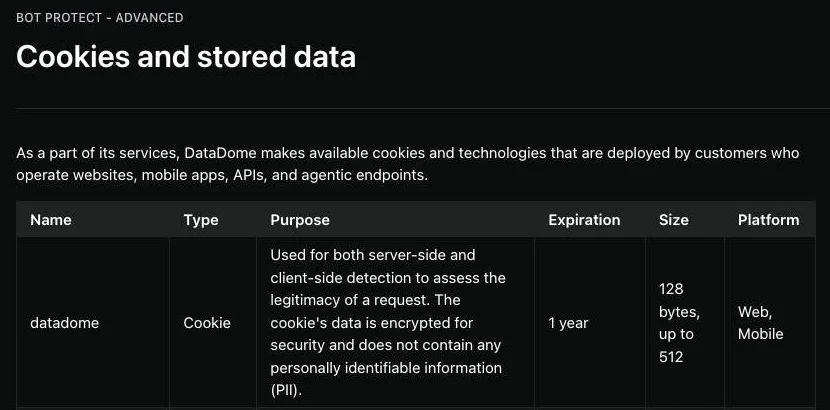
DataDome's cookie documentation says the cookie is used for server-side and client-side detection, is encrypted, holds no personal data and expires after a year. In practice DataDome can challenge again whenever its score drops, but a session that keeps its cookie, IP and client together gets challenged far less than one that starts fresh each time. Saving storage_state means the next run loads the cookie before its first request.
Using the cookie outside the browser
You can move the cookie to a plain HTTP client after the browser earns it, but the client has to look like the same browser. Send the same user agent, through the same proxy, with headers in a browser-like order. Several of the scraping guides we read point out that Python's requests negotiates TLS differently from Chrome. DataDome can see that mismatch even when the cookie is valid. A TLS-impersonating client closes most of the gap. If you crawl with Scrapy, the pattern from our Scrapy captcha middleware applies: detect the challenge in a downloader middleware, solve once, then reuse the cookie for that proxy slot.
What each provider's DataDome task asks for
Every provider asks for the same core inputs: the challenge URL, your proxy and your user agent. The differences are in the extras. This table comes from each provider's public documentation, read on 21 October 2026. It compares request fields only, not speed or success rates, which we haven't measured for anyone else.
| Provider | Task type | Required inputs | Notable extras |
|---|---|---|---|
| CaptchaNo | datadome | url, challengeUrl, proxy | userAgent recommended; refuses the task with proxy_required if no proxy is sent |
| 2Captcha | DataDomeSliderTask | Page URL, captcha iframe URL, user agent, proxy type, address and port | Asks you to change IP on t=bv |
| CapSolver | DatadomeSliderTask | Proxy, captcha URL, user agent | User agent must come from its published list; optional page html; one type covers slider and interstitial |
| CapMonster Cloud | CustomTask, class DataDome | Page URL, captcha URL and current datadome cookie (in metadata), proxy with login and password | Optional datadomeVersion: "new" for pages that load c.js as well as i.js |
If you're choosing a provider on more than fields, our comparison of captcha solving services sets out the criteria we use.
Errors and what to do about them
A failed solve costs nothing on our API, but it still costs time. Here is what each failure usually means for DataDome.
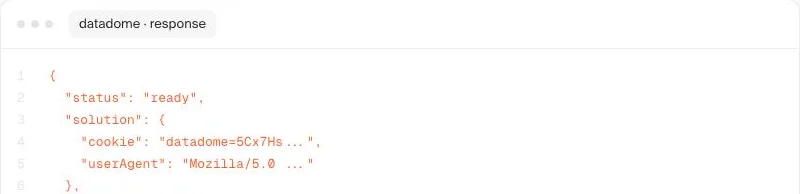
proxy_required(422): no proxy in the request. DataDome cookies are bound to the exit IP, so we refuse rather than return one that would fail on first use.proxy_unreachable: the proxy string is malformed or the proxy refused the connection. Check thescheme://user:pass@host:portformat and that the proxy accepts authenticated connections from outside.unsolvable: the challenge couldn't be passed, often because the IP is already distrusted. Try a fresh session on a different IP before retrying.- Solved, then still challenged: the cookie is being judged with a different IP, user agent or fingerprint than the one that earned it. The script stops after two solves rather than looping and spending.
Our DataDome solver page summarises the same rules: proxy required, cookie returned, same user agent end to end, billed only on success.
When not to use a solver
Skip the solver when the site gives you another way in. Many DataDome customers are retailers, ticketing and travel sites, and some publish an API, an affiliate feed or a data partnership that's cheaper and steadier than any scraper. If you're monitoring prices, our price monitoring use case covers how to keep request volume low. Skip it too when the response is a hard 403: that's a client problem. And read the site's terms first. Our acceptable use policy sets out what CaptchaNo may be used for.
Frequently Asked Questions
Can DataDome be solved automatically?
Yes, the slider challenge can be passed by a solving API that loads it through your proxy and returns a datadome cookie. It only works when the session is otherwise believable: the same IP, the same user agent and a browser-like client. It can't fix a hard 403 block or an IP that DataDome has already banned, which shows as t=bv in the challenge URL.
What does t=bv mean in a DataDome captcha URL?
It means DataDome has already blocked the IP address the request came from. Solver providers' documentation agrees that a URL with t=bv shouldn't be submitted, because no cookie earned from that IP will be accepted. Change to a different proxy, start a new session with an empty cookie jar, and check again for t=fe before solving.
Why does DataDome still block me after a solved slider?
Usually because the next request doesn't match the session that earned the cookie. A rotating proxy changes the IP, a different user agent breaks the pairing, or an HTTP client with a non-browser TLS fingerprint gets flagged even with a valid cookie. Adding the cookie as a duplicate instead of replacing the existing one can also cause it.
How long does a datadome cookie last?
DataDome's documentation gives the cookie a one-year expiration. That's the cookie's lifetime, not a promise of trust: DataDome keeps scoring every request and can challenge again when signals change. Keep the cookie in a persisted session alongside the same IP and user agent, and only solve again when a new challenge appears.
Do I need a residential proxy for DataDome?
A proxy of some kind is required, because the cookie is bound to the exit IP. Residential and mobile IPs generally start with a better reputation than datacenter ranges, which helps avoid t=bv bans. What matters most, though, is that the proxy is sticky, so the same IP serves the browser, the solve and every request after it.
Run your first DataDome solve
Set CAPTCHANO_API_KEY and a sticky PROXY_URL, run the script against a page you're allowed to automate, and keep the session file. Rates for every challenge type are on the pricing page, and solves are billed only when they succeed.